This site uses cookies to enhance your user experience. By clicking any link on this site you are giving your consent to our cookie policy. Read more
Reject
Accept All
Auto Clicker - Automatic tap

Auto Clicker - Automatic tap

verified Verified App

Developer: True Developers Studio

  • category

    Category: Tools

  • price

    Price: free

  • age rating

    Age Rating: Everyone

  • rating

    Rating: 4.6

  • download

    Downloads: 100,000,000+

  • version

    Version: 2.3.0

Screenshot 1
Screenshot 2
Screenshot 3
Screenshot 4
Screenshot 5
Screenshot 6

Features & Highlights

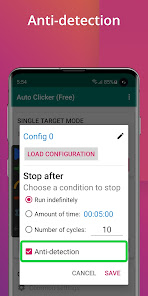
Customizable Click Intervals

The app offers customizable click intervals that let you set the exact speed and frequency of taps according to your needs. Whether you need rapid clicks for gaming or slower options for other tasks, this flexibility ensures you can optimize your experience for maximum efficiency.

Multi-Scenario Support

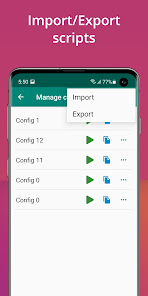
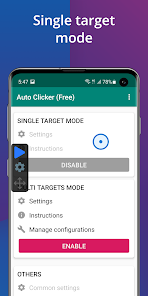
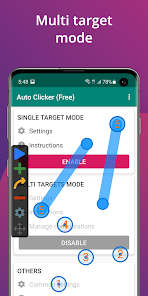
This app supports multiple scenarios, enabling you to save different tap configurations for various tasks. Whether you’re gaming, browsing, or testing apps, you can switch between setups with ease, making it a versatile tool for countless applications.

One-Tap Functionality

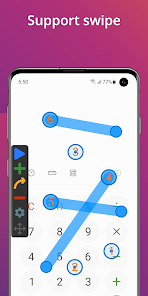
With Auto Clicker's one-tap functionality, users can effortlessly automate repetitive tasks with just a single tap. This feature allows for seamless interaction with apps and games, reducing the strain on your fingers and saving valuable time on monotonous tasks.

User-Friendly Interface

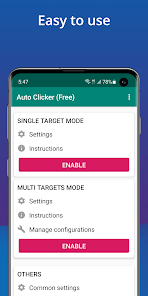
Auto Clicker features a clean, intuitive interface that makes it easy for anyone to get started. You don’t need to be tech-savvy to navigate through the options, allowing users of all skill levels to quickly set up their desired automation without hassle.

Pros & Cons

Pros
  • Saves time by automating repetitive tapping tasks
  • Increases efficiency for gaming and app interactions
  • User-friendly interface for easy setup and use
  • Customizable click speeds for tailored performance
  • Reduces finger fatigue during prolonged usage
Cons
  • May violate app terms of service
  • Can lead to account bans
  • Reduces user engagement and skills
  • Potential for unwanted clicks and errors

Real Experience Using Auto Clicker - Automatic tap

Application Scenarios

The Auto Clicker - Automatic Tap app is designed to streamline repetitive tasks across various applications, making it an essential tool for users who frequently engage in activities that require constant tapping. Whether you're playing mobile games that demand repetitive clicking, automating mundane tasks like scrolling through social media feeds, or even filling out forms, this app proves its versatility. Gamers often find it particularly helpful in titles that require grinding for resources or leveling up characters, as it can significantly reduce the time and effort needed to achieve in-game objectives. Moreover, users looking to enhance productivity in work-related tasks, such as data entry or survey completion, can also benefit from its automated tapping feature. Overall, the app caters to a wide range of scenarios, making it a valuable asset for both casual users and dedicated gamers.

User Experience

User experience with the Auto Clicker app is generally positive, owing to its intuitive interface and user-friendly design. Upon installation, users are greeted with a straightforward setup process that allows them to customize the tapping speed, duration, and location with ease. The app provides a preview of the tapping actions, ensuring that users can make adjustments before commencing automation. Users appreciate the reliability of the app, as it performs its tasks without glitches or crashes. The ability to create multiple profiles for different applications enhances its functionality, allowing users to switch between various tasks seamlessly. Additionally, the app's accessibility features, such as adjustable tap intervals, cater to users with different needs and preferences, making it suitable for a diverse audience.

Pricing

Updates & Support The developers of Auto Clicker - Automatic Tap are committed to providing regular updates that enhance functionality and address any emerging issues. Users can expect periodic enhancements that improve the app's performance and compatibility with the latest operating system updates. Additionally, the app includes a comprehensive support section that offers FAQs and troubleshooting guides, helping users resolve common issues independently. For more complex queries, users can reach out to customer support through the app, ensuring that assistance is readily available. This dedication to updates and customer support fosters a sense of trust and reliability, making the Auto Clicker app a dependable choice for users seeking automation solutions.

verified Security & Privacy Review

The Auto Clicker - Automatic Tap app prioritizes user security and privacy by implementing a range of best practices. It requires minimal permissions, primarily focusing on accessibility features necessary for its core functionality. Users are advised to review the permission requests during installation, ensuring they align with their privacy preferences. The app does not collect personal data or sensitive information from users, which significantly reduces the risk of data breaches. Furthermore, it operates offline for most of its features, enhancing user privacy by limiting data transmission over the internet. However, users are encouraged to remain vigilant and utilize the app in accordance with their device security settings. Transparency is key, and the developers maintain a clear privacy policy that outlines data handling practices. Regular updates ensure that any potential security vulnerabilities are addressed promptly. Overall, Auto Clicker - Automatic Tap demonstrates a strong commitment to safeguarding user privacy while delivering its automation services effectively.

Reviews

4.6

“Easy to use and efficient for gaming!”

“Saves so much time with repetitive tasks.”

“Customizable settings are a game changer!”

“Incredible tool for automating clicks seamlessly.”

“Reliable and works perfectly on my device.”

Editor's Choice