This site uses cookies to enhance your user experience. By clicking any link on this site you are giving your consent to our cookie policy. Read more
Reject
Accept All
App Manager

App Manager

verified Verified App

Developer: AndroidDeveloperLB

  • category

    Category: Tools

  • price

    Price: free

  • age rating

    Age Rating: Everyone

  • rating

    Rating: 3.9

  • download

    Downloads: 1,000,000+

  • version

    Version: 7.52

Screenshot 1
Screenshot 2
Screenshot 3
Screenshot 4
Screenshot 5
Screenshot 6
Screenshot 7
Screenshot 8
Screenshot 9

Features & Highlights

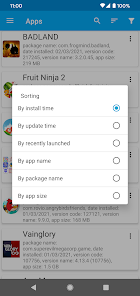
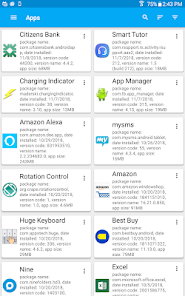
App Organization

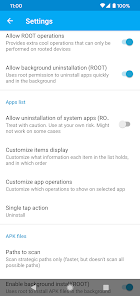
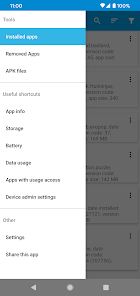
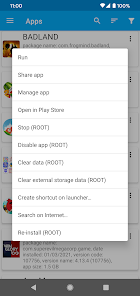
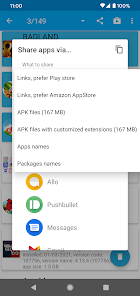
Effortlessly categorize and manage your applications with App Manager's intuitive organization tools. You can create folders, tags, and custom labels to ensure everything is easy to find, making your app experience much smoother and more efficient.

Automatic Updates

Stay up-to-date with the latest features and security patches thanks to App Manager's automatic updates feature. This ensures your apps are always running smoothly and securely, without you having to worry about manually checking for updates.

Backup & Restore

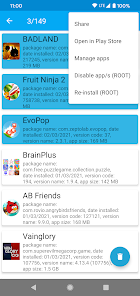
Protect your valuable app data with App Manager's backup and restore functionality. This feature allows you to create secure backups of your apps and their settings, ensuring that you can easily recover everything if you switch devices or need to reset your phone.

Usage Analytics

Gain valuable insights into your app usage patterns with the built-in analytics feature. App Manager tracks how often you use each application, helping you identify which ones you rely on most and which can be uninstalled, streamlining your device for optimal performance.

Pros & Cons

Pros
  • Simplifies app organization for easy access.
  • Enhances productivity with streamlined workflows.
  • Supports seamless updates for optimal performance.
  • Improves security through centralized app management.
  • Offers insights for informed decision-making.
Cons
  • Limited customization options for users' preferences
  • Can be slow to update apps regularly
  • May consume significant device storage space
  • User interface can be confusing for beginners

Real Experience Using App Manager

Application Scenarios

The App Manager is designed to streamline the way users interact with their mobile applications, making it a versatile tool for both casual users and professionals. In everyday scenarios, it excels at organizing and managing apps across various categories, ensuring easy access to frequently used applications. For students and professionals alike, the App Manager simplifies task management by allowing users to categorize productivity apps, educational tools, and communication platforms all in one place. Furthermore, it's perfect for tech enthusiasts who often test beta versions of apps, as it allows for effortless organization and quick access to the latest features without cluttering the home screen.

User Experience

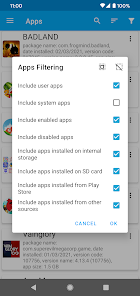
User experience is at the forefront of the App Manager's design. Upon opening the app, users are greeted with an intuitive interface that is both clean and user-friendly. The drag-and-drop functionality for organizing apps is particularly noteworthy, allowing for seamless customization of app categories. Additionally, the search feature is robust, making it easy to locate specific applications quickly. Notifications can be tailored to remind users about app updates or unused applications, enhancing the overall usability of the app. Feedback from users highlights the smooth performance and minimal loading times, ensuring that even those with extensive app libraries can navigate effortlessly. Overall, the App Manager provides a satisfying experience, balancing functionality with aesthetic appeal.

Pricing

The App Manager adopts a competitive pricing model, offering a free version with essential features that cater to the average user. For those looking for advanced functionalities, a premium subscription is available at a reasonable monthly or annual fee. The premium version unlocks features such as cloud backup, advanced analytics on app usage, and priority customer support. Users have reported that the value provided by the premium features justifies the cost, especially for individuals who rely heavily on a multitude of apps for work or study. The option to try the premium features during a trial period allows users to assess the benefits before fully committing.

Updates & Support

Regular updates ensure that the App Manager stays relevant and enhances performance, with developers actively responding to user feedback. The application has seen several updates since its launch, focusing on improving user interface elements, adding new features, and optimizing performance based on user needs. Support is accessible through multiple channels, including email and in-app chat, with a dedicated team ready to assist with any queries or issues. The FAQ section on their website is comprehensive, providing users with resources to troubleshoot common problems independently. Overall, the proactive approach to updates and customer support adds significant value to the App Manager, making it a reliable choice for app management.

verified Security & Privacy Review

The App Manager prioritizes user security and privacy through robust data protection measures. The app employs end-to-end encryption for sensitive data, ensuring that user information remains inaccessible to unauthorized parties. All data transmitted over the network is secured using industry-standard SSL protocols, safeguarding against potential interception. User permissions are carefully managed, with the app asking for only necessary access. For example, location and storage permissions are requested only when features requiring such data are utilized, minimizing unnecessary exposure. Users can easily review and modify these permissions at any time, maintaining control over their personal information. The app's privacy policy is transparent, clearly outlining what data is collected, how it is used, and under what circumstances it may be shared. Importantly, App Manager does not sell user data to third parties, reinforcing its commitment to user privacy. Regular updates ensure that security vulnerabilities are promptly addressed, keeping the application resilient against emerging threats. Overall, App Manager demonstrates a strong commitment to protecting user data and fostering a secure environment for its users.

Reviews

3.9

“User-friendly interface, easy to manage apps!”

“Great performance, boosts my device speed significantly.”

“Helpful tools for organizing and optimizing apps.”

“Love the storage management feature, very efficient.”

“Notifications management is a game changer!”

Editor's Choice