This site uses cookies to enhance your user experience. By clicking any link on this site you are giving your consent to our cookie policy. Read more
Reject
Accept All

Advertiser and Editorial Disclosures

AnyList: Grocery Shopping List

AnyList: Grocery Shopping List

verified

AnyList

4.8
Rating
1,000,000+ Downloads
2.0.9 Version
  • category

    Category: Productivity

  • price

    Price: free

  • age rating

    Age Rating: Everyone

  • rating

    Rating: 4.8

  • available on

    Available on: /

  • updated on

    Updated on: Jun 19, 2026

Screenshot 1
Screenshot 2
Screenshot 3
Screenshot 4
Screenshot 5
Screenshot 6
Screenshot 7
Screenshot 8
Screenshot 9
Screenshot 10
Screenshot 11
Screenshot 12
Screenshot 13
Screenshot 14
Screenshot 15
Screenshot 16

Features & Highlights

Customizable Categories

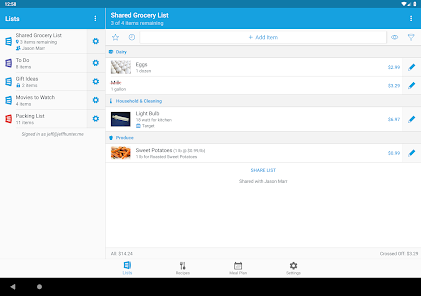
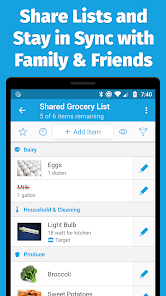
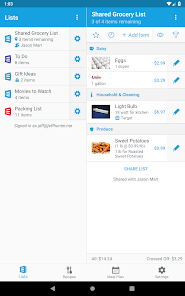
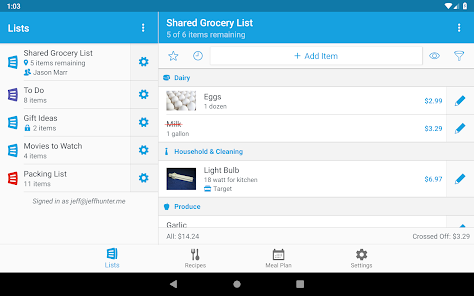
Organize your grocery items into customizable categories that suit your shopping habits. This feature allows you to create groups like 'Fruits', 'Dairy', or 'Snacks', making it easier to navigate the store and find what you need without the hassle of searching through a long list.

Recipe Integration

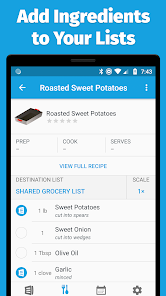
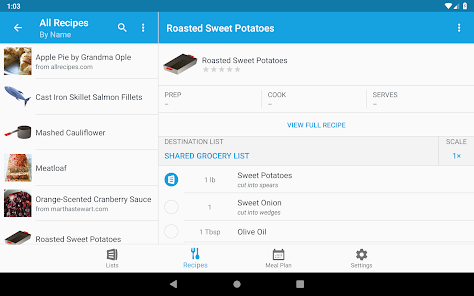
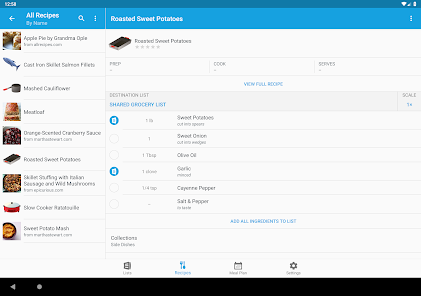
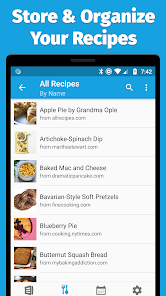
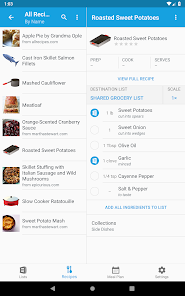
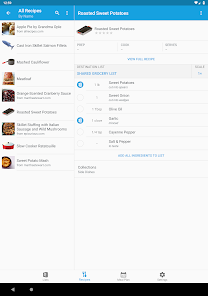
AnyList allows you to save and organize your favorite recipes, seamlessly integrating them with your grocery shopping list. You can easily add ingredients from recipes to your list, ensuring you have everything you need for meal prep without missing a beat.

Smart List Sharing

Easily share your grocery lists with family and friends, making collaborative shopping a breeze. Everyone can see updates in real-time, ensuring no item is overlooked. This feature fosters teamwork and helps streamline the shopping experience for everyone involved.

Voice Entry Capability

Add items to your grocery list using voice commands, making list creation quick and effortless. This hands-free feature is perfect for busy shoppers or those on the go, allowing you to capture your thoughts without needing to type everything out.

Pros & Cons

Pros
  • Easily share lists with family and friends
  • Organize items by store aisle for efficiency
  • Sync across all devices for convenience
  • Add recipes and ingredients in one place
  • Track pantry inventory to minimize waste
Cons
  • Limited features in free version
  • Syncing issues across devices
  • No offline access available
  • User interface can be confusing

Real Experience Using AnyList: Grocery Shopping List

Application Scenarios

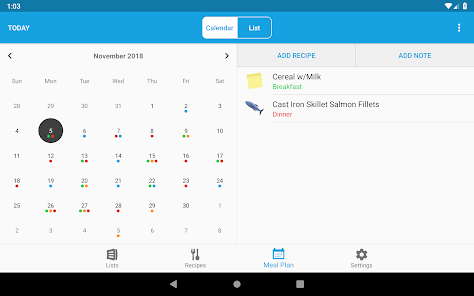
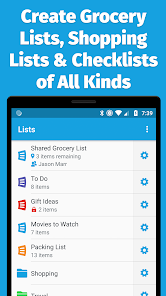
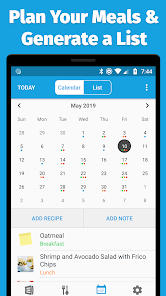
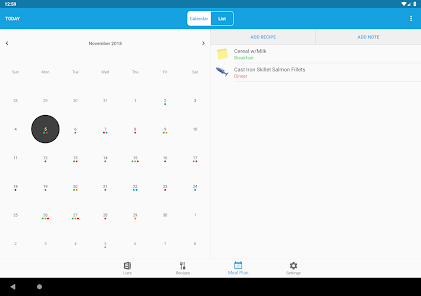
AnyList: Grocery Shopping List is designed to streamline the grocery shopping experience for users in various scenarios. Whether you are a busy professional, a parent managing a household, or a student living on your own, this app simplifies the process of creating and organizing shopping lists. Users can easily categorize items based on different grocery store sections, making it quicker to navigate the aisles. Additionally, AnyList allows users to share their lists with family members or roommates, enabling collaborative shopping and ensuring that no essential items are forgotten. The app also supports meal planning, allowing users to save their favorite recipes and generate shopping lists directly from them, making it an excellent tool for meal preppers and health-conscious individuals.

User Experience

The user experience of AnyList is intuitive and user-friendly, featuring a clean and minimalistic interface that makes navigating through the app a breeze. Users can quickly add items to their lists by typing or using voice input, which is a significant time-saver. The drag-and-drop feature allows for easy reordering of items, and the ability to check off items as they are picked up makes the shopping experience more efficient. Additionally, AnyList supports customization options, enabling users to create their categories and prioritize items according to personal preferences. The app also incorporates smart suggestions based on frequently purchased items, enhancing the overall shopping experience. Its seamless syncing across devices ensures that users can access their lists from anywhere, making it a reliable companion for grocery shopping.

Pricing

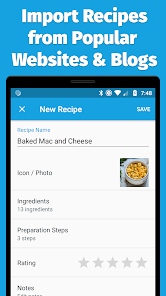
AnyList offers a free version, which is quite functional for users looking to create basic grocery lists. However, to unlock premium features, users can opt for a subscription model. The premium version includes advanced functionalities such as recipe importing from websites, custom list sharing options, and enhanced organizational tools. The pricing is competitive compared to other grocery list apps, and the value offered through premium features justifies the investment for those who frequently use the app. Additionally, AnyList occasionally offers promotional discounts, making it even more accessible to users.

Updates & Support

AnyList is regularly updated to enhance user experience and incorporate new features based on user feedback. The development team is responsive to user needs, often releasing updates that fix bugs and improve app performance. Additionally, AnyList provides comprehensive support through its help center, where users can find tutorials, FAQs, and troubleshooting guides. For more personalized assistance, users can reach out via email, and the support team is known for its prompt and helpful responses. Overall, the commitment to continuous improvement and user support makes AnyList a reliable choice for grocery shopping management.

verified Security & Privacy Review

AnyList: Grocery Shopping List prioritizes user security and privacy through its robust data handling practices. The app employs encryption to protect user data both in transit and at rest, ensuring that sensitive information remains secure against unauthorized access. Regarding permissions, AnyList requires access to the user's device storage and notifications. These permissions are essential for creating and managing grocery lists effectively while providing timely reminders. The app does not request unnecessary permissions, minimizing potential privacy risks. Data collected by AnyList is primarily used to enhance user experience and is not shared with third parties without explicit consent. Users can also opt to create an account to sync their lists across devices, which is protected by secure authentication methods. AnyList’s commitment to transparency is evident in its privacy policy, which clearly outlines data collection practices and user rights. Overall, AnyList demonstrates a strong dedication to safeguarding user information while delivering a seamless and efficient grocery shopping experience.

User Reviews

  • Kimberley Jones
    2026/04/28

    I have tried several different apps for shopping lists - none even come close to this! This is the only app that I have found that helps with your meal planning from start to finish AND does even more. I recommend this to anyone who wants to start meal planning or who wants to streamline that process. The Premium plan is more than worth the price, and adds even more customization and expanded features.

  • F. DeMascio
    2026/02/04

    Started using the app on vacation with another family, they use it regularly. Shared the shopping list on vacation. Worked so well, I got the family using it. No more forgotten shopping lists. No excuses, everyone has access. Paid version let's you customize lists more, add pictures of products, delivery ordering connection, etc.

  • Miranda Berry
    2025/03/29

    Hands down the best meal planning/grocery app I've ever had. Extremely reasonably priced and full of features. I love having all my recipes in one place, ready to add to the meal plan. Very easy to import recipes and add ingredients directly from recipes to your shopping list. Makes meal planning far more managable. I can't imagine cooking any other way now.

  • Mirena Briggs
    2025/12/24

    Fantastic, superlative, amazing... I'm sure there's more! It's hard for me to believe just how quickly this app has become part of my everyday routine in roughly 3 weeks. I paid for the premium future for the whole year. I've got over 120 recipes saved in there already. And, I actually made an inventory list of my freezers so I don't lose track of stuff. Pantry is NEXT. I really truly I cannot recommend enough! here it is. years later, I still pay for the premium! They keep adding new features!

  • Karen Henry
    2025/09/10

    Very Cool App! I got Anylist to try and get a handle on my spending on groceries. I shop multiple stores in my area, but I don't shop every store every week. Because I can add prices, I can get my stuff wherever it's cheapest. I can also plan my purchases for when I'm going to the store with the best price. I like that I can filter and print my list too. Instead of using separate store apps, I can aggregate all my information into one app which I think will be MUCH simpler.

Review Source: Google Play store public user reviews.

FAQ

1

Does AnyList: Grocery Shopping List collect my personal data?

AnyList respects user privacy and only collects personal data necessary for the app's functionality, such as account information for syncing and sharing features. Users can review the privacy policy for more details.

2

Does AnyList: Grocery Shopping List offer a free trial or free version?

Yes, AnyList offers a free version with basic features. Users can also opt for a premium subscription to access additional features, but there is no free trial for the premium version.

3

Does AnyList: Grocery Shopping List require an internet connection?

While AnyList can be used offline to view and edit lists, an internet connection is required for features like syncing with other devices and sharing lists with others.

4

How can I contact support or send feedback for AnyList: Grocery Shopping List?

Users can contact AnyList support through the in-app help section, by visiting the AnyList website, or by sending an email directly to their support team for assistance or feedback.

5

How do I manage or cancel my AnyList: Grocery Shopping List subscription?

Users can manage or cancel their AnyList subscription through their device's app store settings or via the AnyList website, depending on how they subscribed. Detailed instructions are provided within the app.

How to use AnyList: Grocery Shopping List

1

How can I contact customer service for AnyList?

You can reach AnyList customer service by emailing support

2

How do I log in to my AnyList account?

To log in, open the AnyList app, tap "Log In," and enter your email and password associated with your account.

3

Is there a way to activate AnyList features?

AnyList features are activated by subscribing to AnyList Premium through the app's settings.

4

What is the customer number for AnyList?

AnyList does not have a specific customer number; support is primarily handled via email.

What's New

AnyList v3.0.2 fixes a few bugs.Thank you for using AnyList and please email [email protected] with any questions or feedback.

Editor's Choice