This site uses cookies to enhance your user experience. By clicking any link on this site you are giving your consent to our cookie policy. Read more
Reject
Accept All

Advertiser and Editorial Disclosures

Amharic Keyboard

Amharic Keyboard

verified

BRANAH

4.3
Rating
100,000+ Downloads
6.1 Version
  • category

    Category: Productivity

  • price

    Price: free

  • age rating

    Age Rating: Everyone

  • rating

    Rating: 4.3

  • available on

    Available on: /

  • updated on

    Updated on: Apr 21, 2024

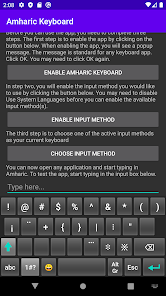
Screenshot 1
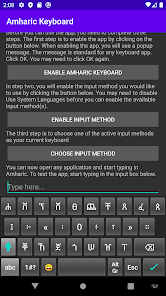
Screenshot 2
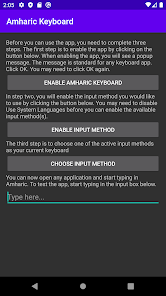
Screenshot 3
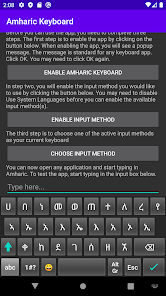
Screenshot 4
Screenshot 5
Screenshot 6
Screenshot 7
Screenshot 8

Features & Highlights

Customizable Layout

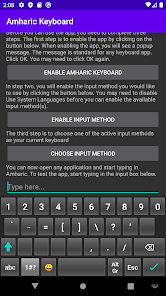
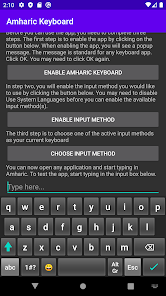
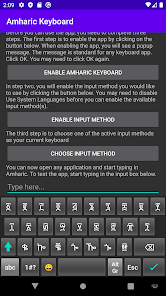
The Amharic Keyboard offers a fully customizable layout, allowing users to rearrange keys according to their preferences. This flexibility ensures a comfortable typing experience, making it easier for both beginners and advanced users to type in Amharic effortlessly.

Multilingual Support

In addition to Amharic, the keyboard supports multiple languages, enabling seamless switching between different scripts. This feature is perfect for bilingual users or anyone who frequently communicates in multiple languages, enhancing overall usability.

Voice Typing

The voice typing feature allows users to dictate text in Amharic, providing a hands-free option for composing messages or documents. This is especially useful for those who prefer speaking over typing or for situations where typing isn't convenient.

Word Prediction

With advanced word prediction capabilities, the Amharic Keyboard anticipates your next word, speeding up your typing and reducing errors. This feature learns from your typing habits, making it more accurate over time and improving your overall writing efficiency.

Pros & Cons

Pros
  • Supports native Amharic script for seamless typing
  • Enhances communication with family and friends easily
  • Boosts productivity for professional and academic use
  • Facilitates learning and practice of the Amharic language
  • Enables access to Amharic content online effortlessly
Cons
  • Limited compatibility with non-Amharic software
  • Slow typing speed for new users
  • Complex layout can confuse beginners
  • Fewer online resources for learning

Real Experience Using Amharic Keyboard

Application Scenarios

The Amharic Keyboard app is designed for users who need to communicate in Amharic seamlessly across various platforms. It is particularly useful for individuals in Ethiopia or those with Ethiopian heritage who want to type in their native language. Whether composing messages on social media, sending emails, or writing documents, this app caters to a wide range of scenarios. Students can use it for academic purposes, professionals for work-related correspondence, and casual users can enjoy chatting with friends and family. The app is also beneficial for language learners who want to practice their Amharic typing skills. Its versatility makes it a must-have tool for anyone looking to engage in Amharic communication effectively.

User Experience

The user experience of the Amharic Keyboard app is largely positive, with its intuitive interface making it easy for users of all ages to navigate. The keyboard layout is well-designed, ensuring that users can type quickly and efficiently with minimal learning curve. Features like predictive text and autocorrect enhance the typing experience, reducing errors and saving time. Users have reported that the app responds quickly, with minimal lag, which is crucial for efficient typing. Additionally, customization options allow users to personalize their keyboard with different themes and settings, catering to individual preferences. Feedback from users indicates that the app is reliable and performs well across various devices, making it a popular choice among Amharic speakers.

Pricing

The Amharic Keyboard app is available for free, which is a significant advantage for users looking for a cost-effective solution for typing in their native language. While the app does offer in-app purchases for additional features or premium themes, the basic functionality is robust enough for most users without requiring any financial commitment. This pricing strategy makes it accessible to a wider audience, allowing anyone interested in typing in Amharic to download and use the app without barriers. The absence of ads, or minimal interruptions from ads, enhances the overall experience, allowing users to focus on their typing tasks without distractions.

Updates & Support

The developers of the Amharic Keyboard app are committed to providing regular updates to enhance user experience and fix any potential bugs. Users can expect periodic improvements that not only refine existing features but also introduce new functionalities based on user feedback. Support is readily available, with a dedicated help section within the app that addresses common issues and FAQs. For more specific queries, users can reach out via email for personalized assistance. The responsiveness of the support team has been praised by users, indicating a strong commitment to customer satisfaction. Regular updates and attentive support ensure that the app remains relevant and functional in a rapidly evolving digital landscape.

verified Security & Privacy Review

The Amharic Keyboard app prioritizes user security and privacy, implementing several measures to protect personal information. The app requires a limited set of permissions primarily focused on keyboard functionality, such as access to the input method and device settings. Importantly, it does not request unnecessary permissions that could compromise user privacy. The app does not collect or store any personal user data, which is a significant advantage for privacy-conscious users. Communication between the app and the user’s device occurs locally, ensuring that sensitive information remains on the device itself without being transmitted to external servers. Additionally, the Amharic Keyboard app adheres to industry-standard encryption practices to safeguard any data that may be temporarily stored during usage. Users are encouraged to review the privacy policy for detailed insights into data handling practices. Overall, the app demonstrates a strong commitment to maintaining user privacy and data security, making it a reliable choice for those seeking a secure typing experience in Amharic.

User Reviews

  • Ahmedin Kemal
    2022/08/27

    It good app and I have been using it since it's release date 2014 GC. It would be better if you have added suggestion and word and grammar correction options. It will rate 5 if you done it.

  • Hilawi eg Eguale
    2024/05/22

    Helpful But makes it a little hard to write faster. A selected one displayed the derivatives of the selected, removing the rest and should be reselected. instead, when an alphabet is selected let The rest remain displayed reserve 7or8 boxes to display the derivatives of the chosen one and CHANGE the selected to the desired ። ለምሳሌ ሀ"ን ስንመርጥ የሀ'ን ዝርያዎችን ያመጣና ሌሎቹን ያጠፋቸዋል ከዝርዝሩ በድጋሚ ፊደሉን ያስመርጠናል፡ የመረጥነውን ፊደል ወደምንፈልገው እንዲለውጠው ቢደረግና ሌሎቹ ባይጠፉ ይቀላል ይህ በፊደል አ'ላይ አይታይም ፊደሉን ወደ ምንፈልገው ፊደል ካለመለወጡ በስተቀር።

  • Prince Fuad
    2024/04/17

    something wrong after last updates. I have been using this app for 3 years and it was very simple to use.

  • mifto manche
    2022/05/28

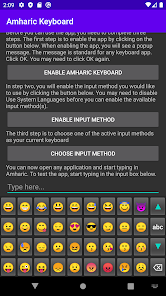
    i use this app almost for 2 years i like it also easy to use but cheak hidden emoji

  • Нαииιвαl lєуιкυи
    2025/01/21

    Can't even change the keybord theme

Review Source: Google Play store public user reviews.

FAQ

1

Does Amharic Keyboard collect my personal data?

Amharic Keyboard prioritizes user privacy and does not collect personal data without consent. Always check the privacy policy for specific details.

2

Does Amharic Keyboard offer a free trial or free version?

Yes, Amharic Keyboard typically offers a free version with basic features, and some apps may provide a trial period for premium features.

3

Does Amharic Keyboard require an internet connection?

No, Amharic Keyboard does not require an internet connection to function, as it operates offline once installed.

4

How can I contact support or send feedback for Amharic Keyboard?

You can contact support or send feedback through the app itself, usually found in the settings menu, or by visiting the official website for customer service options.

5

How do I manage or cancel my Amharic Keyboard subscription?

You can manage or cancel your Amharic Keyboard subscription through the app store where you purchased the subscription, typically found in your account settings.

How to use Amharic Keyboard

1

Can I use the Amharic Keyboard app offline?

Yes, the app can be used offline once it is downloaded and installed.

2

How can I contact customer service for the Amharic Keyboard app?

You can reach customer service through the app's settings or contact us via email at support

3

How can I report a bug or issue with the app?

Please report any issues through the 'Feedback' option in the app's settings or email support

4

How do I change my login credentials for the Amharic Keyboard app?

Go to 'Settings' within the app, select 'Account', and choose 'Change Password' to update your credentials.

5

How do I find the customer number for support?

The customer number is typically listed in the app's settings under 'Help' or 'About'.

What's New

Updates for bug fixes

Editor's Choice