This site uses cookies to enhance your user experience. By clicking any link on this site you are giving your consent to our cookie policy. Read more
Reject
Accept All

Advertiser and Editorial Disclosures

WebMD: Symptom Checker

WebMD: Symptom Checker

verified Verified App

Developer: WebMD, LLC

  • category

    Category: Medical

  • price

    Price: free

  • age rating

    Age Rating: Everyone

  • rating

    Rating: 4.1

  • download

    Downloads: 10,000,000+

  • version

    Version: 11.30.0.12625096

Screenshot 1
Screenshot 2
Screenshot 3
Screenshot 4
Screenshot 5
Screenshot 6
Screenshot 7

Features & Highlights

Comprehensive Health Library

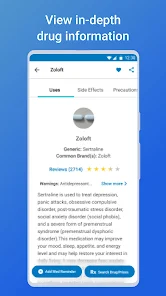
With access to a vast library of health information, users can explore detailed articles about various conditions, treatments, and wellness tips. This feature empowers you with knowledge, so you can make informed decisions about your health and well-being.

Expert Medical Insights

The app provides insights based on data from medical professionals, ensuring that the information you receive is both reliable and up-to-date. This feature bridges the gap between layman’s terms and expert advice, helping you feel more confident in your health decisions.

Personalized Symptom Analysis

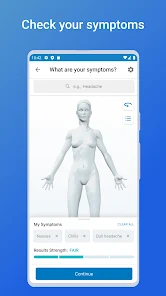
The WebMD Symptom Checker offers a tailored analysis of your symptoms, guiding you through a series of questions to narrow down potential health issues. This personalized approach makes it easy to understand what might be affecting you, providing clarity when you need it most.

User-Friendly Interface

Designed with simplicity in mind, the WebMD Symptom Checker features an intuitive layout that allows users to navigate through symptoms and possible conditions effortlessly. Whether you're tech-savvy or a beginner, you'll find it easy to use and understand.

Pros & Cons

Pros
  • User-friendly interface for easy navigation
  • Access to extensive medical information and resources
  • Provides personalized health insights and recommendations
  • Offers a confidential and private experience
  • Available anytime for immediate symptom evaluation
Cons
  • Limited accuracy for diagnosing conditions
  • Lacks personalized medical advice
  • Can cause unnecessary anxiety or worry
  • May lead to self-diagnosis without professional input

Real Experience Using WebMD: Symptom Checker

Application Scenarios

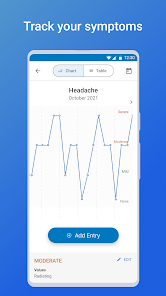
The WebMD: Symptom Checker app serves as a valuable resource for individuals seeking to understand and manage their health concerns. Whether you're experiencing a sudden headache, unusual fatigue, or any other symptom, this app allows users to input their symptoms and receive instant feedback. It is particularly useful for those who prefer to gather information before visiting a healthcare professional. The app can be used in various scenarios, such as when traveling, where access to medical facilities may be limited, or for parents wanting to assess their child's symptoms before making a doctor's appointment. Additionally, it can also assist users who are managing chronic conditions by offering insights into potential complications or related symptoms. Overall, the app provides a convenient first step in health management, empowering users with knowledge and guidance.

User Experience

Users generally find the WebMD: Symptom Checker app to be intuitive and user-friendly. The interface is cleanly designed, making it easy to navigate through various options. Inputting symptoms is a straightforward process, with users guided through a series of questions that help narrow down potential conditions. The app also provides a wealth of information, including detailed descriptions of symptoms and conditions, treatment options, and preventive measures. Many users appreciate the ability to bookmark specific articles or save searches for later reference. However, some users have reported that the app occasionally presents too many options, leading to confusion regarding what symptoms to prioritize. Nevertheless, the overall user satisfaction remains high, with many praising the app's ability to demystify health concerns and enhance their understanding of personal health.

Pricing

The WebMD: Symptom Checker app is available for free, which is a significant advantage for users looking for reliable health information without financial commitment. While the app is free to download and use, it does contain advertisements, which some users may find intrusive. However, the wealth of information and resources provided makes it a worthwhile tool for anyone seeking to take charge of their health. There is currently no premium version or subscription model, keeping access to vital health information open to all users.

Updates & Support

The WebMD: Symptom Checker app is regularly updated to ensure that it remains relevant and useful. Updates typically include new features, bug fixes, and the addition of the latest health information based on current research and guidelines. Users can easily check for updates through their device's app store. Support is readily available through WebMD's website, where users can find FAQs, troubleshooting tips, and contact options for more personalized assistance. While the app is largely self-sufficient, the support resources help maintain a positive user experience, ensuring that users feel supported in their health journeys.

verified Security & Privacy Review

The WebMD: Symptom Checker app prioritizes user security and privacy through robust data protection measures. The app employs encryption protocols to safeguard sensitive information, ensuring that personal health data remains confidential during transmission. WebMD adheres to strict privacy policies that comply with relevant regulations, such as HIPAA, which governs the handling of health information. Users are informed about the data collected, which may include symptoms, medical history, and other health-related information. This data is primarily used to provide personalized health insights and recommendations. However, WebMD assures users that their information will not be sold or shared with third parties without explicit consent. The app requires certain permissions for optimal functionality, including access to device storage and network services. Users are encouraged to review these permissions at installation and can modify them in their device settings. Overall, WebMD: Symptom Checker demonstrates a strong commitment to maintaining user privacy and securing personal health information, making it a trusted resource for health-related inquiries.

Reviews

4.1

“Accurate symptom assessments and easy to use”

“Helpful for quick health insights”

“Great resource for understanding medical conditions”

“User-friendly interface and reliable information”

“Saves time before visiting the doctor”

FAQ

1

Does WebMD: Symptom Checker collect my personal data?

WebMD: Symptom Checker may collect personal data as outlined in its privacy policy, including information you provide while using the app. It is recommended to review the privacy policy for detailed information on data collection and usage.

2

Does WebMD: Symptom Checker offer a free trial or free version?

WebMD: Symptom Checker offers a free version that allows users to access its basic features, including symptom checking and health information. However, certain premium features may require a subscription.

3

Does WebMD: Symptom Checker require an internet connection?

Yes, WebMD: Symptom Checker requires an internet connection to access its database and provide up-to-date information on symptoms and conditions.

4

How can I contact support or send feedback for WebMD: Symptom Checker?

To contact support or send feedback for WebMD: Symptom Checker, you can use the in-app support feature or visit the WebMD website for customer service options and contact information.

5

How do I manage or cancel my WebMD: Symptom Checker subscription?

You can manage or cancel your WebMD: Symptom Checker subscription through your app store account settings, whether on iOS or Android. Detailed instructions are usually provided within the app's settings or help section.

How to use WebMD: Symptom Checker

1

How can I contact customer service for the WebMD: Symptom Checker app?

You can reach customer service through the WebMD website or by accessing the help section within the app for support options.

2

How do I log in to the WebMD: Symptom Checker app?

Open the app and tap on the login option; enter your email and password to access your account.

3

Is it necessary to activate the WebMD: Symptom Checker app?

No activation is required; simply download the app and start using it right away.

4

What is the customer number for WebMD?

WebMD does not publicly list a customer service number; inquiries are best directed through their online support channels.

Editor's Choice