This site uses cookies to enhance your user experience. By clicking any link on this site you are giving your consent to our cookie policy. Read more
Reject
Accept All

Advertiser and Editorial Disclosures

UnitedHealthcare

UnitedHealthcare

verified Verified App

Developer: UNITED HEALTHCARE SERVICES, INC.

  • category

    Category: Medical

  • price

    Price: free

  • age rating

    Age Rating: Everyone

  • rating

    Rating: 4.5

  • download

    Downloads: 5,000,000+

  • version

    Version: 2.96.2

Screenshot 1
Screenshot 2
Screenshot 3
Screenshot 4
Screenshot 5
Screenshot 6
Screenshot 7
Screenshot 8

Features & Highlights

24/7 Virtual Care

With UnitedHealthcare's 24/7 virtual care, members can easily connect with licensed healthcare professionals anytime, anywhere. This service allows you to receive medical advice, consultations, or prescriptions without the need for an in-person visit, ensuring you get timely care when you need it most.

Comprehensive Wellness Resources

UnitedHealthcare provides a wealth of wellness resources, including fitness programs, nutritional guidance, and mental health support. These tools empower members to take charge of their health, fostering a holistic approach to well-being that goes beyond just medical care and encourages a healthier lifestyle.

Personalized Health Plans

UnitedHealthcare offers customized health plans tailored to individual needs, ensuring you receive the coverage that best fits your lifestyle and medical requirements. With various options available, members can select plans that align with their unique health goals and budget considerations, making healthcare more accessible and manageable.

Simple Claims Process

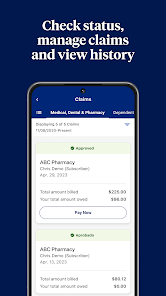
Navigating healthcare claims can be daunting, but UnitedHealthcare simplifies the process with user-friendly tools and resources. Members can easily submit claims online, track their status, and access detailed explanations, making it easier to manage expenses and understand their coverage.

Pros & Cons

Pros
  • Comprehensive coverage options for all health needs
  • Access to a vast network of healthcare providers
  • 24/7 support through telehealth services
  • Wellness programs promoting healthier lifestyles
  • Flexible plans tailored to individual budgets
Cons
  • Limited provider network in some areas
  • High out-of-pocket costs for many plans
  • Complicated claims process can frustrate members
  • Customer service response times may be slow

Real Experience Using UnitedHealthcare

Application Scenarios

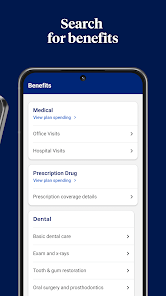
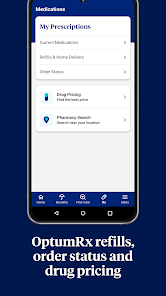
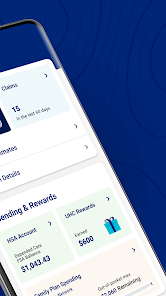
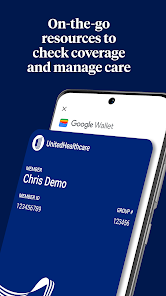
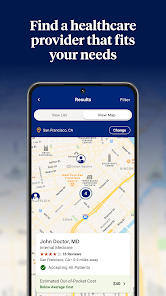
The UnitedHealthcare app is designed to cater to a variety of healthcare needs, making it a versatile tool for users. Whether you are managing your personal health records, scheduling appointments, or finding nearby healthcare providers, the app covers it all. It's particularly useful for individuals who frequently visit doctors or those with chronic conditions requiring regular monitoring. Users can easily view their health insurance benefits, track claims, and access important documents all in one place. Additionally, the app allows users to search for urgent care facilities, making it a handy resource for medical emergencies. Families can also benefit from the app, as it enables the management of multiple family member accounts, streamlining the healthcare process for parents juggling the needs of their children.

User Experience

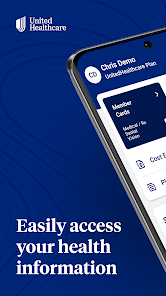
The user experience of the UnitedHealthcare app is generally intuitive and user-friendly. The interface is clean and well-organized, allowing users to navigate through various sections without feeling overwhelmed. Most users appreciate the ease of accessing information regarding their insurance plans, as well as the ability to connect with healthcare providers seamlessly. The app's appointment scheduling feature is particularly praised for its efficiency, enabling users to book, reschedule, or cancel appointments with minimal hassle. However, some users have reported occasional glitches, such as slow loading times or difficulty in logging in, which can detract from the overall experience. Nevertheless, the app continues to receive updates that aim to enhance its functionality and address user concerns.

Pricing

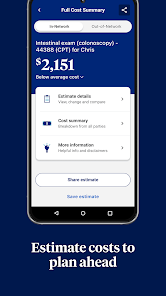
The UnitedHealthcare app itself is free to download and use, providing a cost-effective solution for managing healthcare needs. However, it is essential to note that the app is designed for individuals who are already enrolled in UnitedHealthcare plans. Therefore, any costs associated with healthcare services or insurance premiums are separate from the app's functionality. Users can access their specific benefits and coverage details through the app, ensuring they are well-informed about any out-of-pocket expenses they may incur while utilizing healthcare services.

Updates & Support

UnitedHealthcare consistently rolls out updates to improve the app’s performance and functionality. These updates often include bug fixes, user interface enhancements, and new features based on user feedback. The company also provides extensive support resources, including a help center within the app, where users can find FAQs, guides, and troubleshooting tips. For more complex issues, customer support is readily available through chat or phone, ensuring that users can get the assistance they need promptly. Overall, UnitedHealthcare demonstrates a commitment to enhancing user satisfaction through continuous updates and responsive support, making the app a reliable companion for managing healthcare.

verified Security & Privacy Review

The UnitedHealthcare app prioritizes user security and privacy, incorporating robust measures to protect sensitive health information. Data encryption is employed to safeguard personal data both in transit and at rest, ensuring that users' medical records and personal details remain confidential. The app requires users to create a secure login, which includes multi-factor authentication for an added layer of protection. In terms of permissions, the app requests access to certain device features, such as location services, which enhance user experience but are not mandatory for core functionalities. Users are informed about what data is collected and how it is utilized, promoting transparency in data handling practices. UnitedHealthcare adheres to HIPAA regulations, ensuring compliance with federal standards for protecting healthcare information. Users have the option to manage their privacy settings within the app, allowing them to control what information is shared and with whom. Overall, the UnitedHealthcare app demonstrates a strong commitment to maintaining user privacy and ensuring data security, making it a reliable choice for managing health-related information.

Reviews

4.5

“Great customer service and support!”

“Affordable plans with comprehensive coverage.”

“Easy-to-use app and online services.”

“Claims process can be slow at times.”

“Excellent network of healthcare providers available.”

FAQ

1

Does UnitedHealthcare collect my personal data?

Yes, UnitedHealthcare collects personal data to provide services, improve user experience, and comply with regulatory requirements, but they prioritize user privacy and data security.

2

Does UnitedHealthcare offer a free trial or free version?

UnitedHealthcare does not offer a free trial, but the app is free to download for members of UnitedHealthcare plans. Access to features may vary based on your specific plan.

3

Does UnitedHealthcare require an internet connection?

Yes, an internet connection is required to access most features of the UnitedHealthcare app, as it relies on real-time data and updates.

4

How can I contact support or send feedback for UnitedHealthcare?

You can contact UnitedHealthcare support through the app, website, or by calling their customer service number. Feedback can also be submitted through the app or website contact forms.

5

How do I manage or cancel my UnitedHealthcare subscription?

You can manage or cancel your UnitedHealthcare subscription by logging into your account on the UnitedHealthcare website or app and following the instructions in the account settings, or by contacting customer service.

How to use UnitedHealthcare

1

How do I activate my UnitedHealthcare app account?

To activate, download the app and select "Register." Follow the prompts to create your account using your member information.

2

How do I contact Customer Service for the UnitedHealthcare app?

You can contact Customer Service by calling the number on the back of your member ID card or visiting the UnitedHealthcare website for additional support.

3

How do I log in to the UnitedHealthcare app?

Download the app, open it, and enter your username and password. If you don’t have an account, you can register through the app.

4

What is the customer number for UnitedHealthcare?

The customer number varies by plan; check your member ID card or the UnitedHealthcare website for your specific number.

Editor's Choice