This site uses cookies to enhance your user experience. By clicking any link on this site you are giving your consent to our cookie policy. Read more
Reject
Accept All

Advertiser and Editorial Disclosures

FollowMyHealth®

FollowMyHealth®

verified Verified App

Developer: Veradigm LLC

  • category

    Category: Medical

  • price

    Price: free

  • age rating

    Age Rating: Everyone

  • rating

    Rating: 4.8

  • download

    Downloads: 5,000,000+

  • version

    Version: 25.7

Screenshot 1
Screenshot 2
Screenshot 3
Screenshot 4
Screenshot 5
Screenshot 6

Features & Highlights

Appointment Scheduling

With FollowMyHealth®, scheduling appointments is a breeze. You can book, reschedule, or cancel visits directly through the app, reducing the hassle of phone calls and ensuring you always have the most up-to-date appointment information at your fingertips.

Medication Reminders

FollowMyHealth® helps you stay on top of your medications with built-in reminders. This feature ensures you never miss a dose, promoting better adherence to treatment plans and supporting your overall health management.

Personal Health Records

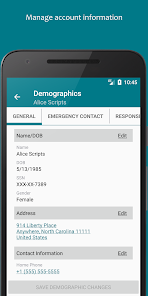
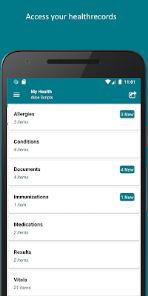
FollowMyHealth® allows users to access and manage their health records all in one place. You can view lab results, medications, and immunization history, making it easier to stay informed about your health and share necessary information with your healthcare providers when needed.

Secure Messaging

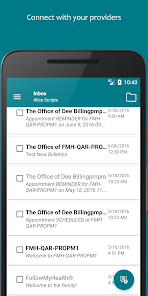
The platform features secure messaging, enabling you to communicate directly with your healthcare providers. This means you can ask questions, discuss concerns, and get timely responses without the need for in-person visits, making healthcare more accessible and efficient.

Pros & Cons

Pros
  • Access your health records anytime, anywhere.
  • Schedule appointments conveniently from your device.
  • Communicate securely with your healthcare providers.
  • Manage medications and track prescriptions easily.
  • Receive reminders for upcoming appointments and tests.
Cons
  • Limited compatibility with some healthcare providers
  • User interface can be confusing at times
  • Frequent technical issues disrupt access
  • Customer support response times can be slow

Real Experience Using FollowMyHealth®

Application Scenarios

FollowMyHealth® is a versatile health management app designed to empower users to take charge of their medical information and wellness journey. It is particularly beneficial for individuals managing chronic conditions, as it allows them to track vital health metrics, medication schedules, and lab results in one convenient location. Families can also utilize the app to manage the health records of multiple members, making it easier to coordinate care for children or elderly relatives. Additionally, FollowMyHealth® is useful for those who frequently visit healthcare providers, as it enables users to view appointment schedules, communicate with healthcare professionals, and access important medical documents from anywhere at any time.

User Experience

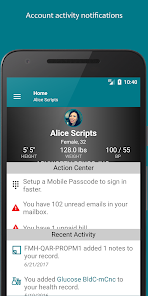
The user experience of FollowMyHealth® is generally positive, with users appreciating its intuitive interface and straightforward navigation. Upon signing up, users can easily connect their healthcare providers, which facilitates seamless access to medical records. The app’s dashboard is well-organized, allowing users to quickly find the information they need, whether it’s medication lists, upcoming appointments, or test results. Many users have noted the convenience of receiving notifications for upcoming appointments and medication reminders, which help them stay on track with their health management. However, some users have reported occasional glitches or slow loading times, which can detract from the overall experience. Nevertheless, the app’s functionality largely outweighs these minor inconveniences.

Pricing

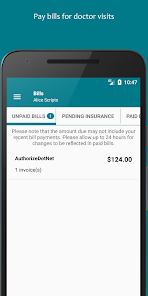
FollowMyHealth® is free to download and use, making it accessible to a broad range of users. While the app itself does not have any subscription fees, users may incur costs associated with specific healthcare services or consultations accessed through the platform. It’s important to note that while the app is free, some healthcare providers may charge for certain services or require insurance coverage for specific features. Overall, the free model allows users to explore the app's capabilities without any financial commitment, which is a significant advantage for those looking to manage their healthcare more effectively.

Updates & Support

The FollowMyHealth® team is committed to providing regular updates to enhance functionality and address user feedback. Users can expect periodic app improvements that often include new features, bug fixes, and security enhancements. For support, the app offers a comprehensive help center with FAQs, troubleshooting guides, and contact information for customer service. Users can reach out for assistance through multiple channels, including email and phone support. The responsiveness of the support team has been praised by many users, who appreciate the timely assistance they receive when encountering issues. Overall, the commitment to updates and user support contributes positively to the overall experience of using FollowMyHealth®.

verified Security & Privacy Review

The FollowMyHealth® app prioritizes user security and privacy, employing robust measures to protect sensitive health information. It utilizes industry-standard encryption protocols to safeguard data both in transit and at rest, ensuring that personal health records remain confidential. Users must create a secure account, which includes multi-factor authentication options, adding an extra layer of security. In terms of permissions, the app requests access to certain device features, such as notifications and location services, which enhance user experience but are not mandatory for core functionality. Users are encouraged to review these permissions carefully during the setup process to maintain control over their personal information. FollowMyHealth® complies with HIPAA regulations, which govern the handling of health-related data, further reinforcing its commitment to user privacy. The app provides clear privacy policies, detailing how user data is collected, used, and shared, allowing users to make informed decisions about their information. Overall, FollowMyHealth® demonstrates a strong commitment to maintaining the security and privacy of its users' health data.

Reviews

4.8

“User-friendly interface makes managing health easy”

“Great for tracking appointments and test results”

“Reliable access to medical records anytime”

“Helpful reminders for medications and upcoming visits”

“Customer support is responsive and effective”

FAQ

1

Can I access my medical records through FollowMyHealth®?

Yes, one of the primary features of FollowMyHealth® is that it allows users to access their medical records. You can view your lab results, medications, immunization history, and other important health information directly through the app. This access enables you to track your health over time and make informed decisions about your care in consultation with your healthcare providers. Keep in mind that the availability of specific records may depend on your healthcare provider's participation in the platform.

2

Can I schedule appointments using FollowMyHealth®?

Yes, FollowMyHealth® offers a convenient way to schedule appointments with your healthcare provider. You can view available time slots, choose the appointment type, and confirm your booking all through the app. This feature helps streamline the process, making it easier to fit healthcare visits into your busy schedule. Additionally, you may receive reminders for upcoming appointments, reducing the likelihood of missed visits.

3

How do I contact my healthcare provider through FollowMyHealth®?

Within FollowMyHealth®, you can easily send messages to your healthcare provider using the secure messaging feature. This allows you to ask questions, request prescription refills, or discuss any concerns without the need for an in-person visit. To contact your provider, navigate to the messaging section within the app, select your provider, and compose your message. You should receive a response within the typical response time set by your healthcare office.

4

How do I create an account on FollowMyHealth®?

To create an account on FollowMyHealth®, you typically need to visit the official website or download the app from your device's app store. You can sign up by providing some basic personal information, such as your name, email address, and date of birth. If your healthcare provider participates in FollowMyHealth®, you may also need to enter an activation code provided by them. Follow the prompts to complete the registration process, and you will receive a confirmation email to verify your account.

5

Is FollowMyHealth® available for all healthcare providers?

FollowMyHealth® is not universally available for all healthcare providers. Participation in the platform depends on whether your specific healthcare provider or medical facility has adopted the FollowMyHealth® system. To find out if your provider is part of the network, you can check with their office or look for information on the FollowMyHealth® website. If your provider does not participate, you may not be able to use the app to access your records or communicate with them.

How to use FollowMyHealth®

1

How can I contact Customer Service for FollowMyHealth®?

You can reach FollowMyHealth® Customer Service by calling their support number or visiting their official website for assistance.

2

How do I activate my FollowMyHealth® account?

To activate your account, follow the activation link sent to your email after registration, and complete the required information.

3

How do I log in to my FollowMyHealth® account?

To log in, visit the FollowMyHealth® website or app, enter your username and password, then click the "Log In" button.

4

What is the Customer Number for FollowMyHealth®?

The Customer Number for FollowMyHealth® can be found on their website or within the app under the support section.

Editor's Choice