This site uses cookies to enhance your user experience. By clicking any link on this site you are giving your consent to our cookie policy. Read more
Reject
Accept All

Advertiser and Editorial Disclosures

PulsePoint Respond

PulsePoint Respond

verified

PulsePoint Foundation

4.6
Rating
1,000,000+ Downloads
4.27 Version
  • category

    Category: Medical

  • price

    Price: free

  • age rating

    Age Rating: Everyone

  • rating

    Rating: 4.6

  • available on

    Available on: /

  • updated on

    Updated on: May 18, 2026

Screenshot 1
Screenshot 2
Screenshot 3
Screenshot 4
Screenshot 5
Screenshot 6
Screenshot 7
Screenshot 8

Features & Highlights

CPR Notifications

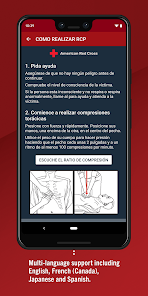
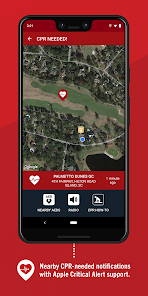
PulsePoint Respond includes a vital CPR notification feature that alerts trained CPR volunteers when someone is in cardiac arrest nearby. By mobilizing community members trained in CPR, the app increases the likelihood of immediate lifesaving action before professional help arrives.

Community Engagement

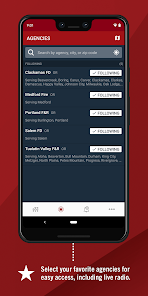
This app promotes community engagement by connecting users with local emergency services and initiatives. Users can stay informed about safety events, training sessions, and volunteer opportunities, fostering a proactive approach to community health and safety.

Incident Mapping

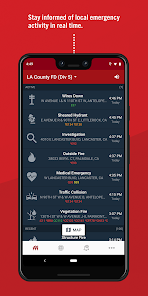
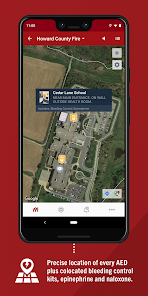
The app offers detailed incident mapping that displays emergency calls in real-time, helping users to visualize the location of emergencies. This feature enhances situational awareness and enables users to make informed decisions about their response or involvement in an ongoing situation.

Real-Time Alerts

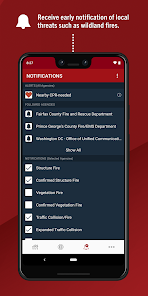
PulsePoint Respond provides real-time alerts for nearby emergencies, allowing users to be informed instantly about incidents in their vicinity. This feature empowers community members to respond to emergencies, potentially saving lives by offering timely assistance when help is needed most.

Pros & Cons

Pros
  • Real-time alerts for nearby emergencies enhance response time.
  • Empowers bystanders to assist in critical situations.
  • Supports community engagement and safety awareness initiatives.
  • User-friendly interface makes navigation simple and efficient.
  • Increases chances of survival through timely assistance.
Cons
  • Limited user engagement reduces effectiveness in emergencies.
  • Requires internet access, limiting use in remote areas.
  • Overwhelming notifications may lead to user fatigue.
  • Lack of integration with all emergency services systems.

Real Experience Using PulsePoint Respond

Application Scenarios

PulsePoint Respond is designed to empower everyday citizens to take action during critical emergency situations. This app is particularly useful for individuals who want to contribute to their community's safety, especially in cases of cardiac arrest, where every second counts. Users can receive real-time alerts about nearby emergencies, allowing them to respond quickly and offer assistance until professional help arrives. The app is also beneficial for bystanders who may have CPR training or are willing to assist emergency services. In addition to medical emergencies, PulsePoint Respond can be utilized in various scenarios such as fires, natural disasters, and other urgent situations, making it a versatile tool for enhancing community safety.

User Experience

The user experience with PulsePoint Respond is overall intuitive and user-friendly. The app's interface is clean and straightforward, allowing users to navigate through alerts and information with ease. Upon launching the app, users are greeted with a map displaying nearby incidents, which is both informative and visually engaging. Notifications are timely and relevant, ensuring that users are updated on emergencies in their vicinity. Additionally, the app includes educational resources on CPR and first aid, further enhancing its value. Users have noted the importance of having such critical information readily available and appreciate the community-oriented focus of the app. However, some users have reported occasional glitches or delays in notifications, which can be critical during emergencies.

Pricing

PulsePoint Respond is free to download and use, making it accessible to a wide range of users. The app does not require any subscriptions or in-app purchases, which is a significant advantage for those who want to participate in emergency response without financial barriers. This free access aligns with the app's mission to promote community engagement and preparedness, ensuring that anyone can become a vital link in the chain of emergency response.

Updates & Support

The development team behind PulsePoint Respond is committed to continually improving the app based on user feedback and technological advancements. Regular updates are released to enhance functionality, fix bugs, and introduce new features that meet the needs of users. Support options are readily available, with an FAQ section and customer service channels to assist users with any issues they may encounter. The responsiveness of the support team has been praised by users, who appreciate the attention and updates provided. Overall, the combination of consistent updates and effective support contributes to a positive user experience, reinforcing the app's reliability in emergency situations.

verified Security & Privacy Review

The security and privacy practices of PulsePoint Respond are designed to prioritize user safety while ensuring sensitive information is handled responsibly. The app employs robust encryption methods to protect data both in transit and at rest, safeguarding user interactions from unauthorized access. PulsePoint Respond requests minimal permissions, primarily focusing on location services to provide timely alerts about nearby emergencies. Users are informed about the necessity of these permissions, allowing for informed consent before granting access. This transparency is a positive aspect of the app's privacy approach. User data is not sold or shared with third parties for advertising purposes, reinforcing the app's commitment to privacy. Additionally, the app provides options for users to manage their data and privacy settings, which empowers them to control their personal information actively. Overall, PulsePoint Respond demonstrates a strong dedication to security and privacy, making it a trustworthy tool for users seeking to engage with their local emergency response community while maintaining control over their personal data.

User Reviews

  • Jimmy Johnson
    2026/06/08

    the apps okay but it really doesn't pick up all of the traffic that is coming across from the communications center so you only get just bits and pieces of what is going on and where its at! plus it doesnt show the type incident on here anymore! it could be better than what it is right now and pick up more of the communications!

  • A. C.
    2025/09/26

    I like to be able to use this app to avoid roads congested by wrecks, etc, or know if we have to leave for work earlier. However, I live right near a fire station and can hear the sirens when they go out, and quite often, it is never posted on this app. I'm not sure how they get their info, but there's a lag there somewhere. I do like that I have the ability to see the traffic cams on the interstate, though. Google Maps isn't always accurate on how backed up they are after a wreck has cleared.

  • Bill Vincent
    2025/09/27

    I find the UI to be somewhat clunky, and it can be tricky to get notifications to work properly, but overall, it is a fantastic app, that works as advertised. Even if you're not a first responder, knowing where certain incidents are can be very helpful. The cpr notification doesn't work at all, it continuously "notifies" me that it's on, which becomes annoying in minutes, causing me to disable it. As an AEMT, this feature would be great... If it worked.

  • Kathy Weiand
    2024/06/09

    I had pulse point for years and like having up-to-date information on calls in the area. But then I upgraded to PulsePoint Professional Responder, and it really filled in a lot of the gaps. It is extremely helpful when I teach on different calls to my crew, as well as keep me up to date on our calls that we go on. I can't recommend it enough. It has been a tremendous help!

  • mstv02
    2021/10/21

    There wasn't any guide when I uploaded the app & figuring out the stations I needed to follow in the unincorporated areas wasn't all that easy. You get to choose the type of reports you get and can adjust the amount of types at any time. Plus, if you're qualified, you can be notified to go to locations where immediate CPR is needed. Ended up with 2 in order to get the coverage needed. There are a lot of reports. The app is Great! Recommend Highly!

Review Source: Google Play store public user reviews.

FAQ

1

Does PulsePoint Respond collect my personal data?

PulsePoint Respond may collect certain data to enhance the user experience, but it prioritizes user privacy and does not sell personal information to third parties.

2

Does PulsePoint Respond offer a free trial or free version?

PulsePoint Respond is available for free, allowing users to access its core features without any cost.

3

Does PulsePoint Respond require an internet connection?

Yes, PulsePoint Respond requires an active internet connection to receive real-time alerts and access information about emergencies and AED locations.

4

How can I contact support or send feedback for PulsePoint Respond?

You can contact support or send feedback through the app's settings or help section, or by visiting the official PulsePoint website for additional contact options.

5

How do I manage or cancel my PulsePoint Respond subscription?

Since PulsePoint Respond is free to use, there is no subscription to manage or cancel. Users can simply uninstall the app if they choose to stop using it.

How to use PulsePoint Respond

1

How can I contact customer service for the PulsePoint Respond app?

You can contact customer service by visiting the PulsePoint website and navigating to the support section, where you can find contact information.

2

How do I activate the PulsePoint Respond app?

Download the app from your device's app store, open it, and follow the on-screen instructions to create an account and activate it.

3

How do I log in to the PulsePoint Respond app?

Open the app, tap on 'Log In,' and enter your registered email and password. If you don’t have an account, you can create one.

4

What is the customer number for PulsePoint Respond?

PulsePoint does not publicly list a customer service number; please refer to their website for specific support inquiries.

What's New

What's New in This Version• Redesigned radio player with improved reliability and lock screen media controls.

Editor's Choice