This site uses cookies to enhance your user experience. By clicking any link on this site you are giving your consent to our cookie policy. Read more
Reject
Accept All

Advertiser and Editorial Disclosures

myPhonak

myPhonak

verified Verified App

Developer: Sonova AG

  • category

    Category: Medical

  • price

    Price: free

  • age rating

    Age Rating: Everyone

  • rating

    Rating: 4.5

  • download

    Downloads: 1,000,000+

  • version

    Version: 7.3.0

Screenshot 1
Screenshot 2
Screenshot 3
Screenshot 4
Screenshot 5
Screenshot 6

Features & Highlights

Battery Monitoring

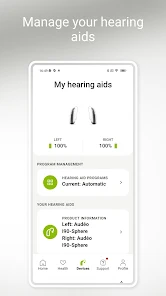
The app includes a battery monitoring feature that keeps users informed about their hearing aids' battery life. With timely notifications and updates, users can stay proactive about charging, ensuring their devices are always ready for use and minimizing interruptions in their daily activities.

Personalized Hearing Settings

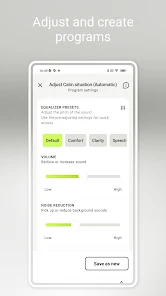
With myPhonak, users can tailor their hearing aid settings to match individual preferences and environments. The app allows for adjustments based on specific listening situations, ensuring a more comfortable and effective hearing experience throughout the day.

Real-Time Control

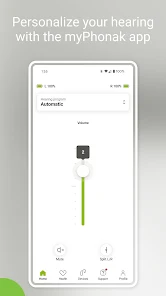
The app provides real-time control over hearing aid functions, enabling users to adjust volume, switch programs, and fine-tune settings instantly. This level of accessibility empowers users to respond to their auditory needs dynamically, enhancing their overall listening experience.

Remote Support Access

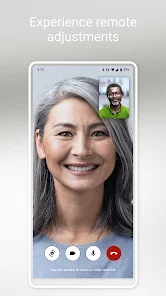
myPhonak offers remote support features, allowing users to connect with their audiologists for assistance without needing to visit a clinic. This convenience saves time and offers peace of mind, ensuring users can quickly address any hearing aid concerns or adjustments they may need.

Pros & Cons

Pros
  • Personalized adjustments for optimal hearing performance
  • Real-time control of hearing aids via smartphone
  • Easy access to hearing aid settings and features
  • Seamless connectivity with other devices and apps
  • Comprehensive battery status monitoring and management
Cons
  • Limited compatibility with older hearing aid models
  • User interface can be confusing for some
  • Requires stable internet for optimal performance
  • May drain smartphone battery quickly

Real Experience Using myPhonak

Application Scenarios

The myPhonak app is designed primarily for users of Phonak hearing aids, making it an essential tool for enhancing the auditory experience. Whether you are in a bustling restaurant, watching a movie, or simply having a conversation in a quiet room, the app allows you to customize the settings of your hearing aids for optimal sound quality. Users can easily switch between different listening programs tailored for various environments, ensuring that they can hear clearly regardless of the background noise. Additionally, the app supports remote adjustments, enabling audiologists to fine-tune hearing aids without the need for in-person visits, which is particularly beneficial for those with mobility issues or those living in remote areas.

User Experience

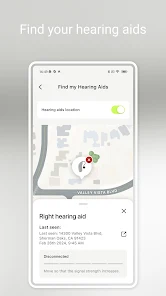
From the moment users download the myPhonak app, they are greeted with a user-friendly interface that is both intuitive and visually appealing. Navigating through the app is seamless, making it easy for users to adjust settings or access features even if they are not tech-savvy. The customization options are extensive—users can modify sound profiles, switch between different environments, and even access hearing aid status and battery life with just a few taps. Feedback from users consistently highlights the app's ability to improve their overall hearing experience, with many noting that they feel more confident in social settings. The integration of features like the "Find My Hearing Aids" function adds an extra layer of convenience, ensuring that users can quickly locate their devices if misplaced.

Pricing

The myPhonak app itself is free to download and use, which is a significant advantage for individuals who have invested in Phonak hearing aids. While there are no hidden fees or subscriptions associated with the app, it is important to note that the effectiveness of the app is closely tied to the specific models of Phonak hearing aids being used. Therefore, users should consult with their audiologists to ensure compatibility. This model of providing a free app enhances accessibility, allowing more users to benefit from the advanced features without financial barriers.

Updates & Support

Phonak is committed to continually improving the myPhonak app, as evidenced by regular updates that enhance functionality and user experience. Users can expect periodic releases that not only introduce new features but also address any bugs or issues that may arise. The support provided by Phonak is commendable, with a dedicated help section within the app offering troubleshooting tips and contact information for customer service. Users have reported prompt responses from support teams, further enhancing their overall satisfaction with both the app and the hearing aids. Overall, the ongoing commitment to updates and user support ensures that myPhonak remains a reliable companion for hearing aid users.

verified Security & Privacy Review

The myPhonak app prioritizes user security and privacy through robust data protection measures. The app employs encryption protocols to safeguard personal information, ensuring that sensitive data is transmitted securely between the device and the cloud. Users are informed about data collection practices and have control over their information, with clear options to manage permissions. The app requires specific permissions such as access to Bluetooth for connecting hearing aids, but it does not request unnecessary access to other device features. Users can customize privacy settings to limit data sharing and can easily delete their account and associated data if desired. The myPhonak team adheres to strict data privacy regulations, providing transparency in how user data is stored, processed, and utilized. Overall, myPhonak demonstrates a commitment to maintaining user confidentiality and ensuring that personal data is handled with care, making it a reliable choice for individuals looking to manage their hearing aids securely.

Reviews

4.5

“User-friendly interface enhances hearing aid control.”

“Great sound quality and customization options.”

“Syncs perfectly with my phone.”

“Battery life could be better.”

“Occasional connectivity issues with Bluetooth.”

FAQ

1

Does myPhonak collect my personal data?

Yes, myPhonak may collect personal data for functionality and user experience improvements, but it adheres to strict privacy policies to protect your information.

2

Does myPhonak offer a free trial or free version?

myPhonak is available for free download, and while it offers many features at no cost, some advanced functionalities may require a subscription.

3

Does myPhonak require an internet connection?

Yes, myPhonak requires an internet connection for certain features, such as accessing remote support and updates, but some functionalities may work offline.

4

How can I contact support or send feedback for myPhonak?

You can contact support or send feedback through the app's support section, which provides options for direct communication or accessing help resources.

5

How do I manage or cancel my myPhonak subscription?

You can manage or cancel your myPhonak subscription through the app's settings or directly from the app store where you purchased the subscription.

How to use myPhonak

1

How do I activate the myPhonak app?

Download the app, create an account or log in, and follow the on-screen instructions to complete the activation process.

2

How do I contact Customer Service for the myPhonak app?

You can reach Customer Service through the app's help section or visit the Phonak website for support contact details.

3

How do I find my Customer Number in the myPhonak app?

Your Customer Number can typically be found in your account settings or on your device's packaging.

4

How do I log in to the myPhonak app?

Open the app, enter your registered email and password, then tap "Log In" to access your account.

Editor's Choice