This site uses cookies to enhance your user experience. By clicking any link on this site you are giving your consent to our cookie policy. Read more
Reject
Accept All

Advertiser and Editorial Disclosures

TruHearing App

TruHearing App

verified

Sivantos Pte. Ltd.

3.0
Rating
100,000+ Downloads
2.7.32.16272 Version
  • category

    Category: Medical

  • price

    Price: free

  • age rating

    Age Rating: Everyone

  • rating

    Rating: 3.0

  • available on

    Available on: /

  • updated on

    Updated on: Jun 18, 2026

Screenshot 1
Screenshot 2
Screenshot 3
Screenshot 4
Screenshot 5
Screenshot 6
Screenshot 7

Features & Highlights

Comprehensive Hearing Tracking

TruHearing App provides comprehensive tracking of your hearing health over time. With detailed reports and insights, you can monitor your progress and understand how your hearing aids are impacting your daily life, empowering you to make informed decisions about your hearing care.

Personalized Hearing Plans

The TruHearing App offers personalized hearing aid plans tailored to your unique hearing needs. By utilizing advanced technology, the app ensures that you receive the most suitable options, making your hearing experience more comfortable and enjoyable, all from the convenience of your smartphone.

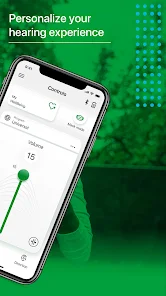
Real-Time Hearing Adjustments

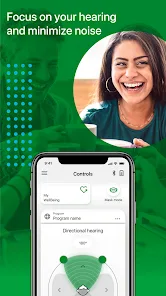
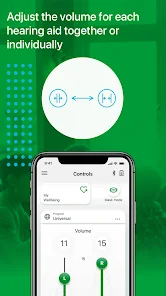
With the TruHearing App, you can make real-time adjustments to your hearing aids right from your device. This feature allows you to customize the sound settings based on your environment, ensuring optimal hearing whether you're in a quiet room or a bustling café.

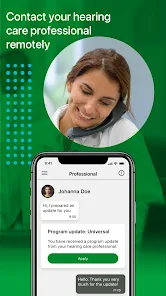
Telehealth Support

The app includes telehealth options, allowing you to connect with audiologists for consultations without leaving your home. This feature provides a seamless way to receive expert advice, troubleshooting, and support, ensuring you get the most out of your hearing aids.

Pros & Cons

Pros
  • Easily connect with hearing care professionals
  • Access personalized hearing aid settings anytime
  • Track your hearing health progress conveniently
  • Receive real-time support and troubleshooting
  • Enjoy user-friendly interface for seamless navigation
Cons
  • Limited compatibility with certain hearing aids models
  • App may have connectivity issues
  • User interface can be confusing for some
  • Updates may cause functionality problems

Real Experience Using TruHearing App

Application Scenarios

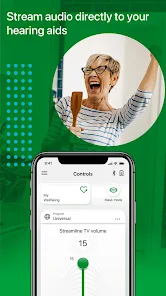
The TruHearing App is designed to cater to various hearing needs, making it an excellent choice for those seeking better auditory experiences. One common scenario includes individuals who have recently purchased hearing aids and need assistance in managing their devices. The app seamlessly connects to various hearing aids, allowing users to adjust settings, change programs, and even check battery levels from their smartphones. Another scenario involves users who wish to track their hearing health over time. The app provides features that help users log their hearing experiences, making it easier to discuss any changes with their audiologists during follow-up appointments. Additionally, the app serves as a platform for accessing educational resources about hearing loss, empowering users to make informed decisions regarding their hearing health.

User Experience

User experience with the TruHearing App is largely positive, with many users appreciating its intuitive interface and ease of navigation. The app’s clean design allows users of all ages to feel comfortable while using it. Features such as customizable sound settings and noise reduction options are particularly praised, as they enable users to personalize their listening experience. Furthermore, the app provides real-time feedback when users make adjustments, which enhances user satisfaction. However, some users have reported occasional connectivity issues with certain hearing aid models, which can be frustrating. Overall, the app excels in providing a user-friendly experience that caters to a broad audience, from tech-savvy individuals to those less familiar with digital tools.

Pricing

TruHearing offers competitive pricing for its services, especially when compared to traditional hearing aid retailers. The app itself is free to download and use, which is a significant advantage for users who want to explore its features without any financial commitment. However, users should be aware that purchasing hearing aids through the app or affiliated providers may come with varying costs. TruHearing often collaborates with health insurance plans, which can lead to substantial savings for users. There are also financing options available, making it easier for individuals to invest in their hearing health without breaking the bank.

Updates & Support

The TruHearing App is regularly updated to enhance functionality and address user feedback. These updates often include new features, improved performance, and bug fixes, ensuring that users have access to the best possible experience. Customer support is readily available through the app, offering users quick access to help with any issues or inquiries they may have. The support team is known for being responsive and knowledgeable, providing assistance via chat or phone. Additionally, the app contains a comprehensive FAQ section that covers common questions and troubleshooting tips, making it easy for users to find solutions independently.

verified Security & Privacy Review

The TruHearing App prioritizes user security and privacy, implementing robust measures to protect sensitive information. The app employs encryption protocols to safeguard user data during transmission and storage, ensuring that personal health information remains confidential. In terms of permissions, TruHearing requests only essential access to function effectively, such as microphone and location services for precise hearing aid adjustments. Users are informed about the necessity of these permissions, promoting transparency in data handling practices. The app's privacy policy outlines its commitment to user data protection, detailing how personal information is collected, used, and shared. TruHearing does not sell user data to third parties and limits data sharing to trusted partners involved in service delivery. Users can manage their data preferences easily through the app settings, allowing for greater control over what information is shared. Overall, the TruHearing App demonstrates a strong commitment to security and privacy, providing users with peace of mind while using the application for their hearing health needs.

User Reviews

  • Rebekah Jennings
    2026/06/14

    I have just started using this app recently with a new set of hearing aids & I like it pretty well. It is easy to learn how to adjust to my hearing needs. One thing I would love to have in coming updates would be to have the ability to program additional hearing environments in the app. My technician programmed a couple environments for me. But I am finding a couple new ones I wouldn't mind having to fine tune my hearing aids. Like "Radio in Car" & "Conversations in Car". Or maybe "Home TV".

  • TangoDwn
    2026/06/21

    Needs a lot of bug and performance improvements. Very spotty connecting to hearing aids and when they do it only connects to one on occasion. When it drops connection you have to close the app and restart it to get connection back. Very frustrating. You say you strive to improve but I have seen none of that. In Truhearings defense though, the Signia app is no better. They are both junk.

  • Brenda
    2026/02/28

    I don't usually rate or comment on apps I use. However, as a former Product Manager for mobile apps, I find this app to be very basic with limited functionality and an unintuitive UI. At this moment, it does not reflect the correct status of the device, it isn't allowing Bluetooth to be turned off, and it won't refresh. I hope there are some enhancements in your near-term backlog.

  • Sharon Me
    2026/05/04

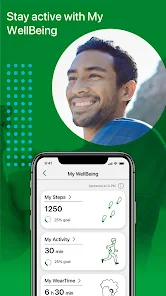
    It seems that every time you make an update, something changes on my hearing aid app, and this last time something that I always used, it was to control the environment which gave me a better hearing advantage.And that has disappeared.I'd like it back.Thank you very much. Also, whatever you did has changed the ability and the speed that the hearing aids will connect to the bluetooth.So I don't know what you did, but it wasn't any better.It did not make anything better.

  • Arthur Roberg
    2026/04/24

    it takes over your sound. as long as the app is installed you can not hear sound from your phone unless you are wearing the aids. this should be selectable. uodate: it seems to be getting worse. connecting to the hearing aids is troublesome. it stopped updating to the wellbeing, and it's ability to give an accurate battery reading is almost no-existent.

Review Source: Google Play store public user reviews.

FAQ

1

Does TruHearing App collect my personal data?

TruHearing App may collect personal data necessary for providing services, but it adheres to privacy policies to protect user information and ensure data security.

2

Does TruHearing App offer a free trial or free version?

TruHearing App offers a free version with limited features, while a subscription may be required for full access to all functionalities and premium services.

3

Does TruHearing App require an internet connection?

Yes, TruHearing App typically requires an internet connection to access its full range of features, including scheduling appointments and downloading updates.

4

How can I contact support or send feedback for TruHearing App?

You can contact support or send feedback through the app's help section, which provides options for customer service via email or phone.

5

How do I manage or cancel my TruHearing App subscription?

You can manage or cancel your TruHearing App subscription through your account settings within the app or by contacting customer support for assistance.

How to use TruHearing App

1

How can I contact Customer Service for the TruHearing App?

You can reach TruHearing Customer Service by calling their support number, which is available on their website under the Contact Us section.

2

How do I activate my TruHearing App account?

To activate your account, check your email for a verification link sent after registration. Click the link to complete the activation process.

3

How do I log in to the TruHearing App?

To log in, open the app and enter your registered email and password. If you don't have an account, you can create one directly in the app.

4

What is the Customer Number for TruHearing?

The Customer Number is typically provided in your account settings within the app or on your account confirmation email. You can also contact Customer Service for assistance.

What's New

• Updated Slovenian translations for improved localization.

Editor's Choice