This site uses cookies to enhance your user experience. By clicking any link on this site you are giving your consent to our cookie policy. Read more
Reject
Accept All

Advertiser and Editorial Disclosures

Trinity Health MyChart

Trinity Health MyChart

verified Verified App

Developer: Trinity Information Services Web Development

  • category

    Category: Medical

  • price

    Price: free

  • age rating

    Age Rating: Everyone

  • rating

    Rating: 4.4

  • download

    Downloads: 100,000+

  • version

    Version: 11.5.2

Screenshot 1
Screenshot 2
Screenshot 3
Screenshot 4
Screenshot 5
Screenshot 6
Screenshot 7
Screenshot 8
Screenshot 9
Screenshot 10
Screenshot 11
Screenshot 12

Features & Highlights

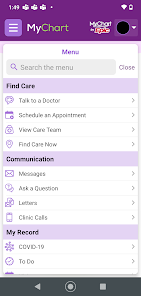
Access to Medical Records

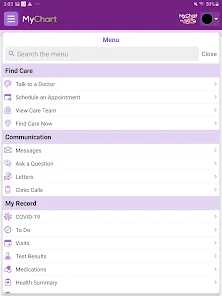
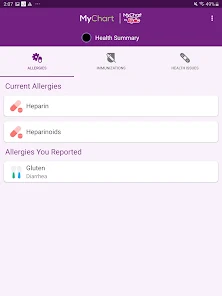
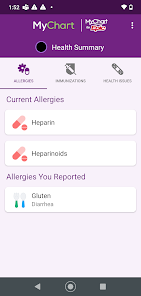
With Trinity Health MyChart, you can easily access your medical records anytime, anywhere. This feature allows you to view test results, medications, and immunization history, empowering you to stay informed about your health and communicate effectively with your healthcare providers.

Easy Appointment Scheduling

Trinity Health MyChart simplifies your healthcare experience by allowing you to schedule appointments at your convenience. With just a few taps, you can choose your preferred date and time, view available providers, and even receive reminders, making it easier to stay on top of your health needs.

Prescription Refill Requests

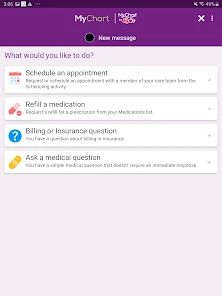
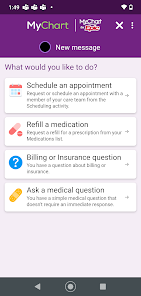
Managing your medications is a breeze with Trinity Health MyChart's prescription refill request feature. You can easily request refills for your prescriptions online, track their status, and receive notifications when they're ready for pickup, helping you maintain your health regimen without any hassle.

Secure Messaging

The secure messaging feature in Trinity Health MyChart enables you to communicate directly with your healthcare team. You can ask questions, request prescription refills, or discuss concerns in a safe environment, ensuring you receive timely and personalized care without needing to make a phone call.

Pros & Cons

Pros
  • Access health records anytime, anywhere.
  • Schedule appointments with ease.
  • Communicate directly with healthcare providers.
  • Request prescription refills quickly.
  • Manage family health information in one place.
Cons
  • Limited technical support for users experiencing issues
  • Not all providers fully integrated with the system
  • Complex navigation can confuse some patients
  • Infrequent updates may delay important information

Real Experience Using Trinity Health MyChart

Application Scenarios

The Trinity Health MyChart app serves as a comprehensive digital healthcare platform designed for patients of Trinity Health. It is particularly beneficial for individuals managing chronic conditions, as it allows them to easily track their medical history, medications, and upcoming appointments. Patients can use the app to schedule routine check-ups, view test results, and communicate directly with their healthcare providers. Additionally, the app is useful for parents managing their children's health records, making it easier to keep track of vaccinations, growth milestones, and pediatric appointments. The app is also ideal for busy professionals who may find it challenging to visit healthcare facilities during regular hours, as it provides access to healthcare services anytime, anywhere.

User Experience

The user experience of the Trinity Health MyChart app is generally positive, with a clean and intuitive interface that makes navigation straightforward. Users appreciate the ease of accessing their medical records and the user-friendly appointment scheduling feature. The app also offers secure messaging, allowing patients to communicate with their healthcare providers without the need for phone calls or in-person visits. While many users find the app reliable and efficient, some have reported occasional technical issues, such as slow loading times or difficulty logging in. However, overall, the majority of users find value in the app's capabilities, particularly its integration with telehealth services, which has become increasingly important in recent times.

Pricing

The Trinity Health MyChart app is free to download and use for patients who are part of the Trinity Health network. There are no hidden fees associated with accessing the basic features of the app, such as viewing health records, scheduling appointments, and messaging providers. However, certain services, such as telehealth visits, may incur standard consultation fees depending on the patient's insurance plan. It is advisable for users to check with their insurance providers to understand any costs associated with specific services accessed through the app.

Updates & Support

The Trinity Health MyChart app is regularly updated to enhance functionality and improve user experience. These updates often include bug fixes, performance enhancements, and new features that respond to user feedback. For support, users can access a dedicated help section within the app, providing answers to frequently asked questions and troubleshooting tips. Additionally, Trinity Health offers customer support via phone and online chat, ensuring users have access to assistance when needed. The commitment to regular updates and responsive customer support demonstrates Trinity Health's dedication to providing a reliable and user-friendly healthcare app.

verified Security & Privacy Review

The Trinity Health MyChart app prioritizes user security and privacy through robust measures designed to protect sensitive health information. The app employs advanced encryption protocols to secure data both in transit and at rest, ensuring that personal health information remains confidential. User authentication is reinforced with multi-factor authentication options, providing an additional layer of protection against unauthorized access. Regarding permissions, the app requires access to specific device features, such as location services and notifications, which enhance user experience but may raise concerns for privacy-conscious individuals. Users are encouraged to review these permissions carefully and adjust settings according to their comfort level. Trinity Health is committed to adhering to HIPAA regulations, which govern the handling of personal health information. The app’s privacy policy outlines how user data is collected, used, and shared, emphasizing transparency in data practices. Users can manage their data preferences within the app, including options for data sharing and communication preferences, ensuring they retain control over their personal information.

Reviews

4.4

“User-friendly interface makes managing health easy.”

“Convenient access to medical records anytime.”

“Great for scheduling appointments quickly.”

“Helpful reminders for upcoming medications.”

“Occasional glitches, but overall a reliable app.”

FAQ

1

Can I submit suggestions or feedback to Trinity Health MyChart?

Yes, users can submit feedback through the app or by contacting customer support directly.

2

Does Trinity Health MyChart collect my personal data?

Yes, the app collects personal health information to provide tailored services and improve user experience.

3

Does Trinity Health MyChart support offline use?

No, Trinity Health MyChart requires an internet connection to access its features and services.

4

How do I cancel my Trinity Health MyChart subscription?

You can cancel your account by contacting Trinity Health customer support for assistance.

5

How much does a subscription to Trinity Health MyChart cost?

There is no subscription fee for using Trinity Health MyChart; it is provided at no cost to patients.

How to use Trinity Health MyChart

1

How can I contact customer service for the Trinity Health MyChart app?

You can reach Trinity Health MyChart customer service at their dedicated support number, which is available on the app or their website.

2

How do I activate my Trinity Health MyChart account?

To activate your account, you need an activation code, which can be obtained from your healthcare provider. Enter the code in the app to complete the activation.

3

How do I log in to my Trinity Health MyChart account?

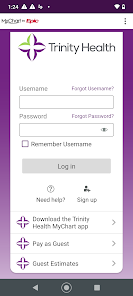
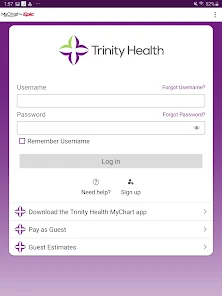
To log in, open the app, enter your username and password, and tap 'Log In.' If you don't have an account, you can create one through the app.

4

What is the customer number for Trinity Health MyChart?

The customer number for Trinity Health MyChart can be found in the app under the 'Help' section or on the Trinity Health website.

Editor's Choice