This site uses cookies to enhance your user experience. By clicking any link on this site you are giving your consent to our cookie policy. Read more
Reject
Accept All

Advertiser and Editorial Disclosures

TigerConnect

TigerConnect

verified

TigerConnect Inc

3.1
Rating
1,000,000+ Downloads
9.12.68 Version
  • category

    Category: Medical

  • price

    Price: free

  • age rating

    Age Rating: Everyone

  • rating

    Rating: 3.1

  • available on

    Available on: /

  • updated on

    Updated on: Jun 25, 2026

Screenshot 1
Screenshot 2
Screenshot 3
Screenshot 4
Screenshot 5
Screenshot 6

Features & Highlights

Integrated Workflow Tools

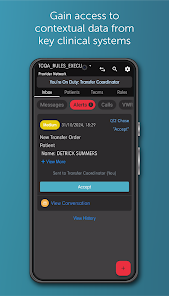
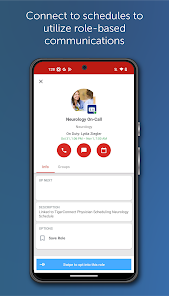
The platform includes integrated workflow tools that streamline tasks such as scheduling, notifications, and patient assignments. This helps healthcare teams to stay organized and efficient, ultimately improving patient care and operational productivity.

Patient Engagement

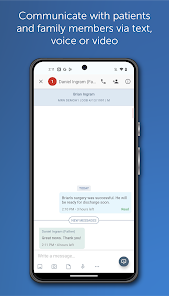
TigerConnect enhances patient engagement by providing a seamless communication channel between providers and patients. Patients can easily reach out to their care teams, ask questions, and receive timely updates, fostering a more collaborative healthcare experience.

Secure Messaging

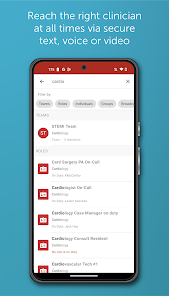
TigerConnect offers end-to-end encrypted messaging to ensure that sensitive patient information is protected. This feature allows healthcare professionals to communicate securely in real-time, facilitating better collaboration and timely decision-making without compromising privacy.

Telehealth Capabilities

With its built-in telehealth capabilities, TigerConnect enables virtual consultations that bridge the gap between providers and patients. This feature supports video conferencing and secure file sharing, making remote care more accessible and convenient for everyone involved.

Pros & Cons

Pros
  • TigerConnect enhances secure communication across healthcare teams.
  • Streamlined workflows lead to improved patient care efficiency.
  • Real-time messaging ensures timely responses and collaboration.
  • HIPAA-compliant features protect sensitive patient information.
  • Integration with existing systems simplifies adoption and usage.
Cons
  • Limited integrations with other healthcare systems can hinder workflow efficiency.
  • User interface may feel unintuitive for new users, impacting adoption rates.
  • Pricing can be higher compared to similar communication platforms in the market.

Real Experience Using TigerConnect

Application Scenarios

TigerConnect is designed to enhance communication within healthcare environments, making it particularly useful for hospitals, clinics, and other medical facilities. In high-pressure situations where timely information is crucial, this app serves as a secure messaging platform that connects healthcare professionals quickly and efficiently. For instance, doctors can send instant updates to their teams about patient conditions, while nurses can alert physicians regarding urgent needs. Additionally, the app supports telehealth services, allowing providers to consult with patients remotely, which has become increasingly important in the era of digital health. Beyond clinical settings, TigerConnect is also beneficial for administrative purposes, enabling seamless coordination among departments, scheduling, and patient management systems.

User Experience

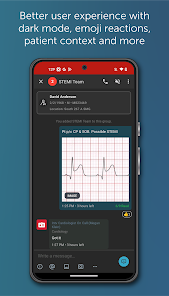
The user experience of TigerConnect is intuitive and straightforward, designed with the end-user in mind. The interface is clean and easy to navigate, allowing users to quickly access messaging, patient information, and other essential features without a steep learning curve. The app supports both direct messaging and group chats, ensuring that team collaboration is efficient. Users have reported that notifications are timely and customizable, which minimizes the risk of missing critical updates. Furthermore, the ability to send images, files, and voice messages adds an extra layer of convenience. The app’s robust security features, including HIPAA compliance, reassure users about the confidentiality of their communications. Overall, the user experience is streamlined, facilitating effective communication in fast-paced healthcare settings.

Pricing

TigerConnect offers a flexible pricing model tailored to the needs of different healthcare organizations. While specific pricing details can vary based on the size of the institution and the features required, the platform generally provides tiered options that allow organizations to choose a plan that best suits their operational requirements. This can range from basic communication tools to comprehensive solutions that include advanced telehealth features. Additionally, TigerConnect often provides a free trial period, enabling potential users to explore the app’s capabilities before making a financial commitment. This approach not only makes it accessible to smaller practices but also ensures that larger institutions can find a plan that meets their extensive needs.

Updates & Support

TigerConnect is committed to continuous improvement, regularly rolling out updates that enhance functionality and address user feedback. These updates range from minor bug fixes to major feature enhancements, ensuring the app remains aligned with the latest industry standards and user expectations. Support is readily available through multiple channels, including email and a dedicated help center filled with resources such as FAQs and tutorials. Users have noted that the support team is responsive and knowledgeable, which helps in resolving issues swiftly. Overall, the combination of regular updates and robust support makes TigerConnect a reliable choice for healthcare communication.

verified Security & Privacy Review

TigerConnect places a strong emphasis on security and privacy, making it a reliable choice for healthcare communication. The app employs end-to-end encryption to ensure that all messages and data shared between users remain confidential and secure. This encryption protects sensitive information from unauthorized access, a critical feature in the healthcare industry. The app adheres to HIPAA regulations, ensuring that user data handling practices meet stringent compliance standards. TigerConnect also implements robust authentication measures, including two-factor authentication, which adds an additional layer of security to user accounts. In terms of permissions, TigerConnect requires access to essential features such as contacts and notifications, which are necessary for its functionality. However, users are informed about these permissions and can manage them through their device settings, promoting transparency. User data is handled with the utmost care, with strict protocols in place to safeguard personal information. TigerConnect commits to not selling or sharing user data with third parties without explicit consent, reinforcing its dedication to user privacy.

User Reviews

  • Connie H
    2026/04/05

    After switching to a Galaxy S26 ultra, I no longer can customize sounds. I have no idea where the sound choice came from but it is not the sound I chose in the app. I also cannot choose a different sound for priority texts, which is essential if you are frequently in isolation rooms and need to know if you need to duck out in a hurry for an emergency. Please fix this.

  • Shannon Dudek
    2024/10/17

    Please fix this app. I get a constant "Oops - looks like we couldn't sync your account. This could happen if we lost our connection to your device." when trying to log on using my Samsung phone but it works fine on an Apple tablet. This is incredibly frustrating as it's much easier to use the app on my phone and the" mobile friendly" version in browser is not at all mobile friendly - it cuts off messages at the bottom and I can't reply.

  • Robert Ada
    2024/07/17

    Terrible app. It keeps logging me off for no reason. I have to log back in 5-10 times a day. I've tried uninstalling, restarting phone, and reinstalling multiple times, sometimes its ok for a few days and most of the time its more of the same log out, log back in business. Does not send me a notification when I receive a message, not even for urgent messages. Notifications are allowed on my phone. Just a horrible, no good app that's required for my job.

  • Asghar Fakhri
    2021/08/26

    Difficulty marking messages as read. Sometimes, after message has been reviewed, it's still remains marked as "unread" and I continue to get notifications every minute that I have a new message. The only way I was able to get it to stop was by logging into the desktop version of the application and reading the message on there, then it finally became "Read” and my phone stopped ringing. Resolving this bug would definitely improve the app significantly

  • Collin
    2025/11/14

    I have been dealing with a bug that I cannot fix not matter what I try. This app remembers what conversation you last messaged in, which is normally a good thing. If I open the app after not using it for a few hours, it will open up the page that shows me every active conversation. However, if I select a different one from what I last used and send a message, it will glitch out and send the message to the one it remembered you using, forcing you to recall the message. FIX THIS ISSUE, PLEASE

Review Source: Google Play store public user reviews.

FAQ

1

Can I submit suggestions or feedback to TigerConnect?

Yes, users can submit suggestions or feedback to TigerConnect through the app or by contacting their support team directly.

2

Does TigerConnect collect my personal data?

TigerConnect adheres to strict data privacy regulations and collects minimal personal data necessary for providing its services, ensuring that user information is protected.

3

Does TigerConnect support offline use?

Yes, TigerConnect allows users to send messages and access certain features even when offline; messages will be delivered once the device is back online.

4

How do I cancel my TigerConnect subscription?

To cancel your TigerConnect subscription, you can do so through your account settings or by contacting TigerConnect's customer support for assistance.

5

How much does a subscription to TigerConnect cost?

Subscription costs for TigerConnect vary depending on the size of the organization and specific needs; interested users should contact TigerConnect for detailed pricing information.

How to use TigerConnect

1

Can I activate my account using my mobile device?

Yes, you can activate your account through the TigerConnect mobile app by following the instructions provided during the setup process.

2

How can I contact customer service for help with my TigerConnect account?

You can reach our customer service by calling the support number listed on our website or through the in-app support feature.

3

How can I update my customer number if needed?

To update your customer number, please contact customer service for guidance on the process.

4

How do I activate my TigerConnect account after signing up?

After signing up, check your email for an activation link. Click it to complete your account activation.

5

How do I log in to my TigerConnect account?

To log in, enter your registered email and password on the login page, then click "Sign In."

What's New

Performance optimizationsBug fixes

Editor's Choice