This site uses cookies to enhance your user experience. By clicking any link on this site you are giving your consent to our cookie policy. Read more
Reject
Accept All
MyUPMC

MyUPMC

verified Verified App

Developer: UPMC

  • category

    Category: Medical

  • price

    Price: free

  • age rating

    Age Rating: Everyone

  • rating

    Rating: 4.3

  • download

    Downloads: 500,000+

  • version

    Version: 3.27.0

Screenshot 1
Screenshot 2
Screenshot 3
Screenshot 4
Screenshot 5
Screenshot 6
Screenshot 7
Screenshot 8

Features & Highlights

Appointment Scheduling

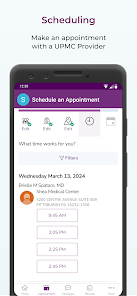
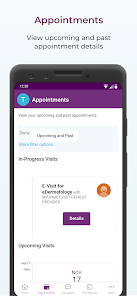
With MyUPMC, scheduling appointments has never been easier. You can view available time slots and book appointments with your healthcare providers directly through the app, making it convenient to manage your healthcare without the hassle of phone calls or waiting on hold.

Medication Management

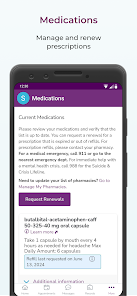
The app provides a robust medication management feature that allows you to keep track of your prescriptions and dosages. You’ll receive reminders for when to take your medications, ensuring you stay on track and promoting better health outcomes over time.

Personal Health Record

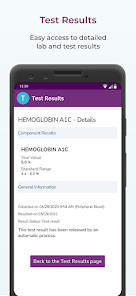
MyUPMC offers users a comprehensive personal health record that consolidates all your medical information in one place. You can easily access test results, medication lists, and immunization records, empowering you to take charge of your health and stay informed about your medical history anytime, anywhere.

Secure Messaging

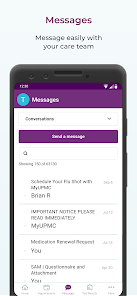
MyUPMC includes a secure messaging system that lets you communicate directly with your healthcare team. This feature allows you to ask questions, discuss concerns, and receive prompt responses, fostering a more interactive and supportive healthcare experience.

Pros & Cons

Pros
  • Access your health records anytime, anywhere.
  • Schedule appointments with ease and convenience.
  • Secure messaging with your healthcare providers.
  • Personalized health reminders for appointments and medications.
  • Easy access to test results and medical information.
Cons
  • Limited functionality in the mobile app experience.
  • User interface can be confusing for new users.
  • Frequent technical issues disrupt access and usability.
  • Lack of comprehensive customer support options available.

Real Experience Using MyUPMC

Application Scenarios

The MyUPMC app serves as a comprehensive platform for patients affiliated with the University of Pittsburgh Medical Center. It is designed to facilitate a variety of healthcare management tasks, making it an essential tool for users seeking to streamline their medical interactions. Patients can schedule appointments, access test results, and view their health records all in one place. Additionally, the app is particularly useful for individuals managing chronic conditions, as it allows users to track medications, monitor symptoms, and communicate directly with healthcare providers. Furthermore, the app integrates features such as telehealth services, enabling users to consult with their doctors from the comfort of their homes, which is especially beneficial during times when in-person visits may not be feasible.

User Experience

The user experience of the MyUPMC app is largely positive, characterized by its intuitive interface and user-friendly navigation. Upon launching the app, users are greeted with a clean, organized dashboard that makes finding necessary features straightforward. The appointment scheduling process is seamless, allowing users to filter available times and receive reminders about upcoming visits. Accessing health records and test results is equally straightforward, providing users with essential information in a clear format. The telehealth feature has received particular praise, as it allows patients to connect with healthcare professionals easily and securely. However, some users have reported occasional glitches, such as slow loading times during peak hours, which can be frustrating. Overall, the app effectively meets the needs of its users, making healthcare management more accessible.

Pricing

The MyUPMC app is free to download and use, which is a significant advantage for patients seeking to manage their healthcare without incurring additional costs. There are no hidden fees associated with using the app, making it an economical option for users who may already be dealing with medical expenses. However, it is important to note that while the app itself is free, certain services accessed through the app, such as telehealth consultations, may incur standard charges that depend on the user's specific insurance plan. Users are encouraged to check with their insurance providers to understand any potential costs associated with telehealth services.

Updates & Support

Regular updates are a hallmark of the MyUPMC app, with developers consistently working to enhance functionality and user experience. These updates often include bug fixes, performance improvements, and new features that align with user feedback. Support is readily available through the app, with a dedicated help section that provides answers to frequently asked questions and troubleshooting tips. Users can also reach out to customer support via email or phone for more complex issues. The commitment to ongoing support and improvement reflects a strong dedication to user satisfaction, ensuring that the app remains a valuable resource for managing healthcare needs.

verified Security & Privacy Review

The MyUPMC app prioritizes user security and privacy through robust data protection measures. It employs industry-standard encryption protocols to safeguard sensitive information during transmission, ensuring that personal health data remains confidential and secure. The app requires user authentication, which adds an extra layer of security, making unauthorized access difficult. In terms of privacy practices, MyUPMC is transparent about its data handling policies. Users are informed about the types of data collected, including health records, appointment details, and personal information necessary for providing healthcare services. The app limits data sharing, only disclosing information to third parties when required for healthcare purposes or with user consent. Regarding permissions, the app requests access only to essential features, such as location services for finding nearby facilities and notifications for appointment reminders. Users have control over these permissions and can modify them at any time. Overall, MyUPMC demonstrates a strong commitment to protecting user data while providing a convenient healthcare management experience.

Reviews

4.3

“Easy to navigate and schedule appointments quickly”

“Great for accessing medical records on the go”

“User-friendly interface with helpful features”

“Notifications keep me informed about my health”

“Love the telehealth options for remote visits”

Editor's Choice