This site uses cookies to enhance your user experience. By clicking any link on this site you are giving your consent to our cookie policy. Read more
Reject
Accept All

Advertiser and Editorial Disclosures

FreeStyle LibreLink - ES

FreeStyle LibreLink - ES

verified Verified App

Developer: Abbott Diabetes Care Inc.

  • category

    Category: Medical

  • price

    Price: Share

  • age rating

    Age Rating: Everyone

  • rating

    Rating:

  • download

    Downloads: 500,000+

  • version

    Version: 2.13.0

Screenshot 1
Screenshot 2
Screenshot 3
Screenshot 4
Screenshot 5
Screenshot 6

Features & Highlights

Personalized Insights

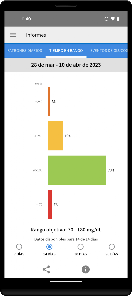
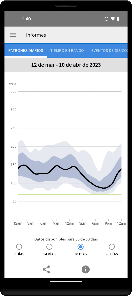
The app offers personalized insights and trends based on the user's glucose readings. By analyzing patterns over time, FreeStyle LibreLink - ES helps users understand their unique responses to food, activity, and medication, allowing for more tailored and effective diabetes management strategies.

Real-Time Glucose Monitoring

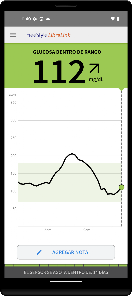
FreeStyle LibreLink - ES allows users to monitor their glucose levels in real-time, providing immediate feedback on their current status. This feature helps users make informed decisions about their diet, exercise, and medication, ultimately promoting better diabetes management and improved health outcomes.

Seamless Data Sharing

With the app, users can easily share their glucose data with healthcare providers or family members. This capability fosters collaboration and support, enabling better-informed treatment decisions and enhancing the overall management of diabetes care.

User-Friendly Interface

Designed with simplicity in mind, FreeStyle LibreLink - ES features an intuitive interface that makes navigation a breeze. Users can effortlessly access their glucose data, set reminders, and track their progress, ensuring that managing diabetes is as straightforward and stress-free as possible.

Pros & Cons

Pros
  • Convenient glucose monitoring anytime, anywhere.
  • No need for fingerstick blood samples.
  • Real-time data for better diabetes management.
  • User-friendly app for easy tracking.
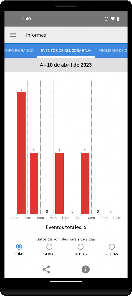
  • Customizable alerts for glucose levels.
Cons
  • Limited accuracy during rapid glucose changes
  • Requires smartphone for scanning
  • May not work well in extreme temperatures
  • Subscription costs can add up over time

Real Experience Using FreeStyle LibreLink - ES

Application Scenarios

The FreeStyle LibreLink - ES app is designed primarily for individuals managing diabetes, particularly those using the FreeStyle Libre continuous glucose monitoring system. Users can scan their glucose sensor using their smartphone to obtain real-time glucose readings. This feature is especially beneficial for those who prefer a more discreet and convenient method of monitoring their blood sugar levels without the need for a traditional fingerstick test. The app can be used in various settings, including at home, during exercise, or while traveling, allowing users to maintain consistent glucose monitoring regardless of their environment. Additionally, caregivers can also use the app to monitor the glucose levels of their loved ones, enhancing the support system around diabetes management.

User Experience

The user experience with the FreeStyle LibreLink - ES app is generally positive, with a user-friendly interface that simplifies navigation. Upon opening the app, users are greeted with intuitive graphics and clear data presentations, making it easy to understand glucose levels at a glance. The app also offers customizable alerts for high and low glucose levels, which many find helpful in preventing potential health issues. Users appreciate the detailed historical data that the app provides, enabling them to track trends over time and make informed decisions regarding their diet and medication. Some users have reported occasional connectivity issues with the sensor, but these instances are relatively rare. Overall, the convenience of having glucose readings on their smartphone and the ability to share data with healthcare professionals enhances the overall user satisfaction.

Pricing

The FreeStyle LibreLink - ES app itself is free to download and use, which is a significant advantage for users looking for cost-effective diabetes management solutions. However, it is important to note that the app requires a compatible FreeStyle Libre sensor, which comes at a cost. Prices for the sensors vary depending on the retailer and location, and users may need to consider the ongoing expense of sensor replacement. While some may find the initial investment in the system to be high, many users feel that the benefits of continuous monitoring justify the costs, especially when considering the potential for improved health outcomes.

Updates & Support

The app is regularly updated to enhance functionality and address any technical issues. Users have noted that updates often include new features aimed at improving user experience and expanding compatibility with various devices. For support, the FreeStyle LibreLink - ES app offers a comprehensive help section within the app itself, along with customer service options for more complex inquiries. Users can contact support via email or through the app, ensuring that assistance is readily available when needed. The commitment to ongoing updates and responsive support contributes to a sense of reliability and trust among users, solidifying the app’s reputation as a valuable tool in diabetes management.

verified Security & Privacy Review

The FreeStyle LibreLink - ES app prioritizes user security and privacy, employing robust measures to protect sensitive health information. The app uses encryption to secure data transmission, ensuring that glucose readings and personal information remain confidential during transfer to connected devices and cloud services. Users are required to grant specific permissions for the app to function effectively, such as access to the camera for scanning sensors and, if applicable, location services for enhanced tracking features. The app's privacy policy outlines how user data is collected, used, and shared, emphasizing that personal health information is not sold to third parties without explicit consent. Furthermore, the app allows users to manage their data preferences, offering options to control what information is shared and with whom. Regular updates and patches are implemented to address potential vulnerabilities, reinforcing the app’s commitment to maintaining a secure environment. Overall, FreeStyle LibreLink - ES demonstrates a strong dedication to safeguarding user data while providing essential diabetes management tools.

Reviews

“Accurate glucose readings, very helpful for diabetes management.”

“User-friendly interface makes tracking easy and efficient.”

“Syncs well with my device, great for on-the-go.”

“Notifications help me stay on top of my levels.”

“Overall, a fantastic tool for monitoring health.”

FAQ

1

Does FreeStyle LibreLink - ES collect my personal data?

Yes, FreeStyle LibreLink - ES may collect personal data such as glucose readings and user profile information to enhance user experience and provide personalized insights. This data is typically used in accordance with privacy policies.

2

Does FreeStyle LibreLink - ES offer a free trial or free version?

FreeStyle LibreLink - ES is available as a free download and can be used without any subscription fees for basic functionalities related to glucose monitoring.

3

Does FreeStyle LibreLink - ES require an internet connection?

FreeStyle LibreLink - ES does not require a continuous internet connection to scan sensors or access glucose data, but an internet connection is needed to upload data to the cloud or share information with healthcare providers.

4

How can I contact support or send feedback for FreeStyle LibreLink - ES?

You can contact support for FreeStyle LibreLink - ES through the app, where there is usually a support or help section, or by visiting the official FreeStyle website for additional resources and contact information.

5

How do I manage or cancel my FreeStyle LibreLink - ES subscription?

Users can manage or cancel their subscription directly through their app store account settings, where they can view subscription details and make changes as needed.

How to use FreeStyle LibreLink - ES

1

Do I need to create an account to use the FreeStyle LibreLink - ES app?

Yes, you need to create an account to log in and access your glucose data and settings. Follow the registration prompts in the app.

2

How can I activate my FreeStyle LibreLink - ES app after downloading?

After downloading, open the app and follow the instructions to link it with your FreeStyle Libre sensor by scanning it.

3

How can I contact customer service for the FreeStyle LibreLink - ES app?

You can reach customer service by calling the number provided in the app or on the official website. Look for "Contacto" for assistance.

4

How do I log in to my FreeStyle LibreLink - ES app account?

Open the app and enter your email and password. If you don’t have an account, you can create one by following the prompts.

5

How do I recover my login information for the FreeStyle LibreLink - ES app?

Use the "Forgot Password?" link on the login page to reset your password via email. Follow the instructions sent to your registered email address.

Editor's Choice