This site uses cookies to enhance your user experience. By clicking any link on this site you are giving your consent to our cookie policy. Read more
Reject
Accept All

Advertiser and Editorial Disclosures

Baritastic - Bariatric Tracker

Baritastic - Bariatric Tracker

verified

BariApps

4.7
Rating
500,000+ Downloads
2.3.0 Version
  • category

    Category: Medical

  • price

    Price: free

  • age rating

    Age Rating: Everyone

  • rating

    Rating: 4.7

  • available on

    Available on: /

  • updated on

    Updated on: Jun 11, 2026

Screenshot 1
Screenshot 2
Screenshot 3
Screenshot 4
Screenshot 5
Screenshot 6
Screenshot 7

Features & Highlights

Hydration Reminders

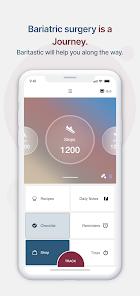
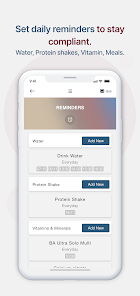
Stay on top of your hydration goals with customizable reminders that prompt you to drink water throughout the day. Proper hydration is crucial for recovery and overall health, and Baritastic makes it simple to keep your water intake in check.

Meal Logging

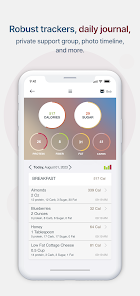
Easily track your meals and nutritional intake with Baritastic's comprehensive food database. This feature helps you stay mindful of your diet, ensuring you meet your dietary requirements while promoting healthier eating habits tailored to your bariatric journey.

Progress Reports

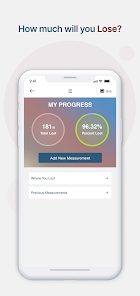
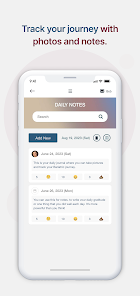
Gain insights into your journey with detailed progress reports that highlight your achievements and areas for improvement. These reports can help you stay accountable and adjust your strategies as needed, making your weight loss journey more effective and rewarding.

Weight Tracking

Monitor your weight loss journey effortlessly with Baritastic's intuitive tracking system. The app allows you to log your weight daily, giving you a clear visual representation of your progress over time, which can be incredibly motivating as you achieve your goals.

Pros & Cons

Pros
  • Track progress easily with user-friendly interface
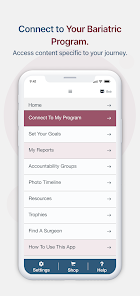
  • Access personalized meal plans and resources anytime
  • Connect with a supportive community of peers
  • Receive reminders for hydration and vitamin intake
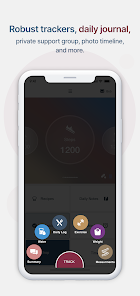
  • Monitor weight, nutrition, and exercise in one app
Cons
  • Limited features in free version compared to premium
  • User interface can be confusing for some users
  • Syncing issues with wearable devices reported
  • Lack of personalized support or coaching options

Real Experience Using Baritastic - Bariatric Tracker

Application Scenarios

Baritastic - Bariatric Tracker is an essential tool for individuals who have undergone bariatric surgery or are on a weight loss journey. The app is designed to assist users in tracking their food intake, exercise routines, and overall progress. It is particularly useful for those who need to adhere to strict dietary guidelines post-surgery, as it allows users to log their meals, monitor their protein intake, and stay on top of their hydration needs. The app is versatile, accommodating various dietary preferences, and offers a barcode scanner for easy logging of food items. Additionally, Baritastic enables users to set personalized goals, making it suitable for different phases of their weight loss journey.

User Experience

The user experience of Baritastic is generally positive, with a clean and intuitive interface that makes navigation seamless. Users appreciate the simplicity of logging meals and the extensive database of foods available within the app. The visual progress tracking, including weight loss charts and measurement logs, provides motivation and accountability. Many users report that the reminders for hydration and protein intake are particularly helpful, as they can serve as prompts throughout the day. However, some users have noted occasional inaccuracies in the food database, which can lead to frustration when trying to log specific meals. Overall, Baritastic's community features, including forums and support groups, enhance the user experience by fostering a sense of connection among users.

Pricing

Baritastic offers a free version with basic tracking features, which is a great way for users to get started without any financial commitment. However, for those seeking a more comprehensive experience, the premium subscription is available at a reasonable monthly or annual rate. Subscribers gain access to advanced features such as meal planning, custom recipes, and enhanced reporting tools, which can significantly aid in achieving weight loss goals. Given the value provided, many users find the premium pricing justifiable, especially compared to the costs associated with traditional weight loss programs.

Updates & Support

The development team behind Baritastic is committed to continuous improvement, frequently releasing updates that enhance functionality and user experience. Users can expect regular updates that introduce new features, improve the food database, and address any bugs. Customer support is readily available, with a responsive team that assists users through email and in-app messaging. The comprehensive FAQ section and community forums provide additional resources for troubleshooting and tips. Overall, the combination of regular updates and responsive support contributes to a robust user experience, ensuring that Baritastic remains a reliable companion on the journey toward better health.

verified Security & Privacy Review

The Baritastic app takes user security and privacy seriously, implementing several measures to protect sensitive health information. User data is encrypted during transmission, ensuring that personal details remain confidential while being sent to the servers. The app adheres to industry-standard security protocols, reducing the risk of unauthorized access. In terms of privacy practices, Baritastic clearly outlines its data handling policies in its privacy policy. Users have the option to control what information is shared and can choose to keep certain data private. The app does not sell user data to third parties, aligning with best practices for personal data management. Baritastic requires specific permissions to function effectively, including access to the device's storage and notifications. Users are informed about these permissions at the time of installation, promoting transparency. Overall, Baritastic demonstrates a commitment to safeguarding user data, making it a trustworthy option for individuals seeking to track their bariatric journey.

User Reviews

  • Lizabeth Dickson
    2025/11/05

    Pretty good weight tracking app. There are ads but they don't overwhelm the experience, they are patiently in the background. It's easy to log your food, exercise, and any medication you take. The only thing I'd love to see updated is not kicking you out of the meal page after every entry, I do eat more than one thing a day.

  • Karen Andersen
    2026/06/26

    I have used this app every day for over 3 years. Today I opened it to log my meals and its like reading the fine print on a bottle of pills. Why make the font so small? There was nothing wrong with the previous font size. Please adjust the font size, or give us the option to adjust it. I love this app and the ways it has helped me on my weight loss journey.

  • Sheila Parker-Stone
    2026/07/02

    I first used Baritastic 11 years ago after gastric bypass. it was very useful. But now, Fantastic. Even better now. I am using it on GLP1. The knowledge base of foods from all grocery stores and restaurants, with a complete breakdown of calories, protein, fiber etc. Plus, water, weight, measurements, BMI. Being able to hookup to exercise monitoring devices. Makes it so easy. I'll be using Baritastic long after I graduate from GLP1. Recently, I showed my Physical Therapist and she downloaded it.

  • Tina Klemmensen
    2026/07/02

    The most recent update broke the recipe builder. I make quite a few homemade protein snacks that the full recipe makes 30+ servings. Now when I want to track a single serving for this item, it actually has the full serving amount listed as 1 serving. Please fix as I am not eating 30 servings; however, the nutritional data for 1 serving is completely wrong.

  • Angelica Lucio
    2026/06/26

    the ease of not having to track every little detail at every single meal is a life saver. I have an overwhelming schedule and I'm a mom to 7, so things can get away from me fast. Seeing those counts are also great for accountability and I don't dread having to count because I have the counts for me!!!! I recommend this app to anyway who considers it!!

Review Source: Google Play store public user reviews.

FAQ

1

Does Baritastic - Bariatric Tracker collect my personal data?

Yes, Baritastic collects certain personal data to enhance user experience and provide tailored insights; however, the app is designed with privacy in mind and adheres to data protection standards.

2

Does Baritastic - Bariatric Tracker offer a free trial or free version?

Baritastic offers a free version with basic features, and users can also opt for a premium subscription that unlocks additional functionalities.

3

Does Baritastic - Bariatric Tracker require an internet connection?

While Baritastic can function offline for basic tracking, an internet connection is required for syncing data, accessing additional features, and utilizing community support options.

4

How can I contact support or send feedback for Baritastic - Bariatric Tracker?

Users can contact Baritastic support through the app by accessing the help section or by visiting the official website for additional contact options and feedback forms.

5

How do I manage or cancel my Baritastic - Bariatric Tracker subscription?

You can manage or cancel your subscription directly through the app settings or by going to the app store where you purchased the subscription, following the appropriate cancellation process.

How to use Baritastic - Bariatric Tracker

1

Can I activate Baritastic on multiple devices?

Yes, you can log into your account on multiple devices using the same credentials.

2

How can I change my login email for Baritastic?

Log into your account, go to settings, and update your email address in the profile section.

3

How can I contact customer service for Baritastic?

You can reach Baritastic customer service via the app's support section or email them directly at support

4

How do I access my account if I forget my login details?

Use the "Forgot Password?" link on the login screen to reset your password via email.

5

How do I activate my Baritastic app after downloading it?

Simply log in with your existing account or create a new account to start using the app.

What's New

fixes for summary graphs.

Editor's Choice