Home
Home  Apps
Apps  Games
Games  Windows
  Topics
  Terms of Service
  Cookies & Privacy Policy
  About us
 Account Management
Easily manage your Ventra account through the app or website. You can add funds, view transaction history, and set up automatic refills, ensuring you never run out of balance when you need it most, all in one convenient location.


Chicago Transit Authority
 3.1
3.1 
Category: Maps & Navigation

Price: free

Age Rating: Everyone

Rating: 3.1

Available on: /

Updated on: Mar 2, 2026
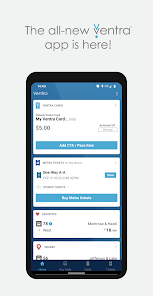
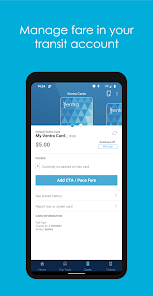
Easily manage your Ventra account through the app or website. You can add funds, view transaction history, and set up automatic refills, ensuring you never run out of balance when you need it most, all in one convenient location.
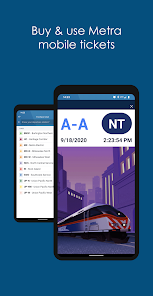
Ventra makes it easy to purchase and store transit tickets directly on your smartphone. With just a few taps, you can buy your fare and be ready to ride without the hassle of carrying cash or waiting in line at ticket machines.
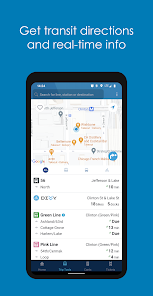
Stay informed with real-time tracking of buses and trains. Ventra provides live updates on arrival times, so you can plan your journey better and avoid unnecessary waits, making your daily commute smoother and more efficient.
Get timely notifications about service changes, delays, and emergencies directly through the app. Ventra keeps you in the loop, allowing you to adjust your travel plans accordingly and ensuring you're always prepared for your next trip.

 Seamless payment options for transit users Real-time tracking for better travel planning Easy online account management and reloading Promotions and discounts for frequent riders Multi-transport integration for convenience
 Limited payment options available for users Frequent technical issues disrupt service Difficulties with account management and support Long wait times for customer service inquiries
 The Ventra app serves as an essential tool for commuters in the Chicagoland area, streamlining the public transit experience. Users can easily purchase transit passes, reload their Ventra cards, and check balance information all from their mobile devices. Whether you are a daily commuter heading to work or a tourist exploring the city, the app simplifies the process of navigating the extensive CTA and Pace bus services. In addition to fare management, Ventra provides real-time tracking of buses and trains, helping users plan their journeys more effectively. With integrated alerts, users can stay updated on service changes or delays, making it particularly useful for those who rely heavily on public transportation.
The user experience of the Ventra app is largely positive, thanks to its intuitive interface and user-friendly design. The app's dashboard is clean and organized, allowing users to access key features without unnecessary clutter. Navigating through the app is seamless, with quick loading times and smooth transitions between screens. Most users appreciate the ability to save payment methods securely, making transactions fast and efficient. However, some users have reported occasional glitches, particularly during peak hours when server traffic may be high. Despite these minor issues, the overall feedback suggests that the app effectively meets the needs of its users and enhances their commuting experience.
Ventra offers a variety of pricing options tailored to different user needs. The app allows users to purchase single rides, 1-day, 3-day, 7-day, and 30-day passes, providing flexibility for both occasional riders and regular commuters. Prices are competitive and align with traditional fare rates, ensuring that users can access public transportation affordably. The app also frequently runs promotions or discounts, making it even more cost-effective for users. For those who opt to use a Ventra card, the app seamlessly integrates with card recharges, allowing users to manage their transit spending efficiently.
Ventra is committed to continuous improvement, regularly releasing updates to enhance functionality and address user feedback. These updates often bring new features, improved performance, and bug fixes, ensuring a robust experience for all users. The support system is also commendable; users can easily access help through the app, with a dedicated FAQ section and customer service contact options. While wait times for support can vary, the overall responsiveness of the Ventra team is appreciated by users. Ongoing updates and active support mechanisms demonstrate Ventra's commitment to providing a reliable and user-friendly transit solution.
Security & Privacy Review


THE VENTRA APP IS DELIBERATELY STEALING MONEY! This posting is an accumulation to my last one 7 years ago! This app's user experience is based on thievery. Each time that I uninstall and reinstall the app to get it to function properly, it still doesn't work! Not only is it still trying to charge a credit card that's no longer attached or set to default, it doesn't even read the passes that I currently have on the Ventra card
this app never works right. It constantly tells me I'm not connected to the internet and that it can't connect to the server. The tickets don't always load when you need to show them. Most recently, I tried to purchase a ticket and nothing happened when I clicked purchase. It just stayed stuck on the same screen. You're better off buying your tickets on the train than using this app.
it's a great way to check the schedule for metra and busses. However, this app is very frustrating. I have uninstalled and reinstalled this app many times and the still won't accept my card. I deleted my card to add it again and it gave me an error. My card isn't expired, and it isn't low on money. I can't even load funds through the website. Please fix this bug. I noticed many have the same problem.
Edit: it's been months now, and the "favorites" section still fails to show any times Do you need something convenient to buy transit fare with? This is a pretty good option. I prefer it to using Google pay or the actual website. Do you need something to check bus/ train routes and statuses? There are so many better apps. Like, actually don't get this one unless it's for the first option. It's slow, it's glitchy, and the bus/train information can be inaccurate more times than not.
Bus and train times are basically always accurate if you only pay attention to the ones that have the tracking (🛜) symbol, times that lack that symbol are just scheduled runs which are rarely accurate. Confusing for new users though. When you 'favorite' a stop, it appears on your home menu, but if the route changes even temporarily, the 'favorite' says "no information available" and you can't remove it from your favorites. These build up fast and drown out the stops you actually need to check.
Review Source: Google Play store public user reviews.
Ventra collects certain personal data to enhance user experience, such as location data and transaction history, but it adheres to privacy policies to protect user information.
Ventra does not offer a free trial, but the app is free to download and use for basic functionalities like checking schedules and balances.
Yes, Ventra requires an internet connection for most functionalities, such as purchasing passes and checking balances, but some features may be accessible offline.
Users can contact Ventra support through the app, the official website, or by calling their customer service hotline for assistance or to provide feedback.
Users can manage or cancel their Ventra subscriptions through the app's settings or by visiting the official Ventra website for more detailed instructions.
To activate your Ventra card, open the app, select "Activate Card," and follow the prompts to enter your card number.
You can reach Ventra Customer Service at 1-844-331-9702 for assistance with your account or app issues.
Open the Ventra app, enter your email and password, then tap "Log In" to access your account.
Your Ventra customer number is found in your app settings or on your physical Ventra card.
Our latest update fixes map loading, purchase errors, and related issues.
Lyft

Waze Navigation & Live Traffic

Transit • Subway & Bus Times
GPS Speedometer: Speed Tracker

Waymo One
Location Share

Phone Tracker by Number
SpotHero - Find Parking

ParkWhiz -- Parking App
Exxon Mobil Rewards+

Moovit: Your Transit Tracker

MapQuest: Get Directions





 Google Play
  App Store