This site uses cookies to enhance your user experience. By clicking any link on this site you are giving your consent to our cookie policy. Read more
Reject
Accept All

Advertiser and Editorial Disclosures

MapQuest: Get Directions

MapQuest: Get Directions

verified Verified App

Developer: MapQuest

  • category

    Category: Maps & Navigation

  • price

    Price: free

  • age rating

    Age Rating: Everyone

  • rating

    Rating: 3.4

  • download

    Downloads: 10,000,000+

  • version

    Version: 10.5.0

Screenshot 1
Screenshot 2
Screenshot 3
Screenshot 4
Screenshot 5
Screenshot 6
Screenshot 7
Screenshot 8

Features & Highlights

Customizable Routes

With MapQuest, you can easily customize your routes based on your preferences, whether you prefer the fastest path or the most scenic drive. This flexibility ensures that your journey aligns with your travel style, making each trip more enjoyable and personalized.

Multi-Stop Planning

Plan your next adventure with ease using MapQuest's multi-stop planning feature. Whether you're running errands or going on a road trip, you can add multiple destinations to your route, allowing for efficient travel without missing important stops along the way.

Real-Time Traffic Updates

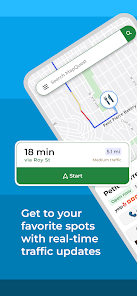
Stay informed with real-time traffic updates that help you avoid congestion and delays. MapQuest provides live traffic conditions, allowing you to adjust your route on the fly for a smoother and faster journey, so you can reach your destination more efficiently.

Voice-Activated Navigation

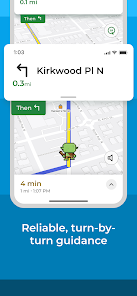
MapQuest offers convenient voice-activated navigation, allowing users to keep their hands on the wheel while receiving turn-by-turn directions. This feature enhances safety and makes driving more enjoyable, ensuring you stay focused on the road ahead without missing important navigation cues.

Pros & Cons

Pros
  • Easily accessible interface for quick navigation planning.
  • Real-time traffic updates help avoid delays on your route.
  • Customizable routes allow for scenic or efficient travel options.
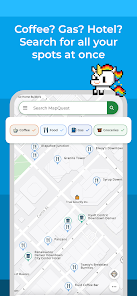
  • Integration with local businesses enhances trip planning and stops.
  • Voice-guided directions ensure hands-free navigation while driving.
Cons
  • Limited real-time traffic updates can lead to inefficient routing decisions.
  • User interface may feel outdated and less intuitive than competitors.
  • Accuracy of directions can sometimes be inconsistent, causing navigation challenges.

Real Experience Using MapQuest: Get Directions

Application Scenarios

MapQuest: Get Directions is a versatile navigation app that caters to a variety of scenarios. Whether you are commuting to work, planning a road trip, or exploring a new city, this app provides reliable directions tailored to your needs. For daily commuters, the real-time traffic updates help users avoid congested routes, ensuring timely arrivals. Travelers can benefit from the app’s ability to suggest popular attractions and nearby restaurants, making it an essential companion for sightseeing. Additionally, MapQuest is ideal for delivery drivers, offering efficient route planning to optimize time and fuel efficiency. The app’s features, such as route customization and the ability to save favorite locations, enhance the overall navigation experience, making it suitable for both casual users and professionals alike.

User Experience

The user experience of MapQuest: Get Directions is generally positive, characterized by a clean and intuitive interface. The app’s layout is user-friendly, making it easy for both tech-savvy individuals and those less familiar with technology to navigate. Users appreciate the clear visual maps and the step-by-step voice directions that make driving easier and safer. The search functionality is robust, allowing users to find specific addresses, points of interest, or even businesses quickly. However, some users have reported occasional inaccuracies in the map data, which can lead to confusion. Despite this, the app’s ability to reroute based on real-time traffic conditions is often praised, ensuring that users stay informed about the best paths available. Overall, the combination of features and usability contributes to a rewarding navigation experience.

Pricing

MapQuest: Get Directions is free to download and use, which is a significant advantage for users looking for a cost-effective navigation solution. The app does not require a subscription, making it accessible to a wide audience. However, like many free applications, it includes advertisements, which some users may find intrusive. The presence of ads can be a downside for those seeking an uninterrupted experience, but the core functionalities of the app remain intact and fully operational without any premium fees. This pricing model allows users to enjoy a comprehensive suite of navigation tools without financial commitment, making MapQuest a popular choice among budget-conscious individuals.

Updates & Support

MapQuest is committed to improving user experience through regular updates and support. The app frequently receives updates to enhance features, fix bugs, and improve map accuracy. Users can expect new functionalities that keep pace with technological advancements and changing user needs. Support is readily available through the app’s help section, which includes FAQs and troubleshooting tips. For more complex issues, users can reach out to customer support via email or through the app’s official website. The responsiveness of the support team has been noted positively by users, providing reassurance that assistance is accessible when needed. Overall, the dedication to updates and user support reflects MapQuest's commitment to providing a reliable navigation experience.

verified Security & Privacy Review

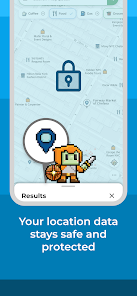
MapQuest: Get Directions prioritizes user security and privacy by implementing various measures to protect personal information. The app requires location access to provide accurate navigation services, but users can manage these permissions through their device settings, allowing for a customizable experience. The app collects data such as location history, search queries, and user preferences to enhance functionality and improve services. However, MapQuest assures users that this data is anonymized and aggregated to prevent identification of individual users. MapQuest also employs encryption methods to safeguard data transmission between devices and its servers, minimizing the risk of data breaches. Additionally, the app's privacy policy is transparent, outlining how user data is collected, used, and shared with third parties. Users are encouraged to review these policies to understand their rights and choices regarding personal information. Overall, MapQuest demonstrates a commitment to maintaining user privacy while delivering reliable navigation services.

Reviews

3.4

“User-friendly interface makes navigation a breeze”

“Accurate directions save time on trips”

“Frequent updates improve map reliability”

“Great for finding local businesses quickly”

“Maps load faster than competitors' apps”

Compare APP

FAQ

1

Can I submit suggestions or feedback to MapQuest: Get Directions?

Yes, users can submit suggestions or feedback through the app’s support section or via the official MapQuest website.

2

Does MapQuest: Get Directions collect my personal data?

Yes, the app collects certain personal data to improve user experience and provide personalized services, but it allows users to manage privacy settings.

3

Does MapQuest: Get Directions support offline use?

Yes, users can download maps for offline use, allowing navigation even without an active internet connection.

4

How do I cancel my MapQuest: Get Directions subscription?

Users can cancel their subscription through their account settings in the app or by following the instructions in the app store where they purchased the subscription.

5

How much does a subscription to MapQuest: Get Directions cost?

The cost of a subscription can vary based on the features offered, typically starting from a basic monthly fee, but users should check the app for the latest pricing details.

How to use MapQuest: Get Directions

1

Can I change my customer number after I log in?

Unfortunately, you cannot change your customer number once it's been assigned. For further assistance, contact customer service.

2

How can I contact customer service for MapQuest?

You can reach MapQuest customer service by visiting the support page on their website or calling their customer number listed there.

3

How can I update my account information after logging in?

After logging in, go to your account settings to update your personal information and preferences.

4

How do I activate my MapQuest account?

To activate your MapQuest account, check your email for the activation link sent during registration and follow the instructions provided.

5

How do I reach MapQuest customer service for account issues?

You can contact MapQuest customer service by calling their customer number or using the contact form on their website for account-related issues.

Editor's Choice