This site uses cookies to enhance your user experience. By clicking any link on this site you are giving your consent to our cookie policy. Read more
Reject
Accept All

Advertiser and Editorial Disclosures

GPS Speedometer: Speed Tracker

GPS Speedometer: Speed Tracker

verified Verified App

Developer: COOL NIKS

  • category

    Category: Maps & Navigation

  • price

    Price: free

  • age rating

    Age Rating: Everyone

  • rating

    Rating: 4.7

  • download

    Downloads: 5,000,000+

  • version

    Version: 18.2.0

Screenshot 1
Screenshot 2
Screenshot 3
Screenshot 4
Screenshot 5
Screenshot 6
Screenshot 7
Screenshot 8

Features & Highlights

Customizable Alerts

Never exceed your desired speed limits again with customizable alerts that notify you when you're going too fast. This feature is perfect for those who want to ensure safety while driving or training, allowing you to focus on your journey without constantly checking your speedometer.

Real-Time Speed Tracking

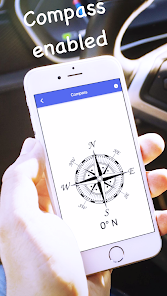
Stay informed about your speed with real-time tracking that ensures you always know how fast you're going. Whether you're driving, cycling, or running, this feature provides accurate measurements directly from GPS, helping you maintain safe speeds on the road or trail.

Trip Logging

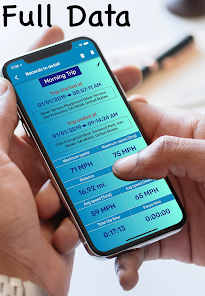
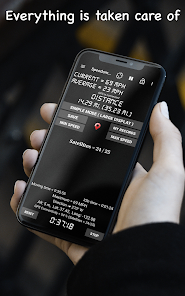
Keep track of your journeys with the built-in trip logging feature that records distance, time, and average speed. You can review your past trips and analyze your performance over time, making it easier to set goals and improve your speed-related activities.

User-Friendly Interface

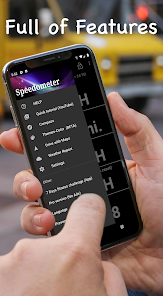
Enjoy a sleek and intuitive interface designed for ease of use. The app's simple layout allows for quick access to all features, ensuring that you can check your speed or settings without any hassle, whether you're a tech novice or a seasoned user.

Pros & Cons

Pros
  • Accurate speed tracking helps ensure compliance with speed limits.
  • Real-time updates allow for instant speed adjustments while driving.
  • User-friendly interface makes navigation and tracking effortless for everyone.
  • Customizable alerts notify you when exceeding your set speed limit.
  • Historical data tracking enables analysis of speed patterns over time.
Cons
  • Inaccurate readings can occur in poor signal areas, affecting speed tracking accuracy.
  • Battery drain can be significant, especially during long drives, impacting device usability.
  • Dependence on mobile data may limit functionality in remote areas with no coverage.

Real Experience Using GPS Speedometer: Speed Tracker

Application Scenarios

GPS Speedometer: Speed Tracker is designed for a variety of scenarios that cater to both casual users and serious enthusiasts. Whether you are a cyclist wanting to track your speed during a ride, a driver monitoring your speed for safety, or an athlete analyzing your performance during a run, this app has you covered. The intuitive interface allows users to switch between different modes easily, making it suitable for road trips, daily commutes, or even competitive sports. Additionally, the app can be used for recreational activities such as boating or hiking, providing real-time speed data and even distance tracking. Its versatility makes it a practical tool for anyone looking to monitor their speed and improve their performance in various outdoor activities.

User Experience

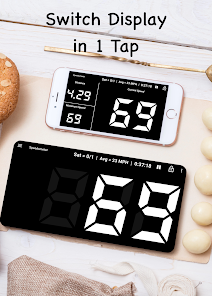
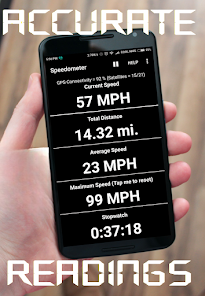
The user experience of GPS Speedometer: Speed Tracker is largely positive, thanks to its clean and user-friendly interface. Upon launching the app, users are greeted with a straightforward layout that displays essential information such as current speed, average speed, and distance traveled. The app features customizable settings, allowing users to choose their preferred units of measurement—whether miles per hour or kilometers per hour. Users have reported that the app is responsive and accurate, with real-time updates that enhance the overall experience. Additionally, the app offers a variety of visual displays, including a traditional speedometer and a digital readout, catering to different preferences. The inclusion of features such as trip logging and speed alerts adds further value, making it an essential tool for anyone serious about tracking their speed.

Pricing

GPS Speedometer: Speed Tracker is available for free, which makes it accessible to a wide audience. However, the app does offer in-app purchases to unlock premium features. Users can opt for a subscription model or make a one-time purchase, depending on their needs. The pricing is competitive compared to similar apps on the market, providing good value for the functionalities offered. The free version is robust enough for casual users, while those requiring advanced features will find the premium options worth the investment.

Updates & Support

The developers of GPS Speedometer: Speed Tracker are committed to providing ongoing updates and support to enhance user experience. Regular updates ensure that the app remains compatible with the latest operating systems and devices. Users have reported that the support team is responsive and helpful, addressing queries and concerns promptly. The app also features a comprehensive help section, guiding users through troubleshooting and optimizing their experience. Overall, the dedication to updates and customer support adds to the app's credibility and reliability, making it a trusted choice for speed tracking.

verified Security & Privacy Review

The GPS Speedometer: Speed Tracker app prioritizes user privacy and data security, implementing several measures to protect personal information. The app requires access to location services to function effectively, which is standard for speed tracking applications. Users are informed about the permissions needed, allowing them to make informed choices regarding their data sharing. Data collected by the app is primarily used for enhancing user experience and providing accurate speed tracking features. The app's privacy policy clearly outlines what data is collected, how it is used, and the circumstances under which it may be shared. Users have control over their data, with options to manage settings and revoke permissions as needed. Additionally, the app employs encryption protocols to safeguard data during transmission, further enhancing security. However, users should remain vigilant about sharing sensitive information and regularly review app permissions. Overall, GPS Speedometer: Speed Tracker demonstrates a commitment to user privacy while providing essential functionality, making it a reliable choice for speed tracking needs.

Reviews

4.7

“Accurate speed tracking, love the real-time updates!”

“User-friendly interface, easy to navigate.”

“Great for biking and running, very reliable.”

“Battery efficient, doesn't drain my phone.”

“Customizable settings are a nice touch!”

Compare APP

FAQ

1

Can I submit suggestions or feedback to GPS Speedometer: Speed Tracker?

Yes, users can submit suggestions or feedback through the app's settings or contact support feature, allowing developers to receive user input for future improvements.

2

Does GPS Speedometer: Speed Tracker collect my personal data?

The app is designed to prioritize user privacy and does not collect personal data unless explicitly permitted by the user for specific features. Always check the privacy policy for detailed information.

3

Does GPS Speedometer: Speed Tracker support offline use?

Yes, GPS Speedometer: Speed Tracker can function offline, but it requires GPS signals to determine speed and distance, which may be less accurate in areas with poor satellite visibility.

4

How do I cancel my GPS Speedometer: Speed Tracker subscription?

To cancel your subscription, you can go to your device's settings, access the subscription management section, and follow the prompts to cancel. Specific instructions may vary depending on the platform used.

5

How much does a subscription to GPS Speedometer: Speed Tracker cost?

Subscription costs for GPS Speedometer: Speed Tracker may vary based on the plan chosen, with options typically including monthly, yearly, or lifetime access. Please refer to the app for the latest pricing details.

How to use GPS Speedometer: Speed Tracker

1

Can I change my customer number?

Unfortunately, customer numbers cannot be changed. If you have further questions, please contact customer service for assistance.

2

Can I log in using social media accounts?

Yes, you can log in using your Facebook or Google account if you linked them during registration.

3

How can I activate my account after downloading the app?

After downloading, check your email for an activation link. Click it to activate your account. If you need help, contact customer service.

4

How can I contact customer service for GPS Speedometer?

You can reach our customer service via the support section in the app or by emailing support

5

How do I contact customer service if I have an issue with my speed tracking?

You can email support

Editor's Choice