This site uses cookies to enhance your user experience. By clicking any link on this site you are giving your consent to our cookie policy. Read more
Reject
Accept All

Advertiser and Editorial Disclosures

TomTom GO Expert: Truck GPS

TomTom GO Expert: Truck GPS

verified Verified App

Developer: TomTom International BV

  • category

    Category: Maps & Navigation

  • price

    Price: free

  • age rating

    Age Rating: Everyone

  • rating

    Rating: 3.6

  • download

    Downloads: 10,000,000+

  • version

    Version: 3.6.292-beta

Screenshot 1
Screenshot 2
Screenshot 3
Screenshot 4
Screenshot 5
Screenshot 6
Screenshot 7
Screenshot 8

Features & Highlights

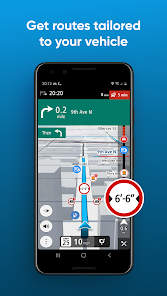
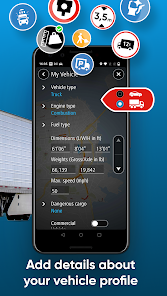
Customizable Truck Profiles

Create personalized profiles for different vehicles and loads, allowing the GPS to optimize routes based on specific requirements. This feature is particularly useful for fleets, ensuring that every truck is guided appropriately according to its unique specifications.

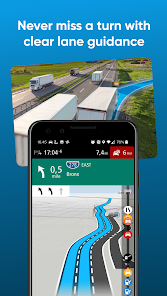
Lane Guidance

TomTom GO Expert provides advanced lane guidance to help you make crucial decisions at complicated intersections. With clear visual and audible prompts, drivers can confidently navigate through heavy traffic, ensuring they stay on the correct path without stress.

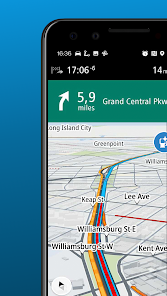
Live Traffic Updates

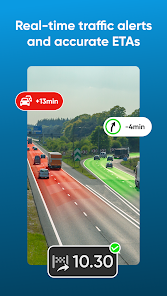
Stay ahead of the traffic with real-time updates that help you navigate around congestion and road closures. The GPS continually analyzes traffic conditions, offering alternative routes to save you time and keep your delivery schedules on track.

Smart Truck Routing

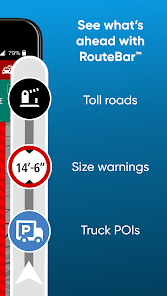
The TomTom GO Expert offers tailored routing specifically designed for trucks, taking into account vehicle dimensions, weight, and cargo restrictions. This ensures that drivers avoid low bridges and other obstacles, providing a safer and more efficient journey on the road.

Pros & Cons

Pros
  • TomTom GO Navigation offers real-time traffic updates for faster routes.
  • It features offline maps for uninterrupted navigation without internet.
  • Voice-guided navigation ensures hands-free driving and safety.
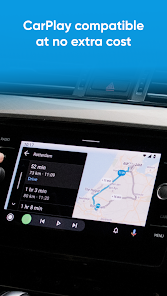
  • Seamless integration with smartphones enhances user experience and connectivity.
  • Regular map updates keep your navigation accurate and reliable.
Cons
  • Limited offline maps can restrict navigation in remote areas
  • Frequent updates are necessary for accurate routes
  • Some users find the interface less intuitive than competitors

Real Experience Using TomTom GO Expert: Truck GPS

Application Scenarios

TomTom GO Expert: Truck GPS is designed specifically for professional drivers and fleet operators, making it an invaluable tool for navigating the complexities of larger vehicles. Truck drivers can utilize the app for various scenarios, including long-haul deliveries, regional routes, and urban navigation. The app allows users to input vehicle dimensions, weight, and cargo types, ensuring that the suggested routes are compliant with legal restrictions and optimal for their specific vehicle. This is particularly beneficial in avoiding low bridges, weight-restricted roads, and other obstacles that could hinder a truck’s journey. Additionally, the app integrates real-time traffic updates, helping drivers to adapt their routes dynamically, saving time and reducing fuel consumption.

User Experience

The user interface of TomTom GO Expert is intuitive and straightforward, making it accessible even for those who may not be tech-savvy. The app’s main screen provides easy access to navigation, route planning, and traffic information, all presented in a visually appealing format. Users have reported that the voice-guided directions are clear and precise, reducing the likelihood of missed turns or miscommunication. The ability to save favorite locations and frequently traveled routes enhances usability, allowing drivers to streamline their journeys. Moreover, the app supports offline maps, which is a crucial feature for drivers who may travel through areas with limited cellular connectivity. The community feedback has been largely positive regarding the app's reliability and accuracy, which are paramount for any navigation tool.

Pricing

TomTom GO Expert: Truck GPS offers a competitive pricing model that caters to a range of users. The app is available for a one-time purchase, which includes access to essential features, such as route planning and traffic updates. For those seeking enhanced functionality, optional subscription services are available, providing users with regularly updated maps and additional features such as advanced route customization and real-time traffic alerts. Many users have found value in the subscription option, especially those who rely on the app for daily operations, as it ensures they have the most current information at their fingertips.

Updates & Support

TomTom is committed to providing ongoing updates and support for the GO Expert app, ensuring that users have access to the latest features and improvements. Regular updates include map enhancements, traffic data, and software optimizations, which help maintain the app's performance and accuracy. Customer support is readily available through multiple channels, including online resources, FAQs, and direct contact options for more complex issues. The responsiveness of the support team has been highlighted in user reviews, demonstrating TomTom's dedication to user satisfaction and problem resolution.

verified Security & Privacy Review

The TomTom GO Expert: Truck GPS app prioritizes user security and privacy through its robust data handling practices. The app requires minimal permissions, ensuring that only essential data is accessed to provide a seamless navigation experience. Users are informed about the data the app collects, which primarily includes location data necessary for route optimization and traffic updates. TomTom employs encryption protocols to safeguard user data during transmission, protecting it from unauthorized access. The app's privacy policy is transparent, detailing how user data is utilized and stored. Users have control over their data, with options to manage location sharing and other settings to enhance privacy. Additionally, TomTom is committed to compliance with relevant data protection regulations, ensuring that user information is handled responsibly. Overall, TomTom GO Expert: Truck GPS demonstrates a strong commitment to security and user privacy, fostering trust among its users while delivering an efficient navigation solution.

Reviews

3.6

“Easy navigation for trucks, very reliable GPS.”

“User-friendly interface, great for long hauls.”

“Accurate routes and helpful traffic updates.”

“Excellent support for large vehicle dimensions.”

“Battery life could be better, but overall great.”

FAQ

1

Can I submit suggestions or feedback to TomTom GO Navigation?

Yes, users can submit suggestions or feedback through the app or the TomTom website, helping to improve future versions and features.

2

Does TomTom GO Navigation collect my personal data?

TomTom GO Navigation may collect some personal data to enhance user experience and improve services, but users can review and manage their privacy settings within the app.

3

Does TomTom GO Navigation support offline use?

Yes, TomTom GO Navigation allows users to download maps for offline use, enabling navigation without a mobile data connection.

4

How do I cancel my TomTom GO Navigation subscription?

Users can cancel their subscription through the app's settings or their respective app store account settings, depending on the platform used for purchase.

5

How much does a subscription to TomTom GO Navigation cost?

Subscription costs can vary based on the plan selected, but users can generally choose between monthly or yearly options for access to premium features.

How to use TomTom GO Expert: Truck GPS

1

Can I change my account information after I log in?

Yes, once logged in, you can update your account information in the settings section of your TomTom GO Expert app.

2

Can I reach Customer Service through social media?

Yes, you can contact TomTom Customer Service via their official social media channels for quick assistance.

3

How can I contact Customer Service for my TomTom GO Expert?

You can reach Customer Service by calling the number listed on the official TomTom website or through the support section of the app.

4

How do I activate my TomTom GO Expert account?

To activate your account, follow the instructions in the activation email sent to you after purchase.

5

How do I verify my account after activation?

After activation, check your email for a verification link and click it to confirm your account.

Editor's Choice