This site uses cookies to enhance your user experience. By clicking any link on this site you are giving your consent to our cookie policy. Read more
Reject
Accept All

Advertiser and Editorial Disclosures

Stagecoach Bus

Stagecoach Bus

verified Verified App

Developer: Stagecoach Services Limited

  • category

    Category: Maps & Navigation

  • price

    Price: free

  • age rating

    Age Rating: Everyone

  • rating

    Rating: 4.2

  • download

    Downloads: 1,000,000+

  • version

    Version: 4.43.1.687

Screenshot 1
Screenshot 2
Screenshot 3
Screenshot 4
Screenshot 5
Screenshot 6

Features & Highlights

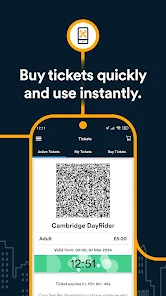
Easy Ticket Purchasing

Purchase your bus tickets with ease through the Stagecoach Bus app, eliminating the need for cash or paper tickets. Simply select your journey, pay securely, and get your digital ticket instantly. It’s a hassle-free way to manage your travel expenses while on the go.

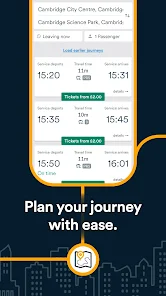
Journey Planning Made Simple

Plan your journey effortlessly with the app's intuitive route planner, which provides you with optimal travel options. Just enter your starting point and destination, and it will suggest the best routes, including transfer information and estimated travel times. It’s all about making your travel experience smoother.

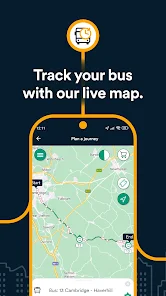
Live Bus Tracking

Stay updated with real-time bus tracking that allows you to see exactly when your bus will arrive. This feature helps you plan your journey more efficiently, reducing wait times and providing peace of mind as you travel. You’ll never have to guess when your bus is coming again.

Service Updates & Alerts

Stay informed with real-time service updates and alerts about any disruptions or changes to your bus routes. This feature ensures you’re always in the loop, allowing you to adjust your plans accordingly. It’s a thoughtful addition that helps enhance your overall travel experience.

Pros & Cons

Pros
  • Easily plan your journey with user-friendly route options and schedules.
  • Track your bus in real-time for better arrival estimates.
  • Purchase tickets conveniently through the app for hassle-free travel.
  • Enjoy flexible payment options to suit your preferences and needs.
  • Access exclusive discounts and promotions for savings on your trips.
Cons
  • Limited route options may restrict travel flexibility.
  • Higher fares can deter budget-conscious passengers.
  • Inconsistent service reliability leads to missed connections and delays.

Real Experience Using Stagecoach Bus

Application Scenarios

The Stagecoach Bus app is designed to cater to a wide range of users, making it a valuable tool for both daily commuters and occasional travelers. Whether you are heading to work, school, or simply exploring a new city, the app provides essential information at your fingertips. Users can easily check bus schedules, plan routes, and receive real-time updates on bus arrivals, which is particularly useful for those on tight schedules. For tourists, the app offers a user-friendly guide to local attractions and the best bus routes to reach them, enhancing the overall travel experience. Additionally, the app accommodates various scenarios, such as late-night travel and weekend services, ensuring that users have access to reliable transportation options whenever they need them.

User Experience

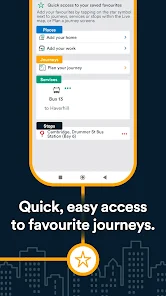
The user experience of the Stagecoach Bus app is generally positive, characterized by its intuitive interface and ease of navigation. Upon opening the app, users are greeted with a simple layout that allows them to quickly find the information they need. The journey planner feature is especially appreciated, as it allows users to enter their starting point and destination to receive tailored route suggestions. Many users report that the real-time tracking feature is a game changer, as it provides updates on bus locations and estimated arrival times, reducing anxiety associated with waiting for public transport. However, some users have noted occasional glitches, such as delays in updating bus statuses. Overall, the app succeeds in making public transportation more accessible and less stressful.

Pricing

The Stagecoach Bus app is free to download, making it accessible to all users. However, while the app itself does not charge any fees, users will need to purchase bus tickets for their journeys. The ticket prices vary based on routes and zones, with options for single, return, and day tickets. The app allows for easy purchasing of tickets, often with the ability to store them digitally for convenience. Additionally, the app occasionally offers promotions or discounts, which can be a great way for users to save money on their travel expenses. Overall, the pricing structure remains competitive, providing good value for the services offered.

Updates & Support

The Stagecoach Bus app is regularly updated to enhance functionality and address user feedback. These updates often include bug fixes, improvements to the user interface, and added features to streamline the travel experience. Customer support is readily accessible through the app, with options for users to report issues, ask questions, or seek assistance. The support team is known for being responsive and helpful, which adds to the overall user satisfaction. The developers also actively encourage user feedback, indicating a commitment to continuous improvement and a user-centered approach.

verified Security & Privacy Review

The Stagecoach Bus app places a strong emphasis on security and privacy, ensuring user data is handled with care. The app employs encryption protocols to protect sensitive information, such as payment details and personal identification, during transmission. This helps to mitigate the risk of unauthorized access and data breaches. In terms of permissions, the app requests access to location services to provide real-time tracking and route information. Users are informed about the necessity of these permissions and can choose to grant or deny access, fostering transparency. The app also allows users to manage their preferences regarding data collection and usage, contributing to a more personalized experience while maintaining control over their information. Furthermore, Stagecoach Bus adheres to data protection regulations, ensuring that user data is not shared with third parties without consent. Regular updates and security patches are implemented to address vulnerabilities, enhancing the overall safety of the app. Overall, the Stagecoach Bus app demonstrates a commitment to maintaining user privacy and securing personal information effectively.

Reviews

4.2

“Reliable service, friendly drivers, clean buses”

“Affordable fares and convenient routes”

“Buses often late, frustrating for commuters”

“App needs improvement for better tracking”

“Great for short trips, but limited schedules”

FAQ

1

Can I submit suggestions or feedback to Stagecoach Bus: Plan>Track>Buy?

Yes, users can submit suggestions or feedback through the app’s support section or via the official Stagecoach website to help improve the app experience.

2

Does Stagecoach Bus: Plan>Track>Buy collect my personal data?

Yes, the app may collect personal data to enhance user experience and provide personalized services, but it adheres to privacy policies to protect user information.

3

Does Stagecoach Bus: Plan>Track>Buy support offline use?

While the app primarily requires an internet connection for real-time updates and ticket purchases, certain features like saved routes may be accessible offline.

4

How do I cancel my Stagecoach Bus: Plan>Track>Buy subscription?

Since the app does not have a subscription model, there is no subscription to cancel; users simply pay for tickets as they choose.

5

How much does a subscription to Stagecoach Bus: Plan>Track>Buy cost?

The app does not require a subscription; however, users will need to pay for individual bus tickets or passes as needed.

How to use Stagecoach Bus

1

Can I change my customer number?

Customer numbers are unique and cannot be changed. If you have concerns, please contact customer service for assistance.

2

Can I update my details through customer service?

Yes, you can update your details by contacting our customer service team, who will assist you with the changes.

3

How can I contact Stagecoach Bus customer service?

You can reach Stagecoach Bus customer service by calling the customer number listed on our website or through our social media channels.

4

How do I activate my Stagecoach account?

To activate your account, click the activation link sent to your email after registration and follow the instructions provided.

5

How do I reset my password if I can't log in?

Click on the "Forgot Password" link on the login page and follow the instructions to reset your password via email.

Editor's Choice