This site uses cookies to enhance your user experience. By clicking any link on this site you are giving your consent to our cookie policy. Read more
Reject
Accept All

Advertiser and Editorial Disclosures

Spanish English Translator

Spanish English Translator

verified

GK Apps

4.4
Rating
10,000,000+ Downloads
25.10.2 Version
  • category

    Category: Books & Reference

  • price

    Price: free

  • age rating

    Age Rating: Teen

  • rating

    Rating: 4.4

  • available on

    Available on: /

  • updated on

    Updated on: Jun 16, 2026

Screenshot 1
Screenshot 2
Screenshot 3
Screenshot 4
Screenshot 5
Screenshot 6

Features & Highlights

Offline Mode

Don't let a lack of internet access hold you back. The offline mode enables you to download essential language packs, providing you with reliable translations even in remote areas or during travel, ensuring you stay connected anytime, anywhere.

Real-Time Translation

Experience seamless communication with real-time translation capabilities that allow you to converse effortlessly in both Spanish and English. Whether you're traveling, studying, or working, this feature ensures you never miss a beat and helps bridge language gaps instantly.

User-Friendly Interface

Navigate effortlessly through the app's intuitive design, which prioritizes user experience. The clean layout and straightforward features make it easy for anyone, from beginners to seasoned travelers, to find the tools they need for effective translation.

Voice Recognition

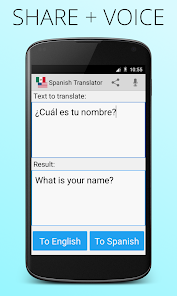
Utilize advanced voice recognition technology to translate spoken words into another language with remarkable accuracy. This hands-free feature is perfect for on-the-go translations, making it easy to communicate in real time without the hassle of typing.

Pros & Cons

Pros
  • Accurate translations for effective communication.
  • User-friendly interface for easy navigation.
  • Supports various dialects for broader understanding.
  • Quick translation speeds enhance productivity.
  • Offline functionality for convenience anywhere.
Cons
  • Limited context understanding in complex sentences
  • Misinterpretation of idiomatic expressions
  • Inaccurate translations for specialized terminology
  • May lack cultural nuances in language

Real Experience Using Spanish English Translator

Application Scenarios

The Spanish English Translator app proves to be incredibly versatile, catering to a wide range of users. Whether you’re a student trying to improve language skills, a traveler navigating through Spain or Latin America, or even a professional needing to communicate effectively with Spanish-speaking colleagues or clients, this app serves as a valuable tool. Its real-time translation capabilities can easily assist in everyday conversations, making it ideal for quick interactions in restaurants, hotels, or shops. Additionally, it can be used in educational settings, allowing students to translate texts or practice vocabulary on the go. The app also supports translation of text from images, which is particularly useful for understanding signs, menus, or documents in a foreign language.

User Experience

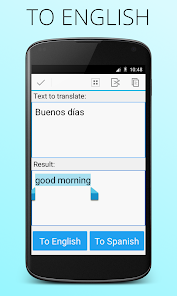
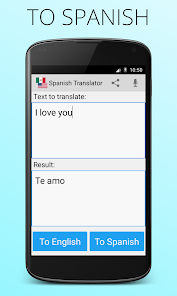
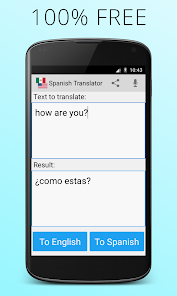
User experience is a strong point for the Spanish English Translator app. The interface is intuitive and user-friendly, allowing even those with minimal technological proficiency to navigate it with ease. The app features a clean layout with clearly labeled sections, making access to translation services straightforward. Users report that the translation speed is impressive, often providing immediate results. The voice recognition feature is another highlight, enabling users to speak phrases aloud for instant translation, which is especially beneficial in conversational settings. Feedback on the accuracy of translations is generally positive, although users note that like any translation tool, it may occasionally struggle with idiomatic expressions. Overall, the app has received acclaim for its seamless integration of features that enhance learning and communication.

Pricing

Updates & Support The developers of the Spanish English Translator app are committed to providing regular updates, ensuring that the app remains current and functional in an ever-evolving digital landscape. Users can expect improvements in translation accuracy, user interface enhancements, and the addition of new features based on user feedback. Support is readily available through the app’s help section, where users can find FAQs and troubleshooting tips. For more personalized assistance, customer support can be contacted directly through the app, with most users reporting prompt and helpful responses. This dedication to both updates and user support contributes significantly to the overall satisfaction of the app’s user base.

verified Security & Privacy Review

The Spanish English Translator app prioritizes user security and privacy, implementing robust measures to protect sensitive information. The app's privacy policy clearly outlines how user data is collected, utilized, and stored, ensuring transparency in its practices. The application does not require excessive permissions, requesting only what is necessary for optimal functionality, such as access to the internet for real-time translation services. User data is encrypted during transmission, safeguarding it from unauthorized access. Additionally, the app does not store translation history on its servers, which minimizes the risk of data breaches. Users are encouraged to review their privacy settings regularly to maintain control over their information. Overall, the Spanish English Translator app demonstrates a commitment to protecting user privacy and security, making it a reliable choice for those seeking translation solutions. Users can feel confident that their data is handled with care and that their privacy is respected throughout their experience with the app.

User Reviews

  • A Google user
    2019/02/03

    While the translation part worked well for the few sentences I translated, the interface is poor: 1. There is no clear button, therefore I have to backspace the whole text in case I want more than one translation. 2. The translate buttons are covered up by the keyboard, therefore an extra, superfluous action to lower the keyboard. The buttons should be on top.

  • A Google user
    2020/01/19

    I have used this app for at least two years now. This app has had more ads then usual. Lately, this app has been giving me too many problems. After showing an ad it will continue to show ads and not allow me to use the translator. It won't even allow me to type in a word because of the constant ads. Lastly, this ad has run it's course and I now have to delete the app completely from my phone and library.

  • Sheila R Gauthun
    2024/03/26

    Sometimes it's a pain to navigate the options in this app. Mostly just want to be able to quickly communicate with the Spanish speaking person I am trying to reach. There sould be an easily option for sending a message, on either side. Spanish or English. And when you get a message in their tongue a quick access for translation.

  • Manneh
    2023/04/21

    I just installed this app so can't give it the best review right now. But after using it for a while I will be able to give it a better honest review. For now I like that it's easy to use going from English to Spanish or vise versa. I also like that you can use the mic to say what you want instead or typing it and the response can be given through audio as well. Looking forward to using it more.

  • A Google user
    2020/01/17

    I don't know what happened to this app but I can't even type without an ad popping up! Never happened before! Political ads left and right! Deleting this app! Terrible! I was just told it was fixed, and it's not. I can't type one thing without being bombarded by political ads.

Review Source: Google Play store public user reviews.

FAQ

1

Does Spanish English Translator collect my personal data?

Spanish English Translator may collect certain personal data, such as usage statistics and preferences, but it typically emphasizes user privacy and complies with data protection regulations.

2

Does Spanish English Translator offer a free trial or free version?

Yes, Spanish English Translator usually offers a free version with limited features, along with a trial period for premium features to allow users to evaluate the app.

3

Does Spanish English Translator require an internet connection?

While some features may be available offline, an internet connection is generally required for real-time translations and access to the latest updates and language databases.

4

How can I contact support or send feedback for Spanish English Translator?

To contact support or send feedback, you can use the in-app support feature, visit the official website, or reach out through email for assistance and inquiries.

5

How do I manage or cancel my Spanish English Translator subscription?

You can manage or cancel your subscription directly through the app's settings or your app store account settings, where you can view your subscription details and make changes.

How to use Spanish English Translator

1

How can I contact customer service for the Spanish English Translator app?

You can reach our customer service via the support section in the app or through our website's contact form.

2

How do I find the customer number for my account?

The customer number is available in the app under "Account Settings" or in your confirmation email.

3

How do I log in to the Spanish English Translator app?

Open the app, tap "Log In," and enter your registered email and password.

4

Is there a way to activate the app if it requires activation?

Yes, you can activate the app by entering the activation code provided during purchase on the activation screen.

What's New

Fixed a startup crash on some Android devices. Improved layout stability.

Editor's Choice