This site uses cookies to enhance your user experience. By clicking any link on this site you are giving your consent to our cookie policy. Read more
Reject
Accept All

Advertiser and Editorial Disclosures

Shimeji: Screen Buddies

Shimeji: Screen Buddies

verified Verified App

Developer: Digital Cosmos

  • category

    Category: Personalization

  • price

    Price: free

  • age rating

    Age Rating: Everyone

  • rating

    Rating: 4.5

  • download

    Downloads: 10,000,000+

  • version

    Version: 9.9

Screenshot 1
Screenshot 2
Screenshot 3
Screenshot 4
Screenshot 5
Screenshot 6

Features & Highlights

Customizable Appearances

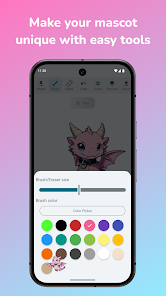
Users can customize their Shimeji characters with various outfits and styles to match their personality or mood. This feature allows for a unique touch, ensuring that your screen buddies not only look cute but also reflect your individuality.

Cute Character Companions

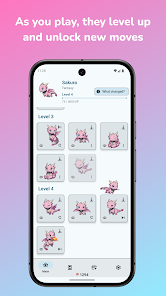
Shimeji brings adorable animated characters to your screen, providing a delightful and interactive experience. These charming buddies can walk around, interact with each other, and even react to your actions, making your device feel more alive and personalized.

Dynamic Interactions

Watch as your Shimeji buddies engage with your activities on the screen! They can help you celebrate achievements, react to notifications, or simply entertain you with their quirky antics, creating a fun and engaging atmosphere while you work or play.

Multiple Character Choices

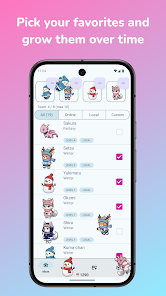
With a wide range of characters to choose from, Shimeji ensures that there’s a perfect buddy for everyone. Whether you prefer whimsical animals, fantastical creatures, or familiar characters, you can easily switch between them to keep your screen experience fresh and exciting.

Pros & Cons

Pros
  • Enhances your desktop with playful characters
  • Fosters a fun and engaging work environment
  • Customizable options for personal expression
  • Lightweight and non-intrusive on system resources
  • Encourages creativity and breaks monotony
Cons
  • Limited customization options for characters and behavior
  • May distract from work or study tasks
  • Can consume system resources and slow performance
  • Not suitable for all age groups or preferences

Real Experience Using Shimeji: Screen Buddies

Application Scenarios

Shimeji: Screen Buddies is an innovative app that transforms your mobile device into a lively canvas filled with adorable animated characters. This app is perfect for anyone looking to add a touch of fun and personality to their everyday smartphone experience. Whether you are a student who wants to liven up your study sessions, a professional seeking to make the workday more enjoyable, or simply a social media enthusiast looking to create engaging content, Shimeji provides a delightful solution. The characters can interact with your screen, respond to your touch, and even engage in playful antics, making them ideal companions during gaming sessions, while watching videos, or during video calls to add an element of whimsy.

User Experience

The user experience with Shimeji is designed to be seamless and intuitive. Upon downloading the app, users are greeted with a simple interface that makes character selection easy. With a variety of customizable characters available, users can choose their favorites and personalize their settings to control the behavior and appearance of their screen buddies. The characters animate smoothly and respond to user interactions, creating a sense of companionship. However, users may note that the app requires certain permissions to function optimally, which might raise privacy concerns for some. Overall, the experience is engaging, and the characters add an entertaining layer to daily mobile use, though users should be prepared for occasional bugs that may arise during updates.

Pricing

Shimeji offers a freemium model that allows users to enjoy basic features at no cost. The free version includes a selection of characters and basic customization options. For users looking to enhance their experience, premium features are available through a subscription model or one-time purchases. These premium options often unlock exclusive characters, advanced customization features, and ad-free usage. The pricing is competitive compared to similar apps in the market, making it accessible for most users. However, some may find the cost of unlocking premium content a bit steep, depending on their level of engagement with the app.

Updates & Support

The developers of Shimeji are committed to providing regular updates to enhance performance and introduce new features. Users can expect periodic character additions and improvements based on feedback from the community. The support team is responsive, with a dedicated help section within the app that addresses common issues and FAQs. Users can also reach out via email for more specific inquiries, and many report timely responses. Overall, the support and update cycle reflects a dedication to user satisfaction, ensuring that the app evolves in line with user expectations and technological advancements.

verified Security & Privacy Review

Shimeji: Screen Buddies prioritizes user privacy and data security with a transparent approach to data handling. The app requires minimal permissions, primarily to function effectively without compromising user information. It does not request access to sensitive data such as contacts or location, which helps to alleviate privacy concerns. All user data is processed locally on the device, ensuring that personal information remains secure and is not transmitted to external servers. This design choice significantly reduces the risk of data breaches. Additionally, Shimeji does not engage in selling user data to third parties, reinforcing its commitment to user privacy. The app's privacy policy is clearly outlined and easily accessible, providing users with insights into what data is collected and how it is used. Overall, Shimeji: Screen Buddies demonstrates a strong commitment to maintaining user privacy and security, making it a trustworthy choice for those concerned about data protection while enjoying their digital companions.

Reviews

4.5

“Cute characters brighten my screen daily!”

“Fun and entertaining, love the customization options.”

“Great way to add personality to my device.”

“Some bugs, but overall a delightful experience.”

“Perfect for anyone who loves adorable distractions!”

FAQ

1

Does Shimeji: Screen Buddies collect my personal data?

Shimeji: Screen Buddies prioritizes user privacy and does not collect personal data unless necessary for certain features, and any data collected is handled in accordance with their privacy policy.

2

Does Shimeji: Screen Buddies offer a free trial or free version?

Yes, Shimeji: Screen Buddies offers a free version with limited features, allowing users to try out the app before considering any premium options.

3

Does Shimeji: Screen Buddies require an internet connection?

Shimeji: Screen Buddies can be used without an internet connection for its basic features, but certain functionalities, like downloading additional characters or updates, may require internet access.

4

How can I contact support or send feedback for Shimeji: Screen Buddies?

Users can contact support or send feedback through the app's help section, or by visiting the official website where contact details and support forms are provided.

5

How do I manage or cancel my Shimeji: Screen Buddies subscription?

You can manage or cancel your Shimeji: Screen Buddies subscription through the app's settings menu or directly through your device's app store subscription management options.

How to use Shimeji: Screen Buddies

1

Can I log in using social media accounts?

Currently, Shimeji only supports direct email logins. Please log in with your registered email and password.

2

How can I change my email associated with my Shimeji account?

To change your email, log in to your account settings or contact customer service for assistance.

3

How can I contact customer service for Shimeji?

You can reach customer service by emailing support

4

How do I log in to my Shimeji account?

To log in, visit the Shimeji website and enter your email and password in the login section.

5

How do I update my customer number if it's incorrect?

Please contact customer service with your details, and they will assist you in updating your customer number.

Editor's Choice