This site uses cookies to enhance your user experience. By clicking any link on this site you are giving your consent to our cookie policy. Read more
Reject
Accept All
Facemoji AI Emoji Keyboard

Facemoji AI Emoji Keyboard

verified Verified App

Developer: EKATOX APPS

  • category

    Category: Personalization

  • price

    Price: 0

  • age rating

    Age Rating: Teen•Violence

  • rating

    Rating: 4.7

  • download

    Downloads: /

  • version

    Version: 3.4.3.4

Screenshot 1
Screenshot 2
Screenshot 3
Screenshot 4
Screenshot 5
Screenshot 6
Screenshot 7
Screenshot 8

Features & Highlights

AI-Powered Suggestions

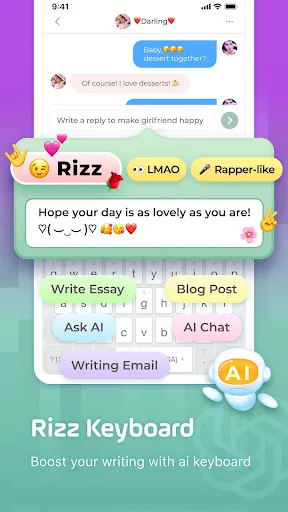
With advanced AI technology, Facemoji provides intelligent emoji suggestions based on your text input. This feature enhances your messaging experience by ensuring you always find the perfect emoji to complement your words, making your conversations more lively and engaging.

Customizable Emoji Packs

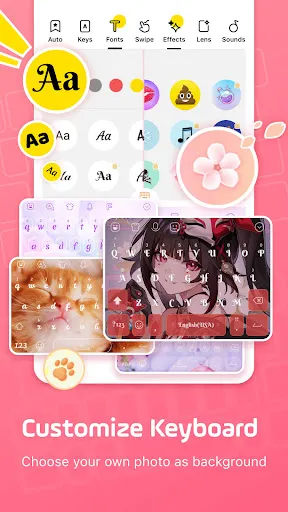
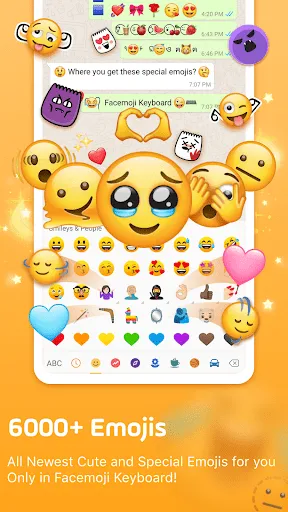
Facemoji AI Emoji Keyboard allows you to create and customize your own emoji packs, making it easy to express your personality in messages. Choose from a vast library of designs, colors, and styles to craft emojis that truly reflect your mood and unique flair.

GIF and Sticker Integration

The keyboard seamlessly integrates GIFs and stickers, enabling users to find and share their favorite animated reactions and fun stickers. This feature adds another layer of expressiveness to your chats, allowing you to communicate in a more dynamic and entertaining way.

Multilingual Support

Facemoji AI Emoji Keyboard supports multiple languages, ensuring that users from different linguistic backgrounds can enjoy its features. This inclusivity allows everyone to express themselves freely and connect with friends and family, regardless of language barriers.

Pros & Cons

Pros
  • Expressive emoji options for every mood
  • Customizable keyboard themes for personal style
  • Quick access to favorite emojis for convenience
  • Smart suggestions enhance messaging efficiency
  • Supports multiple languages for global communication
Cons
  • Limited customization options for emoji appearance
  • Frequent ads disrupt user experience
  • Compatibility issues with some devices
  • Slower response time during heavy use

Real Experience Using Facemoji AI Emoji Keyboard

Application Scenarios

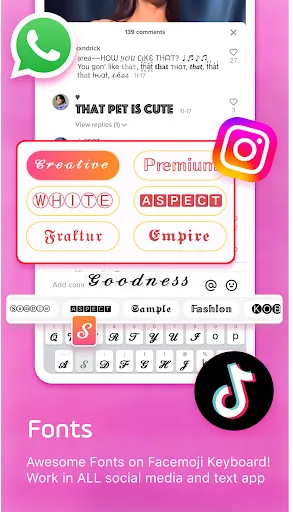
The Facemoji AI Emoji Keyboard excels in various application scenarios, making it an essential tool for anyone looking to enhance their messaging experience. Whether you're chatting with friends on social media platforms like WhatsApp, Facebook Messenger, or Snapchat, this keyboard adds a layer of fun and creativity to your conversations. The app is particularly useful for expressing emotions more vividly; with a vast array of emojis, stickers, and GIFs at your fingertips, you can easily find the perfect visual representation for your feelings. Additionally, the keyboard supports multiple languages, making it a great choice for multilingual users or those communicating internationally. Whether you're sending a quick text or composing a heartfelt message, the Facemoji AI Keyboard ensures your messages stand out.

User Experience

User experience is where the Facemoji AI Emoji Keyboard truly shines. Upon installation, users are greeted with a sleek and user-friendly interface that makes navigating through its features a breeze. The keyboard is highly customizable, allowing users to choose themes, colors, and even the layout that suits their style. The AI-powered prediction feature enhances typing speed and accuracy, learning from your texting habits to suggest emojis and words that fit your conversations. Users appreciate the seamless integration with their favorite apps, making it easy to switch between typing and sending emojis without any interruptions. Additionally, the keyboard's responsiveness is commendable, with minimal lag, ensuring that users can express themselves efficiently and effectively.

Pricing

Updates & Support Facemoji consistently rolls out updates to improve functionality and introduce new features, demonstrating a commitment to user satisfaction. The app's developers actively listen to user feedback, which informs many of the enhancements in each update. Users can expect regular additions of new emojis and themes, keeping the keyboard fresh and relevant. Support is readily available, with a dedicated help section within the app that addresses common issues and queries. For more complex concerns, users can reach out to the support team via email or social media, where they typically receive prompt responses. This level of support contributes to a positive user experience, ensuring that any issues are dealt with swiftly and efficiently.

verified Security & Privacy Review

The Facemoji AI Emoji Keyboard prioritizes user security and privacy, implementing several measures to protect personal information. The app requests minimal permissions, primarily focusing on essential functionalities such as accessing the device's storage for custom emojis. This approach reduces the risk of unauthorized data access. Facemoji employs encryption protocols to safeguard user data during transmission, ensuring that sensitive information remains protected from potential breaches. The app’s privacy policy clearly outlines data collection practices, stating that personal data is not stored or shared with third parties without user consent. Users can customize their privacy settings, allowing them to control what data is shared and with whom. The app also provides an option to disable usage tracking, enhancing user autonomy over personal information. Overall, Facemoji AI Emoji Keyboard demonstrates a commitment to maintaining user privacy while offering a fun and engaging keyboard experience.

Reviews

4.7

“Fun and customizable emojis for every occasion!”

“Easy to use and packed with features.”

“Great keyboard for expressing emotions creatively.”

“Love the variety of stickers and themes available.”

“Improves messaging with unique and fun emojis!”

Editor's Choice