This site uses cookies to enhance your user experience. By clicking any link on this site you are giving your consent to our cookie policy. Read more
Reject
Accept All

Advertiser and Editorial Disclosures

Phone Locator: Family Location

Phone Locator: Family Location

verified Verified App

Developer: WeFindertools

  • category

    Category: Maps & Navigation

  • price

    Price: 0

  • age rating

    Age Rating: Everyone

  • rating

    Rating: 4.3

  • download

    Downloads: /

  • version

    Version: 1.2.11

Screenshot 1
Screenshot 2
Screenshot 3
Screenshot 4
Screenshot 5
Screenshot 6

Features & Highlights

Geofencing Alerts

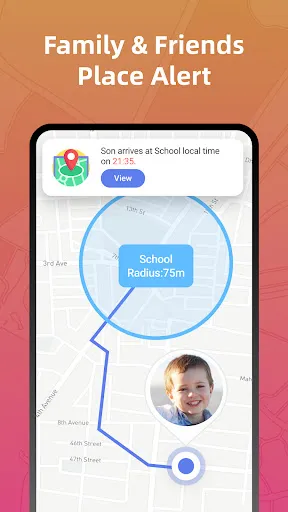
Set up customizable geofences to receive instant notifications when family members enter or leave designated areas. This is perfect for keeping track of kids at school or ensuring that elderly relatives stay within safe zones. You'll always know when they're where they should be, adding an extra layer of security.

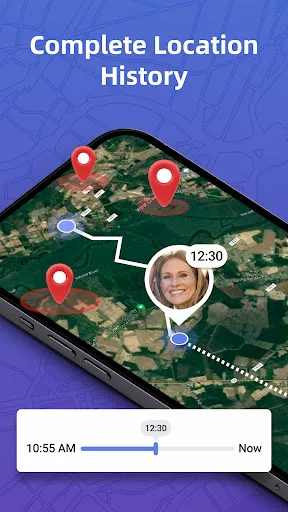
Location History

Access a detailed history of past locations visited by your family members, giving you insights into their routines and activities. This feature is great for understanding patterns and ensuring that everyone is safe. With just a few taps, you can review where they've been and when, fostering peace of mind.

Real-Time Location Tracking

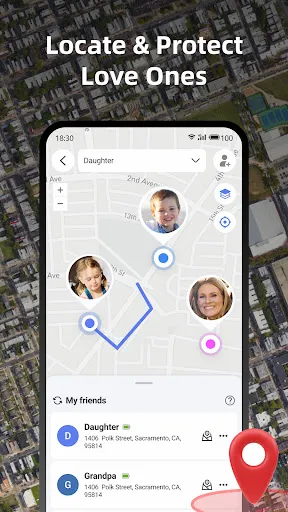
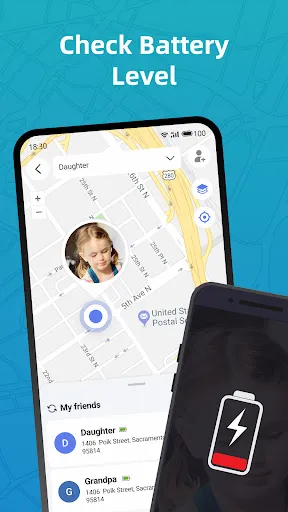
Stay connected with your loved ones by using real-time location tracking. This feature allows you to see where family members are at any given moment, ensuring peace of mind whether they're at school, work, or out with friends. It's like having a virtual safety net right in your pocket.

SOS Button

In case of emergencies, the SOS button allows users to send immediate alerts to designated contacts. This feature ensures that help is just a click away, providing an added layer of security for family members. Knowing that support is readily available can make all the difference in critical situations.

Pros & Cons

Pros
  • Real-time location tracking ensures family safety.
  • Geofencing alerts notify you of location boundaries.
  • Emergency SOS feature provides immediate assistance.
  • User-friendly interface makes navigation effortless.
  • History tracking helps review past locations easily.
Cons
  • Limited accuracy in tracking locations
  • May drain device battery quickly
  • Privacy concerns with location sharing
  • Requires constant internet access

Real Experience Using Phone Locator: Family Location

Application Scenarios

Phone Locator: Family Location excels in various real-life scenarios, making it an indispensable tool for families and close-knit groups. One of the most common applications is ensuring the safety of children. Parents can track their kids in real-time as they navigate to school, friends' houses, or extracurricular activities. This feature provides peace of mind, allowing parents to know their children's whereabouts at all times. Additionally, the app is useful during family outings, ensuring no one gets lost in crowded places like amusement parks or shopping malls. It also serves as a reliable tool for coordinating meetups with friends, allowing users to share their location instantly to find each other without hassle. Moreover, in emergency situations, the app’s location sharing capabilities can assist in quickly locating a family member who may need help.

User Experience

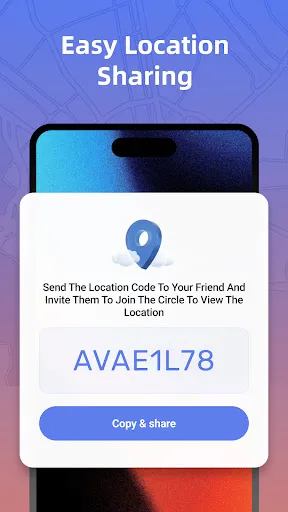
The user experience of Phone Locator: Family Location is generally positive, thanks to its intuitive interface and straightforward navigation. Upon opening the app, users are greeted with a clean layout that makes it easy to access various features. Setting up location sharing is a breeze, allowing users to invite family members or friends with just a few taps. The real-time tracking feature works seamlessly, updating locations accurately and promptly. Notifications for arrivals or departures from designated places enhance the experience, keeping users informed without constant checking. However, some users have reported occasional lag in location updates, which can be concerning in urgent situations. Overall, the app fosters a sense of security and connection among family members, making it a trusted companion for many.

Pricing

Phone Locator: Family Location operates on a freemium model, offering both free and premium subscription options. The free version provides essential location-sharing features, which are adequate for casual users. However, for those seeking advanced functionalities such as location history, geofencing, and unlimited alerts, a premium subscription is necessary. The pricing for the premium service is competitive, with monthly, quarterly, and annual plans available, making it flexible for users to choose according to their needs. The option to try the premium features through a free trial also allows users to assess the value before committing to a paid plan.

Updates & Support

The developers of Phone Locator: Family Location are proactive in rolling out updates, addressing bugs, and enhancing features based on user feedback. Regular updates ensure that the app remains compatible with the latest mobile operating systems and devices. Furthermore, the app includes a dedicated support section, where users can find FAQs, troubleshooting tips, and contact information for personalized assistance. The responsiveness of the customer support team has been noted positively by users, who appreciate the timely help provided for any issues encountered while using the app.

verified Security & Privacy Review

The Phone Locator: Family Location app takes user privacy and data security seriously, implementing several measures to protect personal information. The app requires location permissions to function effectively, but it allows users to control when and how their location is shared with family members. Users can choose to enable or disable location sharing at any time, providing flexibility and control over their data. To further enhance security, the app employs encryption protocols for transmitting data, ensuring that location information remains confidential during transfer. Additionally, user data is stored securely, with strict access controls in place to limit who can view this information. Moreover, the app's privacy policy is transparent, outlining how user data is collected, used, and shared. It emphasizes that personal information will not be sold to third parties, reinforcing the commitment to user privacy. Overall, Phone Locator: Family Location offers a robust framework for protecting user data, making it a reliable choice for families seeking to stay connected while prioritizing security.

Reviews

4.3

“Easy to use and reliable for tracking family.”

“Helps me feel secure about my kids' whereabouts.”

“Great features, but sometimes location updates are delayed.”

“User-friendly interface, love the map view.”

“Notifications are helpful for real-time updates.”

Compare APP

FAQ

1

Does Phone Locator: Family Location collect my personal data?

Phone Locator: Family Location may collect personal data to provide its services, but it adheres to strict privacy policies to ensure that your information is secure and used responsibly.

2

Does Phone Locator: Family Location offer a free trial or free version?

Yes, Phone Locator: Family Location offers a free version with limited features, as well as a free trial of its premium features for new users to explore the app's full capabilities.

3

Does Phone Locator: Family Location require an internet connection?

Yes, Phone Locator: Family Location requires an internet connection to function properly, as it relies on GPS and mobile data to provide accurate location updates.

4

How can I contact support or send feedback for Phone Locator: Family Location?

You can contact support or send feedback for Phone Locator: Family Location through the in-app support feature, or by visiting the app's official website, where you can find contact details and a help center.

5

How do I manage or cancel my Phone Locator: Family Location subscription?

You can manage or cancel your Phone Locator: Family Location subscription through your account settings within the app or by visiting the app store where you purchased the subscription, depending on your device's platform.

How to use Phone Locator: Family Location

1

How can I activate the Phone Locator: Family Location app?

After downloading, create an account and follow the on-screen instructions to activate location tracking.

2

How do I contact customer service for the Phone Locator: Family Location app?

You can contact customer service through the app's settings or visit their official website for support options.

3

How do I log in to the Phone Locator: Family Location app?

Open the app, enter your registered email and password, then click "Log In" to access your account.

4

What is the customer service number for the Phone Locator: Family Location app?

The customer service number can typically be found in the app's help section or on their official website.

Editor's Choice