This site uses cookies to enhance your user experience. By clicking any link on this site you are giving your consent to our cookie policy. Read more
Reject
Accept All

Advertiser and Editorial Disclosures

My Bible - Verse+Audio

My Bible - Verse+Audio

verified Verified App

Developer: JATHLEHEM LIMITED

  • category

    Category: Books & Reference

  • price

    Price: 0

  • age rating

    Age Rating: Everyone

  • rating

    Rating: 4.8

  • download

    Downloads: /

  • version

    Version: 1.0.39

Screenshot 1
Screenshot 2
Screenshot 3
Screenshot 4
Screenshot 5
Screenshot 6
Screenshot 7
Screenshot 8

Features & Highlights

Audio Bible Playback

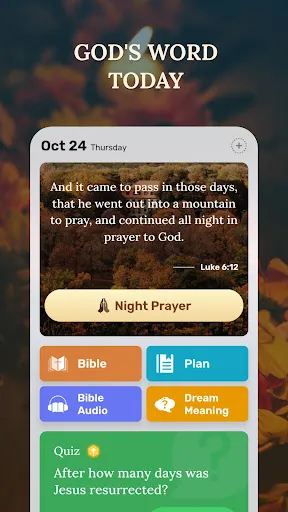
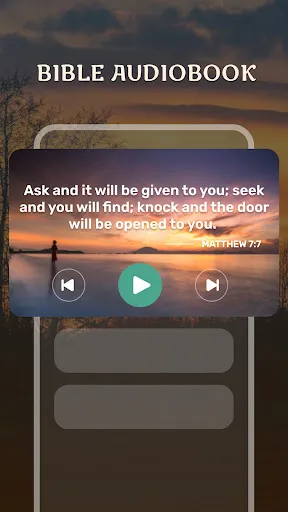
Experience the Bible like never before with high-quality audio readings. Whether you're at home or on the go, you can listen to your favorite verses narrated by professional voice artists, making it easier to absorb the scriptures while multitasking or relaxing.

Daily Devotional Reminders

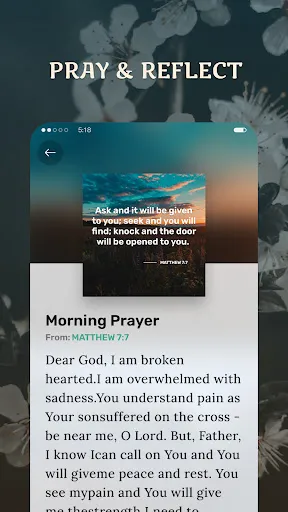
Stay connected to your faith with daily reminders for scripture reading and devotionals. This feature encourages a consistent routine, helping you to deepen your understanding and relationship with the Bible through regular engagement and reflection.

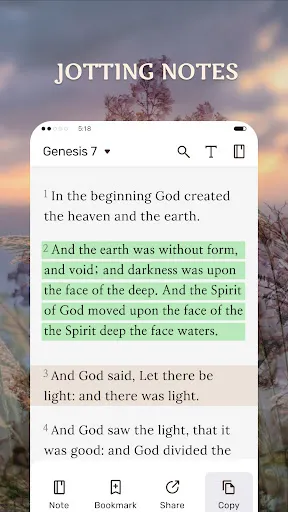
Personalized Verse Highlights

Easily mark and highlight your favorite verses for quick access later. This feature allows you to create a personalized collection of spiritual insights and inspirations, making it simpler to reflect on the passages that resonate most with you.

User-Friendly Interface

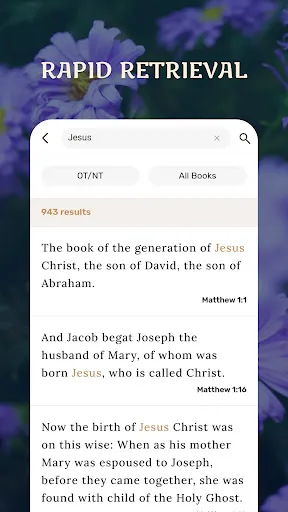
Navigate the app effortlessly with its intuitive design, ensuring that users of all ages can find their way around with ease. Whether you're searching for specific verses or exploring different translations, the streamlined layout enhances your overall experience.

Pros & Cons

Pros
  • Access audio versions for immersive scripture listening
  • Easily search and highlight favorite verses
  • Personalize reading plans for spiritual growth
  • Share inspiring verses with friends effortlessly
  • Track daily progress with engaging features
Cons
  • Limited translation options for diverse users
  • Audio quality can be inconsistent
  • User interface may feel cluttered
  • Some features require a subscription

Real Experience Using My Bible - Verse+Audio

Application Scenarios

My Bible - Verse+Audio is an invaluable tool for users seeking to deepen their understanding of scripture in various everyday contexts. Whether you're at home, commuting, or spending time outdoors, this app allows for flexible engagement with biblical texts. Many users find it particularly useful during personal devotionals, study groups, or while attending church services. The audio feature is particularly beneficial for those who prefer auditory learning or for users with visual impairments. Listening to verses while following along in the app enhances retention and understanding, making it a versatile companion for both casual and serious bible study sessions.

User Experience

The user experience of My Bible - Verse+Audio is designed with simplicity and accessibility in mind. Upon launching the app, users are greeted with an intuitive interface that makes navigation seamless. The layout is clean, allowing users to easily locate their preferred translations and audio options. The audio playback is clear and well-paced, catering to various listening preferences. Users can easily switch between reading and listening modes, making the transition smooth and enjoyable. Additionally, the app allows for bookmarking and highlighting verses, enabling users to personalize their study and revisit meaningful passages effortlessly. Overall, feedback indicates that users appreciate the thoughtful design that prioritizes ease of use while providing a rich bible study experience.

Pricing

My Bible - Verse+Audio adopts a freemium model that appeals to a wide audience. The basic version of the app is free, providing users access to a variety of translations and basic audio features. For those seeking enhanced experiences, the premium version is available through a subscription or one-time purchase, unlocking additional features such as exclusive translations, advanced audio options, and ad-free browsing. The pricing is competitive compared to similar applications, and many users express that the value offered through the premium features is well worth the investment, particularly for avid Bible readers.

Updates & Support

The developers of My Bible - Verse+Audio demonstrate a commitment to continuous improvement and user satisfaction. Regular updates are rolled out, introducing new features and enhancements based on user feedback. The app's support team is readily accessible, with users reporting prompt responses to inquiries and technical issues. The inclusion of a comprehensive FAQ section within the app also aids users in troubleshooting common problems independently. Overall, the ongoing support and frequent updates contribute to a positive user experience, ensuring that the app remains relevant and functional for its audience.

verified Security & Privacy Review

My Bible - Verse+Audio takes user security and privacy seriously, implementing robust measures to protect personal data. The app follows industry-standard encryption protocols to safeguard sensitive information during transmission, ensuring that users' data remains confidential and secure. When installing My Bible, users are informed about the permissions required by the app. These permissions primarily include access to storage for downloading audio files and saving bookmarks. The app does not require excessive permissions, minimizing potential vulnerabilities associated with unnecessary access. User data handling is transparent; the app does not collect personally identifiable information unless explicitly provided by the user. Any data shared, like bookmarks or notes, is stored locally on the device, enhancing user control over their information. Regular updates ensure that the app remains compliant with current privacy regulations and best practices. Overall, My Bible - Verse+Audio demonstrates a commitment to user privacy and data security, allowing users to engage with the app confidently, knowing that their personal information is protected.

Reviews

4.8

“Great audio features enhance my reading experience!”

“User-friendly interface makes navigation easy.”

“Love the variety of translations available.”

“Verses are beautifully presented and easy to share.”

“Perfect for daily devotionals and study.”

FAQ

1

Does My Bible - Verse+Audio collect my personal data?

Yes, My Bible - Verse+Audio may collect personal data as outlined in its privacy policy. Users are encouraged to review the policy for specific details regarding data collection and usage.

2

Does My Bible - Verse+Audio offer a free trial or free version?

My Bible - Verse+Audio typically offers a free version with limited features, and a free trial may be available for premium features. Check the app for current offerings.

3

Does My Bible - Verse+Audio require an internet connection?

While some features of My Bible - Verse+Audio may require an internet connection, many functions, such as reading previously downloaded scripture, can be accessed offline.

4

How can I contact support or send feedback for My Bible - Verse+Audio?

You can contact support or send feedback through the app's help section, or by visiting the official website where you can find contact information and support resources.

5

How do I manage or cancel my My Bible - Verse+Audio subscription?

You can manage or cancel your subscription through the app's settings or your device's app store subscription management options, depending on where you initially subscribed.

How to use My Bible - Verse+Audio

1

Can I change my customer number?

Customer numbers are unique identifiers and cannot be changed. If you have issues, please contact customer service for help.

2

Can I update my email address in my account?

Yes, you can update your email address in the account settings after logging in. If you encounter issues, contact customer service.

3

How can I contact customer service for My Bible - Verse+Audio?

You can reach customer service by emailing support

4

How do I activate my account after signing up?

To activate your account, check your email for a confirmation link and follow the instructions provided.

5

How do I log in on a new device?

To log in on a new device, simply download the app, enter your credentials, and access your account as usual.

Editor's Choice