This site uses cookies to enhance your user experience. By clicking any link on this site you are giving your consent to our cookie policy. Read more
Reject
Accept All

Advertiser and Editorial Disclosures

GPS Navigation, Map Directions

GPS Navigation, Map Directions

verified Verified App

Developer: ShamiTech Apps

  • category

    Category: Maps & Navigation

  • price

    Price: 0

  • age rating

    Age Rating: Everyone

  • rating

    Rating: 3.9

  • download

    Downloads: /

  • version

    Version: 3.55

Screenshot 1
Screenshot 2
Screenshot 3
Screenshot 4
Screenshot 5
Screenshot 6
Screenshot 7
Screenshot 8

Features & Highlights

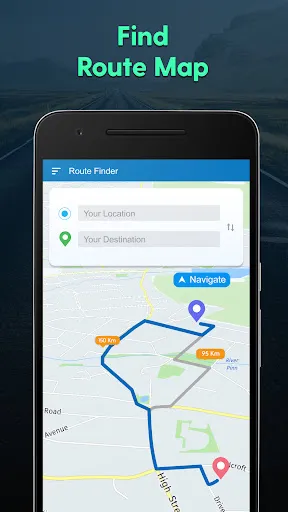
Customizable Routes

Take control of your journey with customizable routes that allow you to prioritize scenic drives or avoid toll roads. The app lets you tailor your navigation experience based on personal preferences, making every trip uniquely yours.

Offline Maps Access

Never worry about losing connection again with offline maps access. Simply download your desired maps in advance and navigate seamlessly, even in areas with poor signal, ensuring you're always on the right track.

Real-Time Traffic Updates

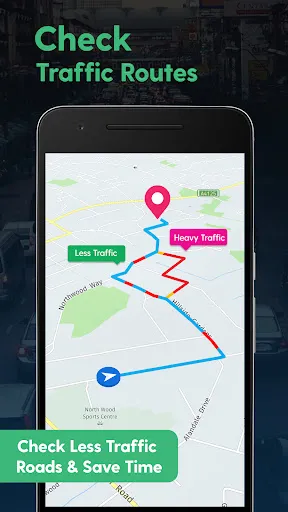
Stay ahead of the game with real-time traffic updates that help you avoid delays. The app analyzes current traffic conditions and suggests alternative routes, ensuring you reach your destination as quickly as possible, even during peak hours.

Voice-Guided Navigation

Navigate hands-free with clear voice-guided directions that help you focus on the road. The app provides timely alerts for turns and lane changes, making it easier to follow routes without constantly checking your screen.

Pros & Cons

Pros
  • Real-time traffic updates for faster routes
  • Voice-guided navigation for hands-free driving
  • Offline maps ensure access without data
  • Customizable routes for personal preferences
  • Landmark highlights enhance travel experience
Cons
  • Can lose signal in remote areas
  • May provide inaccurate or outdated routes
  • Over-reliance can hinder map-reading skills
  • Battery drain can disrupt navigation

Real Experience Using GPS Navigation, Map Directions

Application Scenarios

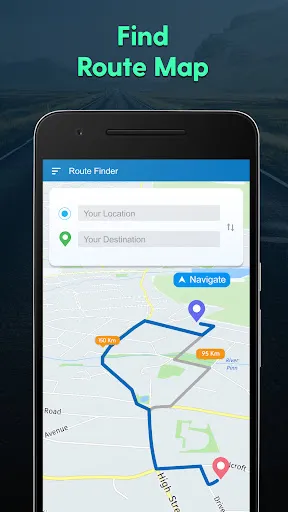
GPS Navigation, Map Directions serves a wide variety of users and scenarios, making it a versatile tool for both everyday commuters and adventurous travelers. Whether you're navigating through bustling city streets, embarking on a cross-country road trip, or exploring hiking trails in remote areas, this app provides reliable directions and real-time traffic updates. Users can easily input their starting point and destination, and the app will generate the fastest routes, taking into account current traffic conditions. Additionally, the app supports various transportation modes, including driving, walking, and cycling, making it suitable for anyone looking to get from point A to point B efficiently.

User Experience

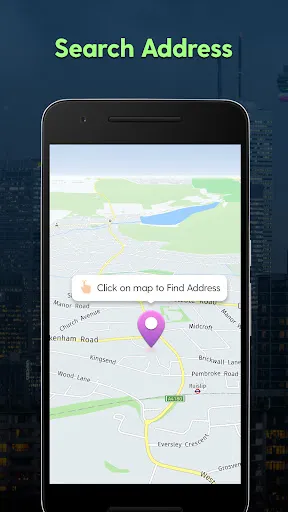
The user interface of GPS Navigation, Map Directions is intuitive and user-friendly, allowing for a seamless navigation experience. Upon launching the app, users are greeted with a clean layout featuring a prominent search bar and a map view that is easy to read. The app provides step-by-step voice guidance, which is particularly helpful for drivers who need to keep their eyes on the road. Users appreciate the real-time traffic alerts that notify them of accidents or road closures, enabling them to make adjustments to their routes as needed. Additionally, the app offers various customization options, such as selecting preferred routes or avoiding tolls, enhancing the overall experience and catering to individual preferences.

Pricing

GPS Navigation, Map Directions adopts a freemium model, offering users a basic version of the app at no cost. This version provides essential features such as route planning and basic maps. For those seeking more advanced functionalities, such as offline maps, advanced traffic analytics, and ad-free usage, the premium subscription is available at a competitive monthly or annual rate. Many users find the investment worthwhile, especially when considering the convenience and accuracy the app provides in their daily commutes or travel plans.

Updates & Support

The developers of GPS Navigation, Map Directions regularly update the app, ensuring that users have access to the latest features and improvements. These updates often include new map data, enhanced navigation algorithms, and user-requested features that improve the app's functionality. Customer support is also readily available, with an extensive FAQ section on their website and prompt responses via email for more complex inquiries. This level of support reassures users that any issues will be addressed swiftly, contributing to a positive overall experience with the app.

verified Security & Privacy Review

The GPS Navigation, Map Directions app prioritizes user security and privacy through a series of robust measures. It employs industry-standard encryption protocols to safeguard user data during transmission, ensuring that sensitive information remains protected from unauthorized access. The app's privacy policy outlines its commitment to transparent data practices, detailing how user information is collected, used, and shared. Upon installation, the app requests several permissions, including access to location services, which is essential for providing accurate navigation. Users are encouraged to review these permissions carefully and can opt out of non-essential access without compromising the core functionalities of the app. The app does not store personal data on its servers, reducing the risk of data breaches. Additionally, the app offers users the ability to manage their data preferences, including options to delete their history and control location sharing. Overall, GPS Navigation, Map Directions demonstrates a strong commitment to protecting user privacy while delivering a reliable navigation experience.

Reviews

3.9

“Accurate directions, easy to use!”

“Reliable GPS, saves me time daily.”

“User-friendly interface, love the live traffic updates.”

“Offline maps are a lifesaver in remote areas.”

“Great for road trips, highly recommend!”

Compare APP

FAQ

1

Does GPS Navigation, Map Directions collect my personal data?

GPS Navigation, Map Directions may collect personal data, such as location information and usage patterns, to improve service and provide personalized experiences, but this is usually outlined in the app's privacy policy.

2

Does GPS Navigation, Map Directions offer a free trial or free version?

Many GPS Navigation, Map Directions apps provide a free version with limited features or a trial period for premium features, allowing users to explore the app before committing to a subscription.

3

Does GPS Navigation, Map Directions require an internet connection?

While some features may require an internet connection for real-time updates and map data, many apps offer offline mode options that allow you to access pre-downloaded maps without an active internet connection.

4

How can I contact support or send feedback for GPS Navigation, Map Directions?

You can typically contact support or send feedback through the app's help section, which may include options for email support, FAQs, or direct messaging for assistance.

5

How do I manage or cancel my GPS Navigation, Map Directions subscription?

You can manage or cancel your subscription through the app's settings or your app store account settings, where you can find options for subscription management.

How to use GPS Navigation, Map Directions

1

Can I use the Map Directions app without logging in?

Yes, you can use basic features without logging in, but some features may require an account.

2

How can I contact customer service for the GPS Navigation app?

You can reach customer service by calling the number listed in the app's settings or visiting their official website for support.

3

How do I activate premium features in the GPS Navigation app?

Go to the app settings, select 'Upgrade,' and follow the prompts to purchase a subscription.

4

How do I log in to my Map Directions app account?

Open the app and tap on 'Log In' at the top right, then enter your email and password.

5

How do I reset my password for the GPS Navigation app?

Tap on 'Forgot Password?' on the login screen and follow the instructions sent to your email.

Editor's Choice