This site uses cookies to enhance your user experience. By clicking any link on this site you are giving your consent to our cookie policy. Read more
Reject
Accept All

Advertiser and Editorial Disclosures

Garmin Explore™

Garmin Explore™

verified Verified App

Developer: Garmin

  • category

    Category: Maps & Navigation

  • price

    Price: free

  • age rating

    Age Rating: Everyone

  • rating

    Rating: 3.9

  • download

    Downloads: 1,000,000+

  • version

    Version: 4.10.1

Screenshot 1
Screenshot 2
Screenshot 3
Screenshot 4
Screenshot 5
Screenshot 6

Features & Highlights

Activity Syncing

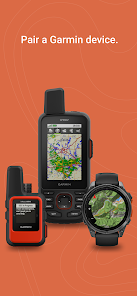
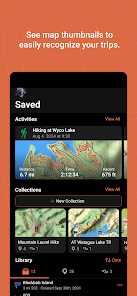
Garmin Explore™ seamlessly syncs your activity data with compatible Garmin devices, allowing you to track your performance and progress over time. This integration helps you stay motivated and informed, making it easier to set and achieve your outdoor goals.

Offline Maps Access

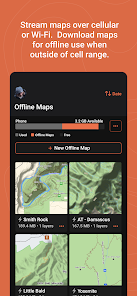
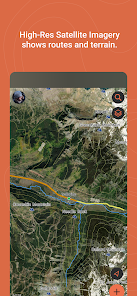
With Garmin Explore™, you can download detailed maps and access them offline, ensuring you never lose your way even in remote areas. This feature is particularly useful for outdoor enthusiasts venturing into regions with limited cell service, providing peace of mind during your adventures.

Route Planning Tools

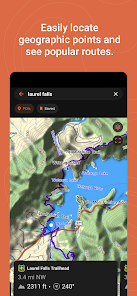
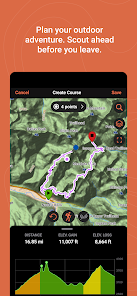
The app offers robust route planning tools that allow you to customize your journey with waypoints, points of interest, and specific trails. You can create and save routes tailored to your preferences, making it easier to explore new terrains and revisit favorite paths.

User-Friendly Interface

Garmin Explore™ boasts a clean and intuitive interface that makes navigation easy for users of all experience levels. Whether you're planning a multi-day hike or a quick bike ride, you can quickly access maps, routes, and essential tools without any hassle.

Pros & Cons

Pros
  • Access offline maps for reliable navigation
  • Plan and track outdoor adventures seamlessly
  • Sync data across devices for convenience
  • Discover new trails and routes easily
  • Stay connected with friends and family
Cons
  • Limited offline map features available
  • Subscription required for advanced features
  • Interface can be confusing for new users
  • Battery life may not meet expectations

Real Experience Using Garmin Explore™

Application Scenarios

Garmin Explore™ is designed for outdoor enthusiasts who seek to enhance their adventures through technology. Whether you’re hiking through rugged mountains, cycling along scenic trails, or kayaking in tranquil waters, this app serves as a versatile tool for navigation and planning. Users can create custom routes, explore maps, and access points of interest tailored to their outdoor activities. The app is particularly beneficial for those who rely on GPS navigation, as it allows for offline map access, ensuring you never lose your way, even in remote areas. Additionally, the app supports syncing with various Garmin devices, enabling seamless integration for outdoor activities. This feature is especially useful for adventurers who own Garmin wearables or handheld GPS devices, as it centralizes data management and trail information.

User Experience

The overall user experience with Garmin Explore™ is commendable, thanks to its intuitive interface and ease of navigation. Upon launching the app, users are greeted with a clean and organized layout that makes it easy to access different features. The mapping tools are robust, providing detailed topographical information that appeals to serious hikers and navigators. Users can easily mark waypoints, share routes with friends, and track their performance metrics. The app also offers a social sharing feature, allowing users to connect with other outdoor enthusiasts and share their experiences. However, some users have reported occasional glitches and slow loading times, especially when accessing large map files. Despite these minor setbacks, the app remains a favorite for many due to its comprehensive functionality and user-friendly design.

Pricing

Garmin Explore™ is available for free, which is a significant advantage for users looking to enhance their outdoor experiences without incurring additional costs. However, certain premium features may require in-app purchases or subscriptions, particularly for advanced mapping options or additional data storage. Overall, the pricing structure is competitive, making it accessible for a wide range of users, from casual adventurers to serious outdoor athletes. Garmin also provides regular promotions and bundles that may include subscriptions or discounts on related devices, adding value for users who are considering investing in Garmin’s ecosystem.

Updates & Support

Garmin is known for its commitment to user satisfaction, and the Explore™ app is no exception. The company regularly releases updates to improve app performance, fix bugs, and introduce new features based on user feedback. This dedication ensures that the app remains relevant and functional for evolving outdoor navigation needs. Additionally, Garmin offers extensive support resources, including a comprehensive FAQ section, user manuals, and a dedicated customer service team that can address technical issues. Users can also engage with online communities for tips and shared experiences, enhancing the overall support network available for Garmin Explore™ users.

verified Security & Privacy Review

The Garmin Explore™ app prioritizes user security and privacy, implementing robust measures to safeguard personal information. The app requires various permissions, such as location services and access to storage, which are essential for its core functionalities. Users are informed about these permissions during installation, ensuring transparency in data collection practices. Garmin employs encryption protocols to protect data transmitted between the app and its servers, minimizing the risk of unauthorized access. Furthermore, user data is stored securely, and Garmin adheres to industry standards for data protection. The app also provides options for users to manage their privacy settings, allowing them to control what information is shared and with whom. Garmin's privacy policy outlines how user data is utilized, emphasizing that personal information is not sold to third parties. The company is committed to compliance with applicable data protection regulations, providing users with confidence in the handling of their information. Overall, Garmin Explore™ demonstrates a strong commitment to maintaining user privacy and ensuring data security throughout the app's usage.

Reviews

3.9

“User-friendly interface enhances outdoor planning experience”

“Excellent mapping features for hiking and biking”

“Syncing with devices is seamless and reliable”

“Great for tracking adventures and sharing routes”

“Battery life is impressive during long trips”

Compare APP

FAQ

1

Does Garmin Explore™ collect my personal data?

Yes, Garmin Explore™ may collect personal data to enhance user experience, improve services, and provide relevant information, while adhering to privacy policies and regulations.

2

Does Garmin Explore™ offer a free trial or free version?

Garmin Explore™ offers a free version with basic functionality, while premium features require a subscription, but there is no specified free trial period.

3

Does Garmin Explore™ require an internet connection?

While an internet connection is needed for initial setup, downloading maps, and syncing data, many features can be accessed offline once the necessary data is stored on your device.

4

How can I contact support or send feedback for Garmin Explore™?

Support for Garmin Explore™ can be accessed through the Garmin website, where you can find help articles, contact customer service, or submit feedback through designated channels.

5

How do I manage or cancel my Garmin Explore™ subscription?

You can manage or cancel your Garmin Explore™ subscription through the app settings or your account settings on the Garmin website, following the prompts for subscription management.

How to use Garmin Explore™

1

How can I contact Garmin customer service for help with the Explore app?

You can reach Garmin customer service by calling 1-800-800-1020 or visiting their website for chat support.

2

How do I activate the Garmin Explore app if necessary?

Typically, you don’t need to activate the app separately. Just log in with your Garmin account, and it will be ready to use.

3

How do I log in to the Garmin Explore app?

Open the app, tap on "Log in," and enter your Garmin account credentials. If you don’t have an account, you can create one from the same screen.

4

What is the customer number for Garmin support regarding the Explore app?

The customer number for Garmin support may vary by region; check the Garmin website for the correct number for your location.

Editor's Choice