This site uses cookies to enhance your user experience. By clicking any link on this site you are giving your consent to our cookie policy. Read more
Reject
Accept All

Advertiser and Editorial Disclosures

Gaia GPS: Offline Trail Maps

Gaia GPS: Offline Trail Maps

verified Verified App

Developer: Outside, Inc.

  • category

    Category: Maps & Navigation

  • price

    Price: free

  • age rating

    Age Rating: Everyone

  • rating

    Rating: 3.4

  • download

    Downloads: 1,000,000+

  • version

    Version: 2025.9

Screenshot 1
Screenshot 2
Screenshot 3
Screenshot 4
Screenshot 5
Screenshot 6
Screenshot 7
Screenshot 8

Features & Highlights

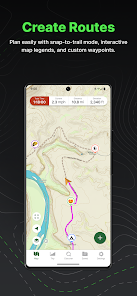
Customizable Waypoints

With Gaia GPS, you can create and customize waypoints to mark important locations on your trails. This functionality enhances your navigation experience, allowing you to easily revisit specific spots, track your progress, and share your favorite routes with friends.

Extensive Trail Database

The app boasts an extensive database of trails, ensuring that you have access to detailed information and routes for various outdoor activities. Whether you’re hiking, biking, or off-roading, you’ll find trails suitable for your skill level and adventure preference.

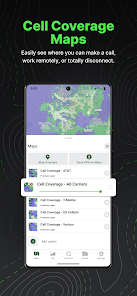
Offline Maps

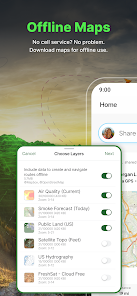
Gaia GPS offers comprehensive offline maps that allow you to navigate trails without a cell signal. This feature is perfect for outdoor enthusiasts who want to explore remote locations without worrying about losing service or draining their phone battery in the wilderness.

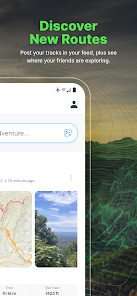
Real-Time Tracking

Gaia GPS includes real-time tracking features, allowing you to monitor your location and progress on the map as you move. This capability not only enhances your safety in unfamiliar terrain but also helps you stay oriented and adjust your route on the fly.

Pros & Cons

Pros
  • Access detailed maps without cellular service
  • Navigate confidently in remote areas
  • Save battery life with offline access
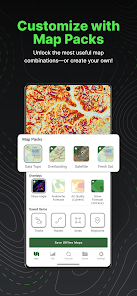
  • Customize maps to suit your needs
  • Track your route without interruptions
Cons
  • Limited customization options for map layers can hinder user experience.
  • Requires a subscription for full access to premium features.
  • Occasional map inaccuracies may lead to navigation challenges in remote areas.

Real Experience Using Gaia GPS: Offline Trail Maps

Application Scenarios

Gaia GPS: Offline Trail Maps is designed for outdoor enthusiasts who seek adventure away from the hustle and bustle of urban life. The app caters to a variety of activities, including hiking, mountain biking, backpacking, and even off-roading. Whether you’re planning a weekend camping trip, exploring national parks, or navigating remote trails, Gaia GPS provides users with a wealth of detailed topographical maps and offline capabilities. The app is particularly useful in areas with limited cell service, allowing users to download maps beforehand and access them without an internet connection. Additionally, the ability to create and share custom routes enhances group outings, making it an ideal companion for both solo adventurers and social hiking groups.

User Experience

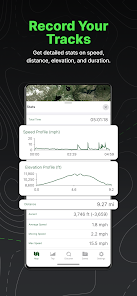
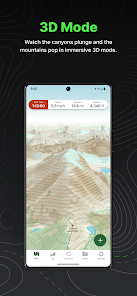
Users often rave about the intuitive interface of Gaia GPS, which strikes a balance between being user-friendly and feature-rich. The app’s design allows for seamless navigation, and users can easily toggle between different map types, including satellite imagery, topographic maps, and even specialized overlays for specific activities. The GPS tracking feature is a standout, providing real-time location updates, which is critical for safety in remote areas. Many users appreciate the detailed offline maps that ensure they never lose their way, even in the backcountry. The ability to record trip statistics, such as distance traveled and elevation gained, adds a layer of enjoyment for those looking to track their progress. Overall, the app’s robust functionality and ease of use create a comprehensive experience for outdoor adventurers.

Pricing

Gaia GPS operates on a subscription model, which can be a consideration for potential users. The app offers a free version with limited features, allowing users to explore its capabilities before committing. For those seeking the full experience, the premium subscription unlocks advanced features such as access to a wider variety of maps, custom waypoints, and offline access. Users often find the pricing reasonable, especially when weighed against the safety and functionality the app provides in outdoor navigation. The annual subscription model ensures users receive continuous updates and new features, keeping the app fresh and relevant for their outdoor adventures.

Updates & Support

The development team behind Gaia GPS is committed to providing regular updates that enhance user experience and expand functionality. Users often highlight the responsiveness of the support team, which is available to address any inquiries or issues promptly. The app also features a comprehensive knowledge base and user forums, making it easy for users to find solutions or tips shared by fellow outdoor enthusiasts. This community-driven aspect, combined with ongoing improvements, ensures that Gaia GPS remains a top choice for those seeking reliable trail navigation tools.

verified Security & Privacy Review

Gaia GPS prioritizes user security and privacy with robust measures in place to protect sensitive information. The app employs encryption protocols to secure user data both in transit and at rest, ensuring that personal information remains confidential. Users have control over their data, with options to adjust privacy settings according to their preferences. The app requests permissions that are essential for its functionality, including location access for map tracking and offline navigation. Gaia GPS is transparent about its data collection practices, outlining what information is collected, such as user location and app usage statistics, and how it is utilized to enhance user experience. Gaia GPS does not share user data with third parties for advertising purposes. The company is committed to maintaining user trust by offering clear privacy policies and ensuring that personal data is handled responsibly. Regular updates address potential security vulnerabilities, reinforcing the app's dedication to safeguarding user information while providing an exceptional outdoor navigation experience.

Reviews

3.4

“Easy to use and navigate on trails.”

“Offline maps are incredibly helpful.”

“Great for hiking and outdoor adventures.”

“User-friendly interface, highly recommend it.”

“Excellent GPS accuracy in remote areas.”

FAQ

1

Can I submit suggestions or feedback to Gaia GPS: Offline Trail Maps?

Yes, users can submit suggestions or feedback through the app or the Gaia GPS website, where they encourage community input to improve the app.

2

Does Gaia GPS: Offline Trail Maps collect my personal data?

Gaia GPS may collect certain personal information as outlined in their privacy policy, but they prioritize user privacy and provide options to manage your data.

3

Does Gaia GPS: Offline Trail Maps support offline use?

Yes, Gaia GPS allows users to download maps for offline use, making it ideal for remote areas without cellular reception.

4

How do I cancel my Gaia GPS: Offline Trail Maps subscription?

You can cancel your subscription through the app store where you purchased it or by visiting the Gaia GPS website and following the cancellation instructions.

5

How much does a subscription to Gaia GPS: Offline Trail Maps cost?

Subscription costs vary depending on the plan chosen, with options for monthly or annual billing, typically starting at around $39.99 per year.

How to use Gaia GPS: Offline Trail Maps

1

Can I retrieve my customer number if I lost it?

Yes, if you need your customer number, please contact customer service with the email associated with your account, and they will assist you.

2

How can I contact customer service for help with my Gaia GPS account?

You can reach our customer service via the support section in the app or by emailing support

3

How can I update my account information if I can't log in?

If you can’t log in to update your information, please contact customer service for assistance with your account directly.

4

How do I activate my Gaia GPS account after signing up?

To activate your account, simply log in using the credentials you created during sign-up. If you encounter issues, reach out to customer service for help.

5

How do I change my customer number if it's incorrect?

Customer numbers cannot be changed. If you have concerns about your account, please contact customer service for assistance.

Editor's Choice