This site uses cookies to enhance your user experience. By clicking any link on this site you are giving your consent to our cookie policy. Read more
Reject
Accept All

Advertiser and Editorial Disclosures

FamilySearch Tree

FamilySearch Tree

verified Verified App

Developer: FamilySearch International

  • category

    Category: Books & Reference

  • price

    Price: free

  • age rating

    Age Rating: Everyone

  • rating

    Rating: 4.5

  • download

    Downloads: 10,000,000+

  • version

    Version: 5.3.6

Screenshot 1
Screenshot 2
Screenshot 3
Screenshot 4
Screenshot 5
Screenshot 6
Screenshot 7
Screenshot 8
Screenshot 9
Screenshot 10
Screenshot 11
Screenshot 12
Screenshot 13
Screenshot 14
Screenshot 15
Screenshot 16

Features & Highlights

Collaborative Family Trees

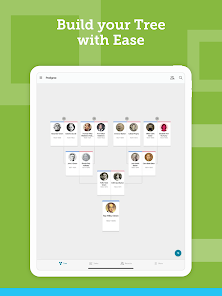
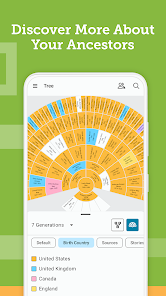
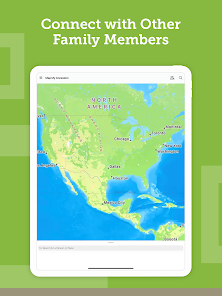
FamilySearch Tree allows users to collaboratively build and expand their family trees with relatives and friends. This feature enhances the research experience by enabling multiple contributors to share insights, photos, and historical documents, fostering a community-driven approach to genealogy.

Extensive Historical Records

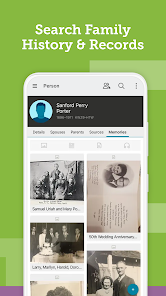
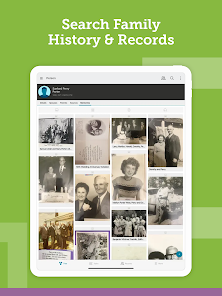
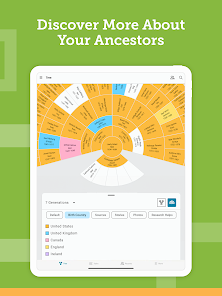
Access a vast collection of historical records, including census data, military records, and immigration documents, all in one place. These resources empower users to trace their ancestry back through generations, providing a wealth of information to enrich their family narratives.

Mobile Accessibility

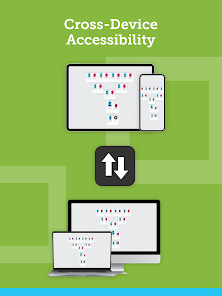
With FamilySearch Tree's mobile app, users can explore their family history on the go. This feature enables you to stay connected to your genealogy research anywhere, making it convenient to update your family tree, access records, and discover new ancestors while out and about.

User-Friendly Interface

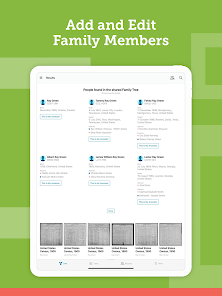
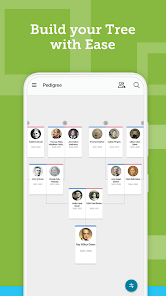
The intuitive design of FamilySearch Tree makes it easy for users of all ages and tech-savviness to navigate their family history. With straightforward tools and a clean layout, users can quickly add relatives, search for records, and visualize their family connections without feeling overwhelmed.

Pros & Cons

Pros
  • Easily collaborate with relatives on family history research
  • Access a vast database of historical records
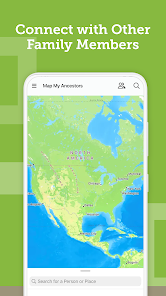
  • Connect with a global community of genealogists
  • Discover and preserve your family's unique stories
  • User-friendly interface makes navigation simple
Cons
  • Limited privacy for personal family information
  • Confusing user interface for newcomers
  • Duplicate entries can cause inaccuracies
  • Collaboration can lead to conflicting data

Real Experience Using FamilySearch Tree

Application Scenarios

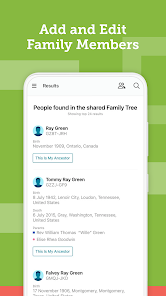
The FamilySearch Tree app is designed for anyone interested in genealogy and family history. Users can utilize the app to create, edit, and expand their family trees, making it an ideal tool for family reunions, historical research, and educational purposes. Whether you're a seasoned genealogist or a novice just starting, the app provides a platform for documenting family connections and discovering ancestral roots. Many users find the app particularly useful during family gatherings, where they can share and update their family trees in real-time. Additionally, the app’s integration with historical records allows users to enrich their family stories with verified data, making it a valuable resource for academic research or personal exploration.

User Experience

The user experience of the FamilySearch Tree app is generally positive, with an intuitive interface that makes navigation straightforward. Users appreciate the clean layout that allows for easy access to various features, such as adding relatives, uploading photos, and collaborating with family members. The app's search functionality is robust, enabling users to find records and ancestors quickly. However, some users have reported occasional bugs and glitches, particularly when syncing with the online FamilySearch database. Despite these minor issues, the overall responsiveness and speed of the app are commendable. The community aspect of the app, where users can connect with other genealogists and share information, adds an engaging element that enhances the user experience.

Pricing

FamilySearch Tree is completely free to use, which is one of its most appealing features. There are no hidden costs or subscription fees, making it accessible to everyone. Users can create unlimited family trees and access a wealth of historical records without any financial commitment. This pricing model sets it apart from many other genealogy apps that often charge for premium features. This free access encourages more individuals to explore their family history without the barrier of cost, promoting a wider engagement in genealogy.

Updates & Support

The app receives regular updates that focus on improving functionality and user experience. FamilySearch is known for actively listening to user feedback and implementing necessary changes to enhance the app's performance. Support is readily available through their website, where users can find FAQs, tutorials, and a community forum. Additionally, for those needing personalized assistance, the app offers customer support through email and chat options, ensuring that users can find help when needed. The commitment to maintaining and improving the app reflects FamilySearch's dedication to genealogy enthusiasts everywhere.

verified Security & Privacy Review

The FamilySearch Tree app takes user security and privacy seriously, implementing robust measures to protect personal data. The app utilizes encryption protocols to safeguard sensitive information during transmission and storage, ensuring that user genealogical data remains confidential and secure. In terms of privacy practices, FamilySearch adheres to strict data handling guidelines, allowing users to control their information sharing preferences. Users can choose what data to make public and can manage their privacy settings easily within the app. FamilySearch also has a clear privacy policy detailing how user data is collected, used, and shared, fostering transparency and trust. The app requests minimal permissions, primarily focused on necessary features such as photo uploads and location services for family history purposes. Users are informed about the permissions required, ensuring they can make informed decisions about their privacy. Overall, FamilySearch Tree effectively balances functionality with strong security and privacy practices, making it a reliable choice for users interested in exploring their family history.

Reviews

4.5

“Great for connecting with distant relatives!”

“User-friendly interface makes family tree building easy.”

“Amazing resource for genealogy research and family history.”

“Helpful hints enhance the research experience.”

“Love the collaboration features with family members!”

Compare APP

FAQ

1

Does FamilySearch Tree collect my personal data?

FamilySearch Tree may collect personal data as outlined in its privacy policy, which includes information you provide while using the app and data related to your activity within the platform.

2

Does FamilySearch Tree offer a free trial or free version?

FamilySearch Tree is completely free to use, with no trial required, allowing users to access all features without any subscription fees.

3

Does FamilySearch Tree require an internet connection?

Yes, FamilySearch Tree requires an internet connection to access the full features, including syncing your tree and retrieving historical records.

4

How can I contact support or send feedback for FamilySearch Tree?

You can contact support or send feedback through the FamilySearch website or app, where you can find resources, FAQs, and a contact form for assistance.

5

How do I manage or cancel my FamilySearch Tree subscription?

Since FamilySearch Tree is a free service, there is no subscription to manage or cancel; users can simply stop using the app at any time without any obligations.

How to use FamilySearch Tree

1

How can I retrieve my Customer Number for the FamilySearch Tree app?

Your Customer Number is typically your FamilySearch username or email associated with your account; check your profile settings for verification.

2

How do I activate my FamilySearch Tree app account if necessary?

Download the app and sign in with your FamilySearch account. If you don't have an account, you can create one directly within the app.

3

How do I contact Customer Service for the FamilySearch Tree app?

You can reach FamilySearch support through their website or by calling their customer service number listed on the site. Check the "Help" section for more details.

4

What should I do if I can't log in to the FamilySearch Tree app?

Ensure you are using the correct credentials. If you've forgotten your password, use the "Forgot Password?" feature to reset it.

Editor's Choice