This site uses cookies to enhance your user experience. By clicking any link on this site you are giving your consent to our cookie policy. Read more
Reject
Accept All

Advertiser and Editorial Disclosures

Curb - Request & Pay for Taxis

Curb - Request & Pay for Taxis

verified Verified App

Developer: Curb Mobility, LLC

  • category

    Category: Maps & Navigation

  • price

    Price: free

  • age rating

    Age Rating: Everyone

  • rating

    Rating: 2.9

  • download

    Downloads: 1,000,000+

  • version

    Version: 7.0.2

Screenshot 1
Screenshot 2
Screenshot 3
Screenshot 4
Screenshot 5
Screenshot 6

Features & Highlights

Driver Ratings and Reviews

Curb empowers users to rate their drivers and leave feedback, fostering a community of accountability. This feature not only helps maintain high service standards but also gives you confidence in the quality of your ride experience.

Easy Taxi Booking

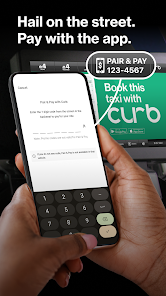
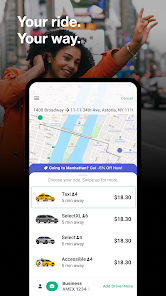
With Curb, booking a taxi is as simple as a few taps on your smartphone. The intuitive interface allows you to quickly input your pickup location and destination, ensuring you get a ride without any hassle, whether you're in a rush or planning ahead.

In-App Payment Options

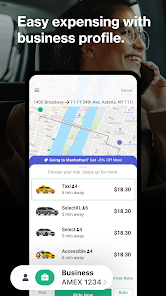
Say goodbye to cash and cards; Curb allows you to pay for your ride directly within the app. You can securely store your payment information, making transactions seamless and straightforward, so you can focus on your journey instead of worrying about payment methods.

Ride Tracking

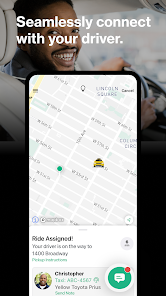
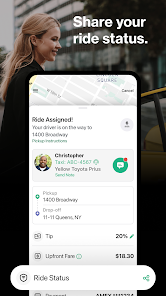
Stay informed with real-time ride tracking that shows you exactly when your taxi will arrive. This feature provides peace of mind and allows you to plan your time better, ensuring you’re always one step ahead of your travel schedule.

Pros & Cons

Pros
  • Convenient mobile app for easy taxi requests.
  • Secure payment options ensure peace of mind.
  • Real-time tracking of your taxi's location.
  • Hassle-free ride management for busy schedules.
  • 24/7 availability for any travel needs.
Cons
  • Limited availability in certain areas
  • Higher fees compared to cash rides
  • Potential app glitches during peak times
  • Requires smartphone for access

Real Experience Using Curb - Request & Pay for Taxis

Application Scenarios

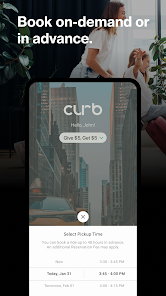
The Curb app is designed for urban commuters and travelers who need a reliable taxi service at their fingertips. Whether you're heading to the airport, going out for a night on the town, or simply commuting to work, Curb simplifies the process of requesting a taxi. Users can easily request rides from licensed taxi drivers in their area, making it a convenient choice for those who prefer traditional taxi services over rideshare options. The app is particularly useful in busy city environments where hailing a taxi can be challenging, allowing users to book a ride in advance or on-demand. Additionally, Curb supports multiple locations, making it ideal for visitors exploring new cities or locals navigating their hometowns.

User Experience

Curb boasts a user-friendly interface that makes navigating the app a breeze. Upon opening the app, users are greeted with a clean layout, clearly displaying the request button and fare estimates. The ride request process is streamlined, requiring just a few taps to confirm pickup and drop-off locations. Users can track their driver's arrival in real-time, which adds a layer of reassurance, especially in busy areas. The app also allows users to save favorite locations, making future bookings even quicker. In terms of payment, Curb offers seamless integration with various payment methods, including credit cards and digital wallets, ensuring a hassle-free checkout experience. Overall, the app provides a smooth and efficient user experience, catering to both tech-savvy individuals and those less familiar with mobile applications.

Pricing

Curb operates with transparent pricing, allowing users to see fare estimates before confirming their ride. Prices are generally competitive with local taxi services, and there are no surge pricing models, unlike many rideshare apps. This transparency is a significant advantage for users who wish to avoid unexpected costs during their journeys. Additionally, users can take advantage of promotional offers and discounts that Curb occasionally provides, making it an economical option for regular commuters. The availability of various payment methods further enhances the overall affordability and convenience of using the app.

Updates & Support

The Curb app is regularly updated to improve performance, add new features, and enhance user experience. Feedback from users is taken seriously, and many updates are driven by community suggestions. The support team is also responsive, providing assistance through in-app messaging and email. Users can access a comprehensive FAQ section within the app, addressing common queries regarding bookings, payments, and app functionality. This commitment to user support ensures that any issues can be resolved quickly, maintaining a high level of customer satisfaction.

verified Security & Privacy Review

The Curb app takes user security and privacy seriously, implementing robust measures to protect personal information. All data transmitted between the app and servers is encrypted using industry-standard protocols, ensuring that sensitive details remain confidential during transit. Curb adheres to strict privacy practices, clearly outlining its data usage policies in its privacy policy document. The app collects essential information such as location and payment details to facilitate seamless taxi requests and transactions. Users have control over their data, with options to manage permissions and review what information is shared. To enhance user trust, Curb employs secure payment processing methods, minimizing the risk of fraud. The app does not store payment details on its servers, reducing exposure to potential breaches. Furthermore, users can delete their accounts and associated data at any time, reinforcing transparency and user autonomy. Overall, Curb demonstrates a commitment to safeguarding user privacy while delivering a convenient taxi service, making it a reliable choice for those concerned about data security.

Reviews

2.9

“Easy to use and reliable for quick rides”

“Great drivers and prompt service every time”

“User-friendly interface makes booking a breeze”

“Occasional surge pricing can be frustrating”

“Excellent customer support when issues arise”

FAQ

1

Does Curb - Request & Pay for Taxis collect my personal data?

Yes, Curb collects personal data such as your name, email address, and payment information to facilitate ride requests and payments, but they have privacy measures in place to protect your information.

2

Does Curb - Request & Pay for Taxis offer a free trial or free version?

Curb does not offer a free trial, but the app itself is free to download and use; you only pay for the taxi services you request.

3

Does Curb - Request & Pay for Taxis require an internet connection?

Yes, Curb requires an internet connection to request rides, track your taxi, and process payments through the app.

4

How can I contact support or send feedback for Curb - Request & Pay for Taxis?

You can contact Curb's support team through the app or visit their website for assistance and to submit feedback.

5

How do I manage or cancel my Curb - Request & Pay for Taxis subscription?

Since Curb does not have a subscription model, there is no subscription to manage or cancel; users simply pay for each ride as needed.

How to use Curb - Request & Pay for Taxis

1

How can I contact Customer Service for the Curb app?

You can reach customer service by visiting the Curb website or through the app’s support section. Email support is also available for inquiries.

2

How do I log in to my Curb account?

Open the Curb app and tap on 'Log In'. Enter your registered email and password to access your account.

3

Is there a need to activate my Curb account?

Yes, after signing up, you may need to verify your email address to activate your account fully. Check your inbox for a verification email.

4

What is the customer service number for Curb?

The customer service number for Curb is typically found in the app under the help section or on their official website.

Editor's Choice