This site uses cookies to enhance your user experience. By clicking any link on this site you are giving your consent to our cookie policy. Read more
Reject
Accept All
CloudLibrary

CloudLibrary

verified Verified App

Developer: OCLC

  • category

    Category: Books & Reference

  • price

    Price: free

  • age rating

    Age Rating: Everyone

  • rating

    Rating: 4.6

  • download

    Downloads: 1,000,000+

  • version

    Version: 5.14.0.2

Screenshot 1
Screenshot 2
Screenshot 3
Screenshot 4
Screenshot 5
Screenshot 6
Screenshot 7
Screenshot 8

Features & Highlights

Offline Access

Once downloaded, your favorite titles can be accessed without an internet connection, making CloudLibrary perfect for on-the-go reading. Whether you're commuting, traveling, or just in a low-connectivity area, your books are ready whenever you are, ensuring uninterrupted enjoyment.

Personalized Recommendations

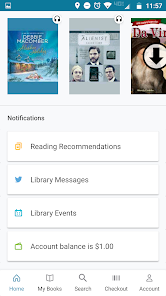
CloudLibrary uses smart algorithms to suggest titles based on your reading preferences and history. This feature helps users discover new authors and genres tailored to their tastes, enhancing the overall reading experience and keeping the library fresh and exciting.

User-Friendly Interface

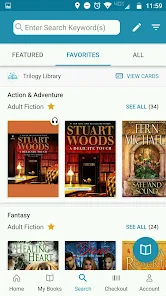
CloudLibrary boasts an intuitive interface that makes it easy for users of all ages to navigate. With simple menus and clear categories, finding your next read becomes a breeze, allowing you to focus more on enjoying books than figuring out how to access them.

Wide Selection of Titles

With access to thousands of eBooks and audiobooks, CloudLibrary offers a diverse range of genres and authors. Whether you're into bestsellers or hidden gems, there’s something for everyone, making it an ideal choice for avid readers seeking variety in their literary adventures.

Pros & Cons

Pros
  • Access a vast collection of digital titles anytime.
  • User-friendly interface enhances reading experience effortlessly.
  • Sync across devices for seamless reading transitions.
  • Offline access allows reading without internet connection.
  • Regular updates keep content fresh and engaging.
Cons
  • Limited availability of titles for borrowing
  • Requires a stable internet connection
  • User interface can be confusing for some
  • Frequent app updates may disrupt usage

Real Experience Using CloudLibrary

Application Scenarios

CloudLibrary is an innovative app designed to cater to a diverse range of reading needs. Whether you are a student looking for academic resources, a professional seeking industry-related materials, or simply an avid reader wanting access to the latest fiction and non-fiction titles, CloudLibrary has you covered. The app excels in providing a user-friendly platform to borrow eBooks and audiobooks from local libraries, making it an essential tool for anyone looking to expand their literary horizons without the need for physical books. Users can seamlessly browse, borrow, and read or listen to titles directly from their devices, fitting perfectly into busy lifestyles. The app is also ideal for book clubs or study groups, allowing multiple users to access the same titles concurrently, thereby fostering discussions and collaborative learning.

User Experience

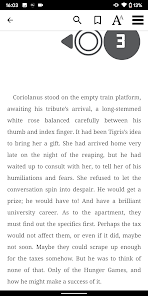
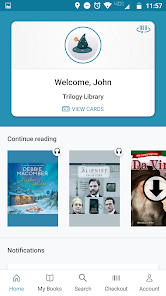
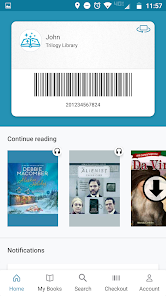
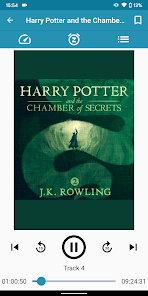
The user experience with CloudLibrary is largely positive, characterized by its intuitive interface and seamless navigation. Upon launching the app, users are greeted with a well-organized dashboard that makes searching for books straightforward. The search functionality is robust, allowing users to filter results by genre, popularity, or new arrivals. One of the standout features is the ability to customize reading settings, such as font size and background color, which enhances accessibility for users with different preferences. The audiobook experience is equally refined, with features like adjustable playback speed and sleep timers. Users have reported that the app operates smoothly without significant glitches, making the reading or listening experience enjoyable. Furthermore, the syncing capability allows readers to switch between devices without losing their place, adding to the overall convenience of the app.

Pricing

CloudLibrary operates primarily on a subscription model, which varies depending on the library partnerships it has established. Many users can access the app for free with a library card from participating libraries, making it an economical choice for avid readers. For those who wish to access premium content or exclusive titles, there may be a small monthly fee involved. The pricing structure is transparent, and users appreciate the value it provides, especially considering the extensive library of titles available. Overall, the cost is reasonable compared to purchasing individual eBooks or audiobooks, making CloudLibrary an attractive option for budget-conscious readers.

Updates & Support

CloudLibrary is committed to continuous improvement, frequently rolling out updates that enhance functionality and user experience. These updates often include new features based on user feedback, bug fixes, and performance enhancements. The support system is commendable, with a comprehensive FAQ section and responsive customer service readily available through email and chat. Users have reported positive experiences when reaching out for assistance, highlighting the team’s commitment to resolving issues promptly. Additionally, the app’s community forums provide a platform for users to share tips and suggestions, fostering a sense of community among readers. Overall, the consistent updates and robust support contribute to a satisfying user experience, making CloudLibrary a reliable choice for readers everywhere.

verified Security & Privacy Review

The CloudLibrary app demonstrates a strong commitment to user security and privacy. It employs advanced encryption protocols to safeguard data in transit and at rest, ensuring that sensitive information remains protected from unauthorized access. The app’s privacy policy is transparent, detailing how user data is collected, used, and shared, which fosters trust among its users. CloudLibrary implements strict access controls, requiring users to authenticate their accounts via secure methods, thereby minimizing the risk of unauthorized access. The app requests only essential permissions, such as access to the device’s storage for saving downloaded content, and explicitly informs users about the necessity of each permission. Additionally, CloudLibrary offers users the ability to manage their data preferences, including options to delete their account and associated data at any time. Regular updates and security patches are provided to address vulnerabilities, further enhancing the app's security posture. Overall, CloudLibrary prioritizes user privacy and data protection, making it a reliable choice for those concerned about their digital security.

Reviews

4.6

“Great selection of books and easy to use!”

“User-friendly interface, perfect for avid readers.”

“Love the offline reading feature for convenience.”

“Quick downloads and seamless browsing experience.”

“Amazing access to libraries and diverse genres!”

Editor's Choice