This site uses cookies to enhance your user experience. By clicking any link on this site you are giving your consent to our cookie policy. Read more
Reject
Accept All

Advertiser and Editorial Disclosures

Chargemap - Charging stations

Chargemap - Charging stations

verified Verified App

Developer: Chargemap

  • category

    Category: Maps & Navigation

  • price

    Price: free

  • age rating

    Age Rating: Everyone

  • rating

    Rating: 3.5

  • download

    Downloads: 1,000,000+

  • version

    Version: 4.49.1

Screenshot 1
Screenshot 2
Screenshot 3
Screenshot 4
Screenshot 5
Screenshot 6
Screenshot 7

Features & Highlights

Community Reviews

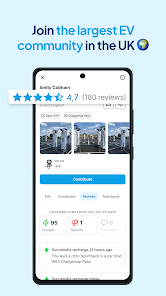
Get insights from fellow EV users through community-generated reviews of charging stations. These firsthand experiences help you choose the best spots to charge, showcasing reliability, amenities, and overall user satisfaction, so you can charge with confidence.

Multi-Network Access

Chargemap connects you to a wide network of charging stations, allowing you to access various platforms and services with ease. This feature simplifies the charging experience, giving you flexibility and a range of options, no matter where your journey takes you.

Route Planning

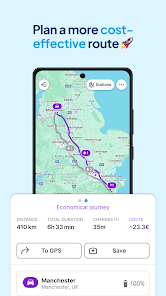
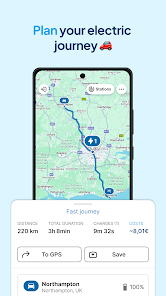
Plan your trips efficiently with Chargemap's route planning feature. By integrating charging station locations along your route, it helps you avoid range anxiety and ensures you can power up when necessary, making long drives more enjoyable.

User-Friendly Map

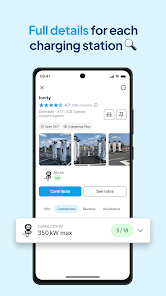
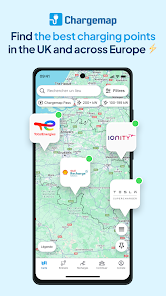
Chargemap offers an intuitive map interface that makes it easy to locate nearby charging stations. With real-time updates, you can quickly find available chargers and plan your route without any hassle, ensuring a smooth journey for electric vehicle drivers.

Pros & Cons

Pros
  • Find local charging stations easily with an intuitive map interface.
  • Access real-time availability updates to plan your charging stops.
  • Enjoy user reviews and ratings to choose the best stations.
  • Benefit from route planning that includes charging station locations.
  • Join a community of EV users for shared tips and experiences.
Cons
  • Limited coverage in rural areas can hinder accessibility for users.
  • Some charging stations may have unreliable availability, causing inconvenience.
  • User interface can be confusing, leading to potential frustration during navigation.

Real Experience Using Chargemap - Charging stations

Application Scenarios

Chargemap is a must-have app for electric vehicle (EV) owners, providing essential information about charging stations across various locations. Whether you're planning a long road trip or just needing a quick charge during your daily commute, Chargemap allows users to search for charging points nearby or along their route. The app is especially useful in urban environments where charging infrastructure can be sparse and difficult to locate. Users can filter searches based on different charging types, such as fast chargers or standard outlets, and even check real-time availability to avoid wasting time at a station that is already occupied. Additionally, Chargemap is invaluable for those who travel abroad, as it features charging stations in multiple countries, making it easier to navigate unfamiliar territories with your EV.

User Experience

The user experience on Chargemap is designed with simplicity and efficiency in mind. Upon opening the app, users are greeted with a clean interface that allows for quick access to the map and search functions. The ability to toggle between list and map views enhances usability, catering to different preferences. Users can also contribute to the community by adding new charging stations or reporting issues, which fosters a sense of involvement and support among EV owners. Notifications about station availability and updates ensure that users remain informed. The app also includes a route planner feature, which calculates the most efficient path while integrating charging stops based on your vehicle's battery level, thereby alleviating range anxiety.

Pricing

Chargemap operates on a freemium model, offering essential features free of charge, which is highly appealing to casual users. For those seeking additional functionalities, such as offline maps and exclusive discounts on charging, a premium subscription is available. The subscription fee is relatively low compared to the potential savings on charging costs, making it a worthwhile investment for frequent users. This pricing structure allows users to experience the basic offerings of the app before deciding if the premium features are worth the investment, ensuring flexibility and satisfaction.

Updates & Support

Chargemap is regularly updated to enhance user experience, fix bugs, and add new features. The developers are responsive to user feedback, continually improving the app based on real-world usage. Their commitment to maintaining a comprehensive database of charging stations means that users can expect reliable information at their fingertips. Customer support is readily available through the app, with a dedicated team to assist with inquiries and issues. The active community forum within the app also provides a platform for users to share tips and experiences, further enriching the overall user experience. Overall, Chargemap demonstrates a commitment to quality and user satisfaction, making it a leader in the EV charging app market.

verified Security & Privacy Review

The Chargemap app prioritizes user security and privacy by implementing robust data protection measures. It utilizes encryption protocols to safeguard sensitive information during transmission, ensuring that user data remains confidential and secure from unauthorized access. In terms of permissions, Chargemap requires users to grant access to location services to provide accurate charging station information. However, users have control over these permissions and can adjust settings according to their privacy preferences. The app also allows users to manage their account settings, enabling them to limit the amount of personal information shared. Chargemap adheres to privacy regulations, and its privacy policy clearly outlines how user data is collected, used, and stored. The app does not sell user data to third parties, emphasizing its commitment to user privacy. Additionally, users can delete their accounts and associated data at any time, reinforcing the app's transparency in user data handling. Overall, Chargemap demonstrates a strong commitment to security and privacy, making it a reliable choice for users seeking charging station solutions without compromising their personal information.

Reviews

3.5

“Great app for finding charging stations easily!”

“User-friendly interface and accurate station locations.”

“Love the real-time availability updates.”

“Community reviews help choose the best stations.”

“Perfect for long road trips with an EV!”

FAQ

1

Can I submit suggestions or feedback to Chargemap - Charging stations?

Yes, users can submit suggestions or feedback directly through the app or by contacting Chargemap's customer support team, as they value user input for app improvements.

2

Does Chargemap - Charging stations collect my personal data?

Chargemap may collect certain personal data to enhance user experience and app functionality, but it adheres to privacy regulations and provides users with information on how their data is used.

3

Does Chargemap - Charging stations support offline use?

Yes, Chargemap allows users to download maps for offline use, enabling them to find charging stations even without an internet connection.

4

How do I cancel my Chargemap - Charging stations subscription?

Users can cancel their subscription through the app's settings or their app store account settings, depending on how they subscribed. Instructions are typically provided in the app's help section.

5

How much does a subscription to Chargemap - Charging stations cost?

The subscription cost for Chargemap can vary based on the plan chosen, and users should check the app for the most current pricing options and details.

How to use Chargemap - Charging stations

1

Can I change my customer number after I've activated my account?

Unfortunately, customer numbers cannot be changed once your account is activated.

2

How can I activate my Chargemap account?

To activate your account, click the activation link sent to your email after registration.

3

How do I contact customer service for Chargemap?

You can reach customer service through the support section of our website or via the app's help feature.

4

How do I log in if I haven't activated my account yet?

You need to activate your account first by following the email instructions before you can log in.

5

I forgot my customer number; how can I retrieve it?

You can retrieve your customer number by logging into your account and checking your profile settings.

Editor's Choice