This site uses cookies to enhance your user experience. By clicking any link on this site you are giving your consent to our cookie policy. Read more
Reject
Accept All

Advertiser and Editorial Disclosures

WRAL Weather

WRAL Weather

verified Verified App

Developer: Capitol Broadcasting Company

  • category

    Category: Weather

  • price

    Price: free

  • age rating

    Age Rating: Everyone

  • rating

    Rating: 4.2

  • download

    Downloads: 100,000+

  • version

    Version: 7.0.537

Screenshot 1
Screenshot 2
Screenshot 3
Screenshot 4
Screenshot 5
Screenshot 6

Features & Highlights

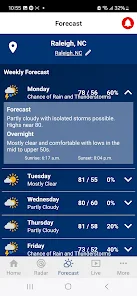
Hourly Forecasts

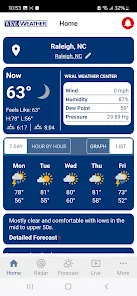
Plan your day effectively with accurate hourly forecasts that break down temperature, precipitation, and wind conditions. This feature allows you to see how the weather will change throughout the day, helping you make informed decisions for outdoor activities.

Interactive Weather Maps

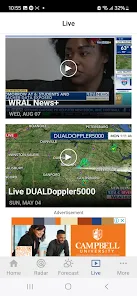
Explore interactive weather maps that give you a comprehensive view of current conditions and forecasts. With options to zoom in on specific areas, you can easily visualize weather patterns and anticipate changes in your local climate.

Local Radar Maps

Stay informed with precise local radar maps that offer real-time updates on weather conditions in your area. With detailed overlays, you can track storms, rainfall, and other weather phenomena, ensuring you’re always prepared for what’s coming your way.

Severe Weather Alerts

WRAL Weather provides timely severe weather alerts to keep you safe and informed. Get notifications for tornadoes, hurricanes, and other extreme conditions, allowing you to take action quickly and stay one step ahead of any potential dangers.

Pros & Cons

Pros
  • Accurate forecasts for reliable planning.
  • Real-time updates keep you informed.
  • User-friendly interface for easy navigation.
  • Comprehensive radar maps enhance visibility.
  • Expert meteorologists provide trusted insights.
Cons
  • Limited coverage outside North Carolina cities
  • Forecasts can lack detail and depth
  • User interface may feel outdated
  • Occasional inaccuracies in severe weather alerts

Real Experience Using WRAL Weather

Application Scenarios

The WRAL Weather app proves to be an essential tool for anyone navigating the unpredictability of weather conditions. Whether you are planning a weekend getaway, preparing for a daily commute, or monitoring severe weather alerts, this app serves a plethora of scenarios. For outdoor enthusiasts, it provides minute-by-minute radar updates, allowing you to make informed decisions about when to hit the trails or the beach. On the other hand, those in urban settings can benefit from real-time forecasts that help in planning daily activities, ensuring that sudden rain showers or storms don’t catch them off guard. Additionally, the app’s severe weather alerts are particularly crucial for families, keeping them informed about tornado warnings, flash floods, or winter storms, ensuring safety is prioritized.

User Experience

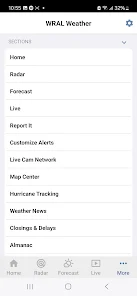
The user experience of the WRAL Weather app is commendable, marked by a clean and intuitive interface that makes navigation seamless. Upon opening the app, users are greeted with a visually appealing layout that presents essential weather data at a glance. The homepage features current conditions, a detailed hourly forecast, and a seven-day outlook, all easily accessible. Users can customize their settings to receive notifications for specific weather alerts, which adds a personal touch to their experience. The interactive radar map is a standout feature, providing a comprehensive view of weather patterns and precipitation forecasts. Furthermore, the app's performance is generally smooth, with quick loading times and minimal lag, enhancing overall satisfaction. However, some users have noted occasional glitches that could benefit from further optimization.

Pricing

Updates & Support The WRAL Weather app is regularly updated to ensure that users have access to the latest weather data and features. Developers are proactive in addressing bugs and performance issues, which is crucial for an app that relies on real-time data. User feedback is taken seriously, with many updates reflecting suggestions from the community. For those seeking assistance, the app offers a dedicated support section where users can find answers to common questions or report issues. This commitment to continuous improvement and user support enhances the overall experience and fosters a loyal user base.

verified Security & Privacy Review

The WRAL Weather app prioritizes user security and privacy by adhering to industry-standard practices. The app collects location data to provide personalized weather updates, but users have the option to disable location tracking at any time. This feature ensures that users maintain control over their geographical information. In terms of permissions, the app requires access to the device’s location services, which is essential for delivering accurate weather forecasts. Other permissions may include access to the device's network state for data connectivity. Users are informed about these permissions at the time of installation, promoting transparency. The app implements secure data transmission protocols to protect user data from unauthorized access. Additionally, WRAL Weather’s privacy policy outlines how user data is collected, used, and shared. Personal information is not sold to third parties, offering users peace of mind regarding their privacy. Overall, WRAL Weather demonstrates a commitment to safeguarding user data while delivering a reliable weather experience.

Reviews

4.2

“Accurate forecasts, reliable for daily planning”

“User-friendly interface, easy to navigate”

“Great alerts for severe weather updates”

“Love the radar feature, very detailed”

“Consistently provides timely weather information”

Compare APP

FAQ

1

Does WRAL Weather collect my personal data?

WRAL Weather may collect certain personal data such as location information to provide personalized weather updates, but it adheres to privacy policies to protect user information.

2

Does WRAL Weather offer a free trial or free version?

Yes, WRAL Weather offers a free version with basic features, while additional premium features may be available through subscription plans.

3

Does WRAL Weather require an internet connection?

Yes, WRAL Weather requires an internet connection to access real-time data and features, although some basic information may be available offline.

4

How can I contact support or send feedback for WRAL Weather?

You can contact support or send feedback for WRAL Weather through the app's help section, or by visiting the WRAL website for additional contact options.

5

How do I manage or cancel my WRAL Weather subscription?

You can manage or cancel your WRAL Weather subscription through your account settings within the app or by visiting the subscription management section of the relevant app store.

How to use WRAL Weather

1

How can I contact customer service for the WRAL Weather app?

You can reach customer service by visiting the WRAL website and looking for the support section or calling their customer support number listed there.

2

How do I log in to the WRAL Weather app?

Open the app and tap on the login option, then enter your credentials or create a new account if you don't have one.

3

Is there an activation process for the WRAL Weather app?

The app does not require activation. Simply download it from your app store and log in or create an account to start using it.

4

What is the customer service number for assistance with the WRAL Weather app?

The customer service number can be found on the WRAL website under the contact section.

Editor's Choice