This site uses cookies to enhance your user experience. By clicking any link on this site you are giving your consent to our cookie policy. Read more
Reject
Accept All

Advertiser and Editorial Disclosures

TED Talks: Watch and Learn

TED Talks: Watch and Learn

verified Verified App

Developer: TED Conferences LLC

  • category

    Category: Education

  • price

    Price: free

  • age rating

    Age Rating: 10+

  • rating

    Rating: 4.0

  • download

    Downloads: 10,000,000+

  • version

    Version: 7.5.87

Screenshot 1
Screenshot 2
Screenshot 3
Screenshot 4
Screenshot 5
Screenshot 6

Features & Highlights

Curated Playlists

Explore expertly curated playlists that group talks by themes, topics, or speakers, making it easier to find content that sparks your curiosity. Whether you're looking for inspiration, education, or entertainment, these playlists provide a seamless viewing experience tailored to your mood.

Interactive Transcripts

The app offers interactive transcripts that allow you to follow along with the talk and easily jump to specific sections. This feature enhances comprehension and retention, making it a valuable tool for learners who want to engage more deeply with the material.

Offline Viewing

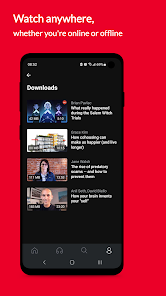
With the offline viewing feature, you can download your favorite TED Talks and watch them anytime, anywhere without needing an internet connection. This is perfect for commutes, travel, or simply enjoying a talk during your downtime without interruptions.

Personalized Recommendations

The app uses smart algorithms to suggest TED Talks tailored to your interests, ensuring that you discover content that resonates with you. This feature helps you dive deeper into topics you love while also encouraging you to explore new ideas and perspectives.

Pros & Cons

Pros
  • Gain insights from diverse experts across various fields and industries.
  • Enhance your knowledge with engaging and easily digestible presentations.
  • Discover innovative ideas that inspire creativity and critical thinking.
  • Access a vast library of talks anytime, anywhere, for convenient learning.
  • Enjoy the opportunity to connect with a global community of curious minds.
Cons
  • Limited depth may oversimplify complex topics, leaving viewers with incomplete understanding.
  • Reliance on charismatic speakers can overshadow the content's educational value.
  • Short format may discourage critical thinking and deeper engagement with subjects.

Real Experience Using TED Talks: Watch and Learn

Application Scenarios

The TED Talks: Watch and Learn app serves as a versatile platform suitable for various application scenarios. Whether you are a student seeking inspiration for a project, a professional looking to enhance your skills, or simply someone who enjoys learning about new ideas, this app caters to all. Users can easily search for talks on specific topics, making it an excellent resource for educators and researchers. Additionally, the app allows users to create playlists of their favorite talks, enabling easy access for those who want to revisit impactful speeches. The offline feature is particularly useful for commuters or travelers who wish to consume content without worrying about internet connectivity.

User Experience

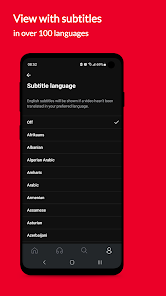
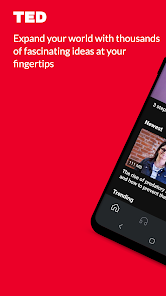
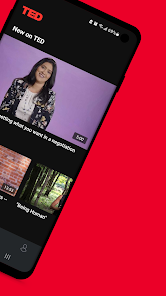
The user experience on the TED Talks app is commendable, characterized by an intuitive interface that allows for seamless navigation. Upon launching the app, users are greeted with a clean layout showcasing trending talks, recommendations based on preferences, and categories for easy browsing. The video quality is exceptional, with options to adjust resolution depending on the user's internet speed. One of the standout features is the ability to save talks for offline viewing, ensuring that users can enjoy content anywhere, anytime. Furthermore, the app includes subtitles in multiple languages, making it accessible to a broader audience. Users can also engage with the community by liking, sharing, and commenting on talks, enriching the overall experience.

Pricing

The TED Talks app follows a freemium model, allowing users to access a vast library of talks without any cost. The free version offers an extensive range of content, making it a valuable educational tool for anyone. However, users can opt for a premium subscription to unlock exclusive features, such as ad-free viewing and early access to new talks. The pricing is competitive, and the value provided through premium content justifies the cost for those who are avid learners or professionals seeking advanced knowledge.

Updates & Support

Regular updates ensure that the TED Talks app remains relevant and user-friendly. The developers continually enhance the app's features, fix bugs, and optimize performance based on user feedback. The support team is responsive and helpful, providing assistance through various channels, including FAQs, email support, and community forums. Users can easily report issues or suggest features, fostering a sense of community and collaboration. Overall, the commitment to regular updates and robust support significantly enhances the overall user experience, making the TED Talks app a reliable learning tool.

verified Security & Privacy Review

The TED Talks: Watch and Learn app prioritizes user security and privacy through robust data handling practices. The app employs encryption protocols to safeguard user data during transmission, ensuring that sensitive information remains protected from unauthorized access. In terms of permissions, the app requests access to essential functions such as internet connectivity for streaming content. Users are informed about the permissions required, promoting transparency and trust. The app does not request unnecessary permissions, thereby minimizing potential privacy risks. TED respects user privacy by adhering to stringent data protection regulations. Personal data collected is minimal and primarily used to enhance user experience, such as personalizing content and managing user accounts. The app's privacy policy clearly outlines how data is collected, used, and shared, allowing users to make informed decisions regarding their information. Overall, TED Talks: Watch and Learn demonstrates a strong commitment to user security and privacy, making it a reliable platform for accessing educational content.

Reviews

4.0

“Inspiring talks that spark creativity and innovation”

“User-friendly interface with great content variety”

“Perfect for learning on the go”

“Engaging speakers make knowledge enjoyable”

“Love the personalized recommendations feature”

FAQ

1

Can I submit suggestions or feedback to TED Talks: Watch and Learn.?

Yes, users can submit suggestions or feedback through the app's support section or official website, where the team welcomes input to improve the user experience.

2

Does TED Talks: Watch and Learn. collect my personal data?

The app may collect some personal data to enhance user experience, but it adheres to privacy policies and guidelines to protect user information.

3

Does TED Talks: Watch and Learn. support offline use?

Yes, TED Talks: Watch and Learn. allows users to download talks for offline viewing, making it convenient to access content without an internet connection.

4

How do I cancel my TED Talks: Watch and Learn. subscription?

Users can cancel their subscription through the app's settings or the platform's subscription management page, following the provided instructions for cancellation.

5

How much does a subscription to TED Talks: Watch and Learn. cost?

The subscription cost for TED Talks: Watch and Learn. varies by region and may include monthly or annual payment options, providing users with access to exclusive content.

How to use TED Talks: Watch and Learn

1

Can I change my email after I log in?

Yes, you can change your email address by logging into your account and navigating to the account settings. Make sure to verify the new email after updating it.

2

Can I log in to TED Talks from multiple devices?

Yes, you can log in to your TED Talks account from multiple devices. Just use your email and password on each device to access your account.

3

How can I reach customer service for TED Talks?

You can reach customer service by visiting the help section on the TED Talks website, where you'll find options to chat, email, or call for support.

4

How do I activate my TED Talks account?

To activate your account, check your email for the activation link sent after registration. Click the link to complete the activation process.

5

How do I find help if I have questions about my account?

For account-related questions, visit the help section on the TED Talks website, where you can find FAQs or contact customer service for further assistance.

Editor's Choice