This site uses cookies to enhance your user experience. By clicking any link on this site you are giving your consent to our cookie policy. Read more
Reject
Accept All

Advertiser and Editorial Disclosures

Simple Radio: Live AM FM Radio

Simple Radio: Live AM FM Radio

verified Verified App

Developer: Streema, Inc.

  • category

    Category: Music & Audio

  • price

    Price: free

  • age rating

    Age Rating: Teen

  • rating

    Rating: 4.8

  • download

    Downloads: 50,000,000+

  • version

    Version: 6.1.1

Screenshot 1
Screenshot 2
Screenshot 3
Screenshot 4
Screenshot 5
Screenshot 6

Features & Highlights

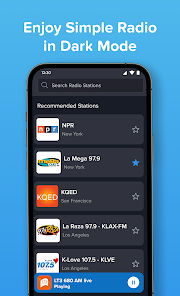
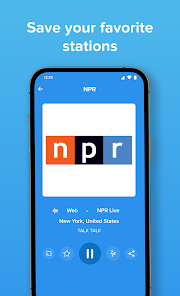
Custom Favorites List

The app allows you to create a personalized list of your favorite stations, so you can access them with just a tap. This feature makes it incredibly convenient to switch between your go-to channels without missing a beat, enhancing your listening experience.

Live Radio Streaming

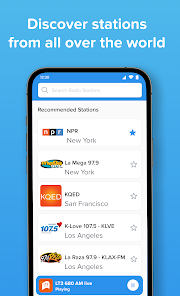
Simple Radio offers an extensive selection of live AM and FM radio stations from around the world. You can easily explore different genres and discover new favorites, making it a breeze to find the perfect station for any mood or occasion.

Sleep Timer Functionality

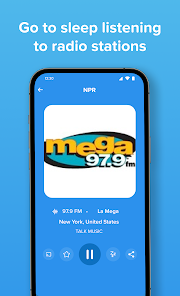
Simple Radio includes a handy sleep timer that lets you drift away to your favorite station without worrying about it playing all night. Set the timer for a specific duration, and the app will automatically turn off, making it perfect for bedtime listening.

User-Friendly Interface

With its clean and intuitive design, Simple Radio ensures a seamless user experience. Navigating through your favorite stations is quick and easy, allowing you to spend less time searching and more time enjoying your favorite tunes and talk shows.

Pros & Cons

Pros
  • Access thousands of live AM and FM radio stations worldwide
  • Enjoy a user-friendly interface for easy navigation and quick access
  • Listen to your favorite stations anytime with a reliable streaming experience
  • Discover new music and shows tailored to your interests and preferences
  • Save your favorite stations for instant access at any time
Cons
  • Limited station selection may restrict listener preferences.
  • Occasional buffering can disrupt the listening experience.
  • User interface may feel outdated and less intuitive.

Real Experience Using Simple Radio: Live AM FM Radio

Application Scenarios

Simple Radio: Live AM FM Radio is designed for users who enjoy listening to their favorite radio stations anytime, anywhere. Whether you are commuting to work, exercising at the gym, or simply relaxing at home, this app offers a convenient solution to access a wide variety of radio broadcasts. It caters to diverse interests, providing everything from news and talk shows to music and sports. Users can seamlessly switch between local AM/FM stations and international online streams, making it an ideal choice for travelers who want to keep up with their hometown stations while abroad. The app is also perfect for those who want to explore new cultures by tuning into stations from different countries, broadening their listening experience beyond their usual preferences.

User Experience

The user experience of Simple Radio is notably intuitive and user-friendly. Upon opening the app, users are greeted with a clean and straightforward interface that allows for easy navigation. Finding and selecting stations is simple, thanks to the search function and categorized lists. The sound quality is impressive, ensuring that listeners enjoy crystal-clear audio regardless of their location. Additionally, the app supports background playback, which allows users to multitask without interruptions. One of the standout features is the ability to save favorite stations, making it quick and easy to return to preferred content. However, some users have reported occasional buffering issues, especially with international streams, which can be a minor drawback in an otherwise seamless experience.

Pricing

Simple Radio offers a free version, which includes basic features and access to numerous stations. For users who desire an ad-free experience and additional functionalities, the app provides a premium subscription option. The pricing is competitive, making it accessible for most users. Subscribing to the premium version not only enhances the listening experience by removing ads but also unlocks features like recording live broadcasts and accessing exclusive content. This tiered pricing strategy ensures that both casual listeners and dedicated radio enthusiasts can find a suitable plan that meets their needs.

Updates & Support

The developers of Simple Radio are committed to providing regular updates, ensuring that the app remains current and continues to meet user expectations. Users can expect frequent enhancements, bug fixes, and the addition of new stations as part of these updates. The support system is robust, featuring a comprehensive FAQ section and responsive customer service that can be reached via email. Users have praised the support team for their prompt and helpful responses, which contribute to a positive overall experience. This commitment to improvement and user satisfaction makes Simple Radio a reliable choice for anyone looking to enjoy live radio on their devices.

verified Security & Privacy Review

Simple Radio: Live AM FM Radio prioritizes user security and privacy, ensuring that personal data is handled with care. The app employs robust encryption methods to safeguard user information during transmission, minimizing the risk of data breaches. In terms of permissions, Simple Radio requires access to the internet to stream live radio stations. However, it does not request unnecessary permissions that could compromise user privacy, such as access to contacts or location services. This limited access helps to maintain a secure environment for users. The app's privacy policy clearly outlines how user data is collected, used, and shared. Simple Radio commits to not selling or sharing personal information with third parties without explicit consent. Users can listen to their favorite stations without providing personal details, giving them greater control over their privacy. Overall, Simple Radio demonstrates a solid approach to data security and privacy, making it a reliable choice for users who value their digital safety while enjoying live radio broadcasts.

Reviews

4.8

“Great selection of stations, easy to use!”

“Love the simple interface and reliable streaming.”

“High-quality sound, perfect for music lovers.”

“Variety of genres keeps it interesting.”

“Occasional buffering issues, but overall fantastic app.”

FAQ

1

Can I submit suggestions or feedback to Simple Radio: Live AM FM Radio?

Yes, users can submit suggestions or feedback directly through the app or by contacting customer support via their official website.

2

Does Simple Radio: Live AM FM Radio collect my personal data?

Yes, the app collects some personal data to improve user experience, but it is committed to maintaining user privacy and provides a detailed privacy policy.

3

Does Simple Radio: Live AM FM Radio support offline use?

No, Simple Radio: Live AM FM Radio requires an active internet connection to stream radio stations and does not support offline listening.

4

How do I cancel my Simple Radio: Live AM FM Radio subscription?

Users can cancel their subscription through their app store account settings, following the specific instructions for their device type.

5

How much does a subscription to Simple Radio: Live AM FM Radio cost?

The premium subscription typically costs a monthly or annual fee, which may vary by region and any ongoing promotions.

How to use Simple Radio: Live AM FM Radio

1

Can I change my customer number if needed?

Unfortunately, customer numbers cannot be changed. For any concerns, please reach out to customer service for guidance.

2

Can I log in using my social media account?

Yes, you can log in using your social media account by selecting the appropriate option on the login screen.

3

How can I contact customer service for Simple Radio?

You can reach our customer service by emailing support

4

How do I activate my account after downloading the app?

After downloading, open the app and follow the prompts to enter your details and activate your account.

5

How do I log in to my Simple Radio account?

To log in, open the app, tap on 'Log In', and enter your email and password associated with your account.

Editor's Choice