This site uses cookies to enhance your user experience. By clicking any link on this site you are giving your consent to our cookie policy. Read more
Reject
Accept All

Advertiser and Editorial Disclosures

Amazon Music: Songs & Podcasts

Amazon Music: Songs & Podcasts

verified Verified App

Developer: Amazon Mobile LLC

  • category

    Category: Music & Audio

  • price

    Price: 0

  • age rating

    Age Rating: Teen•Diverse Content: Discretion Advised

  • rating

    Rating: 3.4

  • download

    Downloads: /

  • version

    Version: 45608

Screenshot 1
Screenshot 2
Screenshot 3
Screenshot 4
Screenshot 5
Screenshot 6
Screenshot 7
Screenshot 8

Features & Highlights

Music Library Access

Dive into an extensive library of over 70 million songs, albums, and playlists. Whether you're a fan of chart-toppers or indie gems, Amazon Music ensures you have a diverse range of music at your fingertips, perfect for any mood or occasion.

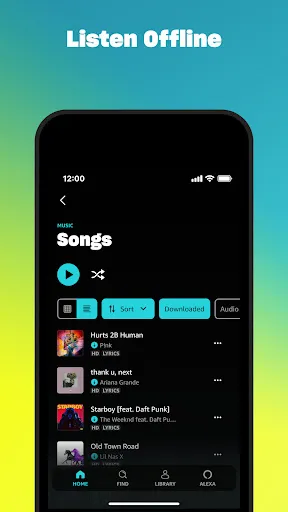
Offline Listening

Download your favorite songs and podcasts to enjoy offline, perfect for when you're traveling or in areas with limited connectivity. This feature allows you to take your music library anywhere, ensuring uninterrupted listening no matter the circumstances.

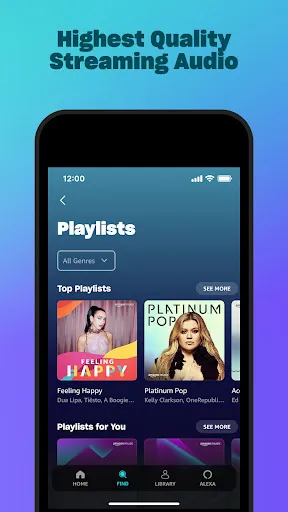
Personalized Playlists

Enjoy personalized playlists curated just for you, based on your listening habits and preferences. Amazon Music uses advanced algorithms to create tailored experiences that keep your music fresh and exciting, making every listening session feel unique and special.

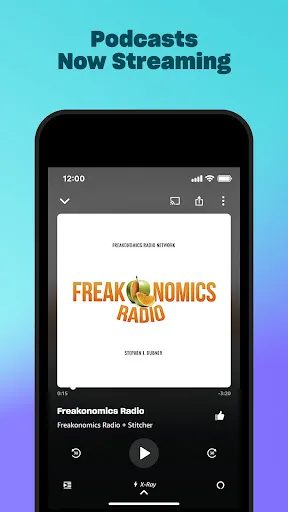
Podcasts Galore

Explore a vast selection of podcasts across various genres, from true crime to comedy. Amazon Music makes it easy to discover new shows or catch up on your favorites, offering something for everyone, whether you're at home or on the go.

Pros & Cons

Pros
  • Enjoy unlimited access to millions of songs and podcasts.
  • Discover personalized playlists tailored to your taste.
  • Stream music offline, perfect for on-the-go listening.
  • Enjoy high-quality audio for an immersive experience.
  • Access exclusive content and live performances from top artists.
Cons
  • Limited song library compared to competitors may restrict music choices.
  • User interface can be confusing and less intuitive for new users.
  • Offline listening requires a premium subscription, adding extra costs.

Real Experience Using Amazon Music: Songs & Podcasts

Application Scenarios

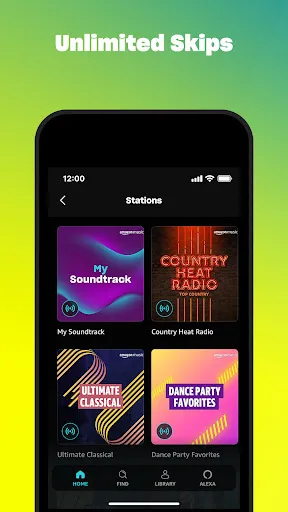
Amazon Music: Songs & Podcasts is a versatile application that caters to a wide range of listening scenarios. Whether you are a casual listener, a dedicated music aficionado, or a podcast enthusiast, this app has something for everyone. Imagine starting your day with an energizing playlist while commuting to work or tuning into a podcast episode during your lunch break. The app also excels in providing curated playlists for specific moods or activities, such as workout sessions or relaxation time. Furthermore, users can create personalized playlists to suit their preferences, making it easy to access favorite tracks or discover new music based on listening history. With its integration with Alexa, users can control playback hands-free, enhancing the functionality in various environments, from the kitchen to the car.

User Experience

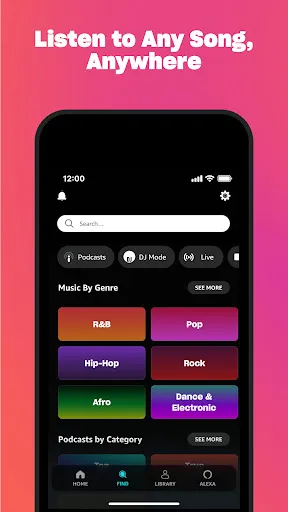
The user experience on Amazon Music is designed to be intuitive and engaging. The app features a clean, modern interface that is easy to navigate. Users can quickly search for songs, albums, or podcasts using the search bar or explore the extensive library organized by genre, mood, and curated playlists. The playback quality is commendable, with options for high-definition audio that enhances the listening experience. Users can also download music and podcasts for offline listening, which is a significant advantage for those who travel frequently or have limited data plans. The app's recommendation algorithm is impressive, often suggesting tracks and podcasts that align well with individual tastes, thereby keeping the listening experience fresh and exciting.

Pricing

Amazon Music offers a variety of pricing plans to accommodate different users. While there is a free tier available, it comes with ads and limited access to the full library. For a more comprehensive experience, users can opt for Amazon Music Unlimited, which offers thousands of songs and podcasts ad-free for a monthly subscription fee. Additionally, Amazon Prime members enjoy a discounted rate for Music Unlimited, making it a cost-effective choice for those already invested in the Amazon ecosystem. Overall, the pricing structure is competitive when compared to other music streaming services, providing good value for the extensive library and features offered.

Updates & Support

Amazon Music consistently rolls out updates to enhance functionality, fix bugs, and improve user experience. The development team is attentive to user feedback, frequently introducing new features based on popular requests. Support is also robust, with a comprehensive FAQ section and the option to contact customer service for more complex issues. Users can expect timely responses and helpful solutions, ensuring that any problems encountered while using the app are swiftly addressed. This commitment to continuous improvement and customer support contributes significantly to a positive overall experience with Amazon Music.

verified Security & Privacy Review

The Amazon Music app prioritizes user security and privacy through robust data protection practices. It employs encryption protocols to safeguard user data, both in transit and at rest, ensuring that sensitive information remains secure from unauthorized access. Users are informed about data collection practices in the privacy policy, highlighting transparency in what information is gathered and how it is utilized. In terms of permissions, the app requests access to various device features, such as storage and microphone, which are essential for functionalities like offline listening and voice commands. Users have the option to manage these permissions, allowing for a tailored experience while maintaining control over their data. Amazon's commitment to user privacy extends to its data handling practices. The app anonymizes personal information and limits data sharing with third parties. Users can also access and manage their data preferences within the app settings, enhancing their ability to protect their privacy. Overall, Amazon Music demonstrates a strong focus on security and user trust, making it a reliable choice for music and podcast enthusiasts.

Reviews

3.4

“Great selection of songs and podcasts!”

“User-friendly interface and easy navigation.”

“Offline listening feature is a game changer.”

“Love the personalized playlists and recommendations.”

“Excellent sound quality and streaming performance.”

FAQ

1

Does Amazon Music: Songs & Podcasts collect my personal data?

Yes, Amazon Music: Songs & Podcasts may collect personal data as outlined in its privacy policy, including information related to your account, listening habits, and device information.

2

Does Amazon Music: Songs & Podcasts offer a free trial or free version?

Amazon Music: Songs & Podcasts typically offers a free trial for new users, allowing them to explore the service before committing to a paid subscription. There is also a free version with limited features and ads.

3

Does Amazon Music: Songs & Podcasts require an internet connection?

While an internet connection is required for streaming music and podcasts, users can download songs and episodes for offline listening without the need for a connection.

4

How can I contact support or send feedback for Amazon Music: Songs & Podcasts?

Users can contact support or send feedback through the Amazon Music app or website, where they can find help resources, FAQs, and options for reaching customer service directly.

5

How do I manage or cancel my Amazon Music: Songs & Podcasts subscription?

You can manage or cancel your Amazon Music: Songs & Podcasts subscription through your Amazon account settings under the "Your Memberships and Subscriptions" section.

How to use Amazon Music: Songs & Podcasts

1

Can I activate my Amazon Music account on multiple devices?

Yes, you can activate your account on multiple devices by logging in with the same credentials on each device.

2

How can I contact customer service for issues with my Amazon Music account?

You can reach Amazon Music customer service through the Help section in the app or on the website. They offer chat and email support options.

3

How can I update my customer information for Amazon Music?

You can update your customer information by logging into your account and going to the account settings section.

4

How do I find my customer number for Amazon Music?

Your customer number can typically be found in your account settings under account information.

5

How do I log in to my Amazon Music account?

To log in, open the app or website, enter your email and password, and click on the login button.

Editor's Choice