This site uses cookies to enhance your user experience. By clicking any link on this site you are giving your consent to our cookie policy. Read more
Reject
Accept All

Advertiser and Editorial Disclosures

Rosetta Stone: Learn Languages

Rosetta Stone: Learn Languages

verified

Rosetta Stone Ltd

4.6
Rating
10,000,000+ Downloads
8.34.4 Version
  • category

    Category: Education

  • price

    Price: free

  • age rating

    Age Rating: Everyone

  • rating

    Rating: 4.6

  • available on

    Available on: /

  • updated on

    Updated on: May 28, 2026

Screenshot 1
Screenshot 2
Screenshot 3
Screenshot 4
Screenshot 5
Screenshot 6

Features & Highlights

Cultural Context Integration

The app emphasizes cultural context alongside language learning, helping users understand not just the words but the nuances of different cultures. This holistic approach enriches the learning experience, enabling users to communicate more effectively and meaningfully in real-world situations.

Interactive Learning Environment

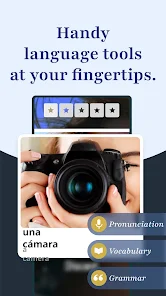
Rosetta Stone offers an immersive learning experience that encourages active participation through interactive exercises. Users can engage in speaking, listening, reading, and writing activities that mimic real-life scenarios, making language acquisition feel natural and intuitive.

Personalized Learning Path

Rosetta Stone tailors the learning journey to each user’s pace and interests. With personalized lessons and adaptive learning strategies, users can focus on areas that matter most to them, making the process both efficient and enjoyable.

Speech Recognition Technology

The app utilizes advanced speech recognition technology to help users improve their pronunciation and speaking skills. By providing instant feedback, it allows learners to practice and refine their spoken language abilities, ensuring they sound more authentic when conversing with native speakers.

Pros & Cons

Pros
  • Immersive learning environment enhances language retention and comprehension.
  • Interactive exercises boost speaking and listening skills effectively.
  • Cultural context integration enriches understanding of the language.
  • Personalized learning paths cater to individual pace and preferences.
  • Convenient mobile access allows learning anytime, anywhere.
Cons
  • Limited grammar explanation may hinder deeper understanding of the language.
  • High subscription costs can be a barrier for many learners.
  • Lack of personalized feedback reduces opportunities for improvement.

Real Experience Using Rosetta Stone: Learn Languages

Application Scenarios

The Rosetta Stone app is designed to cater to a variety of language-learning needs, making it suitable for different scenarios. Whether you are a traveler looking to pick up essential phrases before a trip, a student aiming to supplement your classroom learning, or a professional seeking to enhance your career prospects through language acquisition, this app has you covered. The immersive approach of Rosetta Stone encourages users to engage in practical conversations, making it particularly beneficial for those who need to use their language skills in real-world contexts. Additionally, the app's flexibility allows users to learn at their own pace, making it an excellent choice for busy professionals and students juggling multiple commitments.

User Experience

The user experience of the Rosetta Stone app is intuitive and engaging. The interface is clean and user-friendly, allowing learners to navigate through lessons with ease. Each lesson incorporates interactive elements, including speech recognition technology that helps users refine their pronunciation. The gamified approach keeps users motivated, as they can earn points and track their progress over time. Moreover, the comprehensive speech and writing exercises ensure that learners develop a well-rounded skill set. However, some users have reported that the lack of grammar explanations can be a drawback for those who prefer a more traditional approach to language learning. Nevertheless, the immersive experience and focus on practical usage make it a compelling choice for many language learners.

Pricing

Rosetta Stone offers various pricing plans to accommodate different budgets and learning goals. Users can choose between a subscription model, where they can pay monthly or annually, or a one-time purchase for lifetime access to a specific language course. While the pricing may be higher compared to some other language-learning apps, many users feel that the quality of content and the effectiveness of the learning approach justify the expense. Additionally, Rosetta Stone often provides promotional discounts, making it more accessible to new users looking to try out the service without a significant financial commitment.

Updates & Support

Regular updates to the Rosetta Stone app ensure that users benefit from new features, improved performance, and additional content. The developers are proactive in responding to user feedback, often incorporating suggestions into future updates. Customer support is readily available, with resources such as FAQs, forums, and direct customer service options to assist users with any issues they may encounter. The commitment to continuous improvement and customer satisfaction sets Rosetta Stone apart in the competitive landscape of language-learning applications, making it a reliable choice for users seeking ongoing support and updates throughout their language-learning journey.

verified Security & Privacy Review

When evaluating the security and privacy practices of Rosetta Stone: Learn Languages, it is essential to note the app’s commitment to protecting user data. The app employs industry-standard encryption protocols to safeguard personal information during transmission and storage. This ensures that sensitive data remains protected from unauthorized access. In terms of privacy practices, Rosetta Stone adheres to strict policies regarding user data collection and usage. The app collects only the information necessary to enhance the learning experience, such as user progress and preferences. Users are informed about data usage through a transparent privacy policy, which outlines how their information is managed. The app requires certain permissions, including access to the device’s microphone for speech recognition features. Users are prompted to grant permissions, ensuring they have control over what is shared. Overall, Rosetta Stone demonstrates a solid commitment to user privacy and data security, making it a trustworthy option for language learners concerned about their personal information.

User Reviews

  • Midnight
    2025/10/26

    I don't know what is being used to detect how you're saying a word but no other app has had problems "hearing" what I say. I can't even get the words in the first lesson "right" despite attempting speech fast, slow, regular speed, and with a native speaker saying I'm saying it correctly. I have the voice settings "on easy" and it still isn't working properly.

  • Russell Carey
    2025/04/15

    Direct language immersion is great so far, it feels like great practice for a beginner, but it often feels like the lessons are too structured and I struggle to pay attention. I still haven't found the exact fit I need for me, as I have tried four different language learning apps so far. One of them was well beyond what I've learned (AI driven), and with the others I struggle to keep my already limited attention span (ADHD), or they feel really basic. This one is Ok, it just drains my dopamine.

  • Chelsie Schuette
    2025/08/26

    The overall learning experience is great, but when I try to buy a lifetime membership, the website sends me immediately to the app. When I try to purchase through the app, it gives an error message. It winds up a vicious cycle, as I can't purchase through the app, and the website keeps sending me to the app. Very annoying.

  • Scarlett Long
    2026/06/16

    absolutely amazing! I love this learning program. the style is unique and so easy to learn with! I am a visual learner so the pictures REALLY help and it's so much fun. It'd be the best mobile game if it was one! sooooo worth the money. I'm fascinated with languages and especially French, which is what I'm learning. I just completed the Unit 1 Language basics!!! I already know so much and I think I'm a natural! the picture word combos are great for visual learners. merci! J'adore.

  • Col. Jim Worrall
    2026/05/21

    Buyer beware! Buying the lifetime version was a big mistake. Free alternatives are better. Speech recognition fails often. Courses are chaotic & disjointed. Each lesson involves guessing which sentence is correct based on photos. The sentences are full of words that haven't been introduced before. Zero explanation or instruction, just guess. Rosetta Stone defrauded lifetime subscribers by dropping support & adding the word 'Sapphire' to their update so they can pretend it's a different product.

Review Source: Google Play store public user reviews.

FAQ

1

Can I submit suggestions or feedback to Rosetta Stone: Learn, Practice?

Yes, users are encouraged to submit feedback and suggestions through the app's support features or directly on the Rosetta Stone website.

2

Does Rosetta Stone: Learn, Practice collect my personal data?

Yes, the app collects some personal data for account creation and to enhance user experience, but it is committed to protecting user privacy.

3

Does Rosetta Stone: Learn, Practice support offline use?

Yes, users can download lessons for offline use, allowing them to continue learning without an internet connection.

4

How do I cancel my Rosetta Stone: Learn, Practice subscription?

Users can cancel their subscription through their account settings in the app or on the Rosetta Stone website.

5

How much does a subscription to Rosetta Stone: Learn, Practice cost?

Subscription costs vary based on the plan chosen, with options for monthly, annual, and lifetime subscriptions available.

How to use Rosetta Stone: Learn Languages

1

How can I contact customer service for Rosetta Stone?

You can contact Rosetta Stone customer service through their support page on the website or by calling their customer support number listed there.

2

How do I activate my Rosetta Stone subscription?

To activate, log in to your account, go to the "My Products" section, and enter your activation code if prompted.

3

How do I find my customer number for Rosetta Stone?

Your customer number can typically be found in your account settings or on your order confirmation email.

4

How do I log in to my Rosetta Stone account?

To log in, go to the Rosetta Stone website, click on "Log In," and enter your email and password associated with your account.

What's New

• Includes various fixes and enhancements to improve your experience with Rosetta Stone.• SSO conditional access support• Edge-to-edge layout support

Editor's Choice