This site uses cookies to enhance your user experience. By clicking any link on this site you are giving your consent to our cookie policy. Read more
Reject
Accept All

Advertiser and Editorial Disclosures

Remind: School Communication

Remind: School Communication

verified Verified App

Developer: Remind101

  • category

    Category: Education

  • price

    Price: free

  • age rating

    Age Rating: Everyone

  • rating

    Rating: 4.3

  • download

    Downloads: 10,000,000+

  • version

    Version: 15.6.4

Screenshot 1
Screenshot 2
Screenshot 3
Screenshot 4
Screenshot 5
Screenshot 6

Features & Highlights

Classroom Announcements

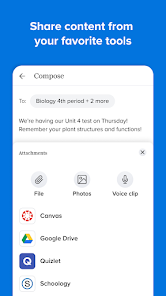
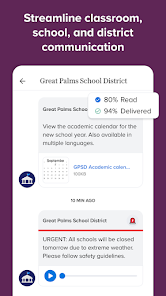
Teachers can easily post announcements that reach all students and parents in one go, streamlining communication and ensuring critical information is shared promptly. This feature helps keep everyone on the same page, whether it's about upcoming events, deadlines, or changes in schedules, enhancing overall classroom management.

Group Chats

Remind enables the creation of group chats for specific classes or extracurricular activities, allowing for focused discussions and sharing of resources. This feature promotes collaboration among students and teachers, making it easier to work together on projects, assignments, or any group-related tasks.

Multilingual Support

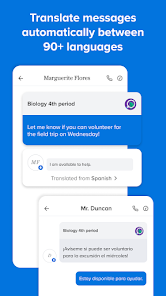
With multilingual support, Remind caters to diverse school communities by allowing users to communicate in their preferred language. This inclusivity ensures that parents and students from various backgrounds can fully participate in school communications, making the educational environment more welcoming and accessible.

Real-Time Messaging

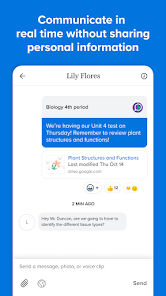
Remind allows for instant communication between teachers, students, and parents, ensuring that everyone stays informed and engaged. With real-time messaging, users can send quick updates, reminders, and important announcements, fostering a strong school community and enhancing collaboration among all parties involved.

Pros & Cons

Pros
  • Enhances parent-teacher communication effectively
  • Supports real-time updates and announcements
  • Encourages student engagement and participation
  • Simplifies scheduling and event coordination
  • Offers easy access to resources and information
Cons
  • Limited customization options for messages
  • User interface can be confusing
  • Notifications may overwhelm parents and students
  • Reliance on internet access for functionality

Real Experience Using Remind: School Communication

Application Scenarios

Remind: School Communication serves as a crucial tool for educators, students, and parents looking to enhance communication within the school environment. The app is particularly effective for sending quick messages, reminders about assignments, and important announcements. Teachers can create classes and invite students and their parents to join, ensuring everyone stays informed about upcoming events and deadlines. In addition, the app is beneficial for group projects, enabling students to collaborate and communicate in real-time. Furthermore, schools can use Remind to notify parents about school closures, meetings, and other essential information, making it a versatile platform for various educational scenarios.

User Experience

The user experience of Remind is generally positive, characterized by its intuitive interface and ease of use. Upon downloading the app, new users can quickly set up their profiles and join classes through unique codes provided by teachers. The layout is clean, allowing users to navigate between messages, assignments, and notifications effortlessly. One of the standout features is the ability to send messages in multiple languages, catering to diverse communities. Users appreciate the real-time notifications that ensure important messages are not missed. However, some users have reported occasional glitches, such as delays in message delivery, which can hinder timely communication. Overall, the app's user-friendly design and essential features make it a valuable tool for school communication.

Pricing

Remind offers a free version that provides essential features suitable for most users, including messaging, announcements, and document sharing. This version is particularly appealing to teachers and schools with limited budgets. For those seeking advanced features, such as the ability to manage larger groups or access analytics, Remind offers premium plans at competitive prices. These paid options are designed to enhance the functionality of the app, making it an attractive choice for educational institutions looking to optimize their communication efforts. The pricing structure is transparent, with no hidden fees, allowing users to choose the plan that best suits their needs.

Updates & Support

Remind is committed to continuous improvement, regularly releasing updates that enhance functionality and user experience. Users can expect new features, bug fixes, and performance improvements with each update, demonstrating the developers' dedication to providing a reliable communication platform. In terms of support, Remind offers a comprehensive help center filled with FAQs and troubleshooting guides. Users can also reach out to customer support via email or through the app for more personalized assistance. The responsive customer support team ensures that users' concerns are addressed promptly, contributing to overall satisfaction with the app.

verified Security & Privacy Review

The Remind app prioritizes user security and privacy, implementing robust measures to protect sensitive information. All data transmitted via the app is encrypted, ensuring that messages and personal details remain confidential between users. Remind requires minimal permissions to function effectively, primarily accessing user contacts to facilitate communication between students, parents, and educators. Users have control over their privacy settings, allowing them to manage who can contact them and view their information. Moreover, the app adheres to strict data handling practices, ensuring that personal data is collected only for necessary functionalities. Remind does not sell user data to third parties, reinforcing its commitment to maintaining user trust. The company provides clear privacy policies detailing how user information is used, stored, and shared, giving users transparency and control over their data. Overall, Remind demonstrates a strong commitment to data security and privacy, making it a reliable choice for school communication.

Reviews

4.3

“Easy to use for teacher-parent communication”

“Great for keeping track of assignments”

“Helpful reminders for students and parents”

“User-friendly interface, love the chat feature”

“Reliable notifications for important updates”

FAQ

1

Does Remind: School Communication collect my personal data?

Yes, Remind: School Communication may collect personal data such as names, email addresses, and phone numbers to facilitate communication, but it follows strict privacy policies to protect user information.

2

Does Remind: School Communication offer a free trial or free version?

Yes, Remind: School Communication offers a free version that includes basic messaging features, allowing users to communicate without a subscription.

3

Does Remind: School Communication require an internet connection?

Yes, Remind: School Communication requires an internet connection to send and receive messages and updates in real-time.

4

How can I contact support or send feedback for Remind: School Communication?

You can contact support or send feedback for Remind: School Communication by visiting their help center on their website or using the support feature within the app.

5

How do I manage or cancel my Remind: School Communication subscription?

You can manage or cancel your Remind: School Communication subscription through your account settings within the app or website, where you can also find options for changing your plan.

How to use Remind: School Communication

1

How can I contact customer service for the Remind app?

You can contact Remind customer service through their help center at help.remind.com or by emailing support

2

How do I activate my Remind account?

You activate your account by following the link sent to your email after registration. Click the link to confirm and set up your account.

3

How do I find the customer number for Remind?

Remind does not have a specific customer number; you can reach support through their website or email.

4

How do I log in to my Remind account?

Go to the Remind website or app, enter your email or phone number, and password, then click 'Log in.'

Editor's Choice