This site uses cookies to enhance your user experience. By clicking any link on this site you are giving your consent to our cookie policy. Read more
Reject
Accept All

Advertiser and Editorial Disclosures

Rain Sounds - Sleep & Relax

Rain Sounds - Sleep & Relax

verified

Maple Media

4.2
Rating
5,000,000+ Downloads
5.2.0(145) Version
  • category

    Category: Music & Audio

  • price

    Price: free

  • age rating

    Age Rating: Everyone

  • rating

    Rating: 4.2

  • available on

    Available on: /

  • updated on

    Updated on: Mar 31, 2026

Screenshot 1
Screenshot 2
Screenshot 3
Screenshot 4
Screenshot 5
Screenshot 6
Screenshot 7
Screenshot 8
Screenshot 9
Screenshot 10
Screenshot 11
Screenshot 12
Screenshot 13
Screenshot 14
Screenshot 15
Screenshot 16
Screenshot 17
Screenshot 18

Features & Highlights

Customizable Soundscapes

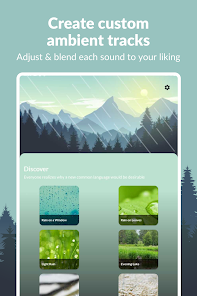
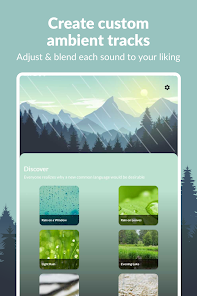
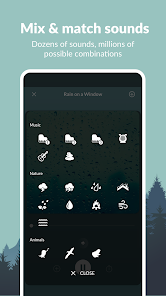
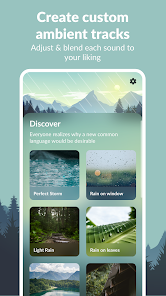
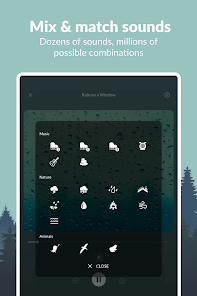
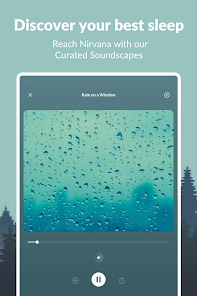
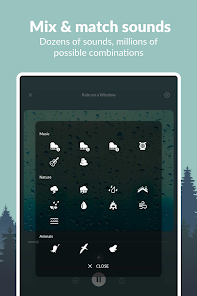
Rain Sounds - Sleep & Relax offers a variety of customizable soundscapes, allowing users to mix different rain sounds with ambient noises like thunder or gentle wind. This feature enables users to create their perfect audio atmosphere for relaxation or sleep, catering to individual preferences seamlessly.

High-Quality Audio

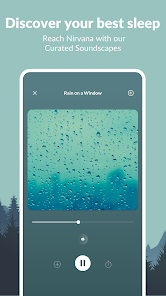
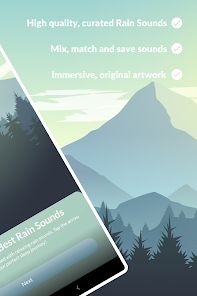
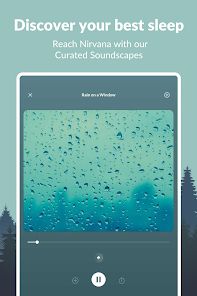
Experience rich, high-quality audio that immerses you in the soothing sounds of rain, enhancing your relaxation and sleep experience. The app is designed to deliver crystal-clear soundscapes, providing a tranquil auditory backdrop that helps drown out distractions and promotes mindfulness.

Sleep Timer Function

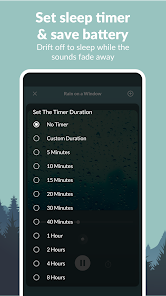
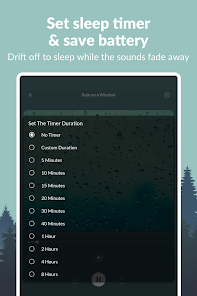
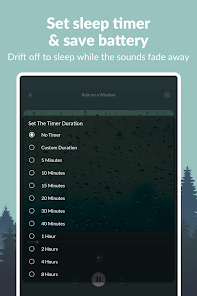
With the built-in sleep timer, users can set their preferred duration for sound playback, ensuring they drift off peacefully without worrying about the sounds continuing all night. This thoughtful feature promotes restful sleep while conserving battery life, enhancing the app's usability during nighttime.

User-Friendly Interface

Rain Sounds - Sleep & Relax boasts a user-friendly interface that makes navigating through its features a breeze. With intuitive controls and easy access to favorite soundscapes, users can quickly find their go-to relaxation sounds, making the app a delight to use for everyone.

Pros & Cons

Pros
  • Enhances sleep quality for deeper rest
  • Promotes relaxation and reduces stress levels
  • Masks disruptive noises for peaceful environments
  • Improves focus and concentration during tasks
  • Creates a calming atmosphere for meditation
Cons
  • Limited variety of sounds may become monotonous
  • May not effectively mask louder background noises
  • Some users find it hard to sleep with rain sounds
  • Potential for over-reliance on sound for relaxation

Real Experience Using Rain Sounds - Sleep & Relax

Application Scenarios

The "Rain Sounds - Sleep & Relax" app is designed for a variety of scenarios where relaxation and focus are paramount. Many users turn to this app during their bedtime routine to help ease the transition into sleep. The soothing sounds of rain create a calming atmosphere, which can be particularly beneficial for those who struggle with insomnia or restless nights. Additionally, the app serves well in creating a tranquil environment for meditation or yoga practices, allowing users to disconnect from daily stresses and immerse themselves in a peaceful state of mind. Beyond sleep and meditation, the app is also ideal for enhancing concentration during work or study sessions. By masking distracting noises, the rain sounds help users to maintain their focus and productivity, making it a versatile tool for various aspects of daily life.

User Experience

The user experience of the "Rain Sounds - Sleep & Relax" app is notably seamless and intuitive. Upon opening the app, users are greeted with a clean interface that makes navigation effortless. The sound library is extensive, featuring a diverse range of rain sounds, from gentle drizzles to heavy downpours, each customizable to suit personal preferences. Users can easily create playlists or set timers for automatic shut-off, which is particularly useful for those who like to fall asleep to the sounds. Furthermore, the sound quality is impressive, delivering a realistic auditory experience that transports users to a serene environment. Feedback from users indicates that the app is effective in improving sleep quality and enhancing relaxation, making it a favored choice among those seeking a moment of peace in their busy lives.

Pricing

Updates & Support The developers of "Rain Sounds - Sleep & Relax" are committed to delivering consistent updates and support for their users. Regular app updates not only introduce new sounds and features but also improve overall performance and user experience. Users can easily access support through the app or the website, where they can find FAQs and contact information for assistance. The responsive support team is known for addressing user queries promptly, ensuring that any issues are resolved efficiently. This dedication to ongoing improvement and user satisfaction contributes to the app's positive reputation among its user base.

verified Security & Privacy Review

The "Rain Sounds - Sleep & Relax" app prioritizes user security and privacy, implementing robust measures to protect personal information. The app does not require extensive permissions, ensuring that users can enjoy its features without compromising their privacy. The primary permissions requested are for storage, enabling users to save their favorite sounds for offline use. User data handling practices are transparent, with the app clearly stating that no personal data is collected or shared with third parties. This commitment to privacy allows users to enjoy a serene sound experience without concerns about data tracking or misuse. Additionally, the app adheres to industry-standard encryption protocols to safeguard any data that may be temporarily stored on devices. Regular updates are provided to enhance both functionality and security, ensuring that the app remains compliant with the latest privacy regulations. Overall, "Rain Sounds - Sleep & Relax" offers a secure environment for users seeking relaxation without the worry of intrusive data practices.

User Reviews

  • Iris Harris
    2026/05/14

    Edit- I have used this app since 2015 and I loved it, I stuck with it through the random crashing and when they introduced ads because at the time it was maybe 15 seconds and then I moved on. However, now the ads are ridiculous. You have to "play" a game for another app and when you've finished it stays on the Google play store. I have to close the app completely and restart hoping it doesn't make me play the af again. Extremely disappointed in the direction this app has gone.

  • Rachael L
    2024/05/14

    I used to enjoy this app, and it's still decent. Simple, good rain and white noise, but then they started getting more quickly, ones that would play and have noise while I checked the app teying to fall asleep. I would be willing to pay to get fewer or no ads, but it is quite expensive to have no ads, $3 a month or $25 a year (previously costing $50 for a no ad version). I just can't see justifying that much for a pretty simple app. And the ads are getting ridiculous and invasive.

  • A Google user
    2020/01/11

    EDIT: It was great, until it started allowing ads that make the sound cut out. Kinda ruins it. I'm looking for a new sleep app. Nice, simple app for sleep sounds. Good customization and I really lime the guitar and piano tracks. The thunder sounds aren't the best, too much loud cracking and not enough deel rumbling. The rain, wind, and ocean sounds fade in and out too much, but if you throw a few together, they make a nice sound.

  • A Google user
    2020/01/21

    Update, they now have ads when you go to turn off the app that just muted the white noise and keeps running in the background, even after I thought I closed all my running apps . I didn't realize this and it killed my phone battery. Nice easy to use app. The only thing I would change is a quick turn off, rather than having to log into my phone to back out

  • Matt Guardabascio
    2024/03/28

    Purchased the app when it was first released for a one-time fee to remove ads (7+ years ago?). Then they moved to an annual subscription model and I wasn't able to restore my one-time purchase version, so I signed up for the annual subscription despite the poor customer service because the customization was worth it. They have introduced ads for annual subscribers. Cancelling my subscription unless this changes - was willing to pay for a good product but can't support bad business practices.

Review Source: Google Play store public user reviews.

FAQ

1

Does Rain Sounds - Sleep & Relax collect my personal data?

Rain Sounds - Sleep & Relax prioritizes user privacy and does not collect personal data without consent. However, it's advisable to review the privacy policy for specific details.

2

Does Rain Sounds - Sleep & Relax offer a free trial or free version?

Yes, Rain Sounds - Sleep & Relax typically offers a free version with limited features, and users may also have access to a free trial of premium features for a limited time.

3

Does Rain Sounds - Sleep & Relax require an internet connection?

No, Rain Sounds - Sleep & Relax can be used offline, allowing you to enjoy the sounds without needing an internet connection once they are downloaded.

4

How can I contact support or send feedback for Rain Sounds - Sleep & Relax?

You can contact support or send feedback via the in-app support feature or by visiting the official website, where you will find contact information and a feedback form.

5

How do I manage or cancel my Rain Sounds - Sleep & Relax subscription?

You can manage or cancel your subscription through the app settings or your device's app store account settings, where you will find options for subscriptions and billing.

How to use Rain Sounds - Sleep & Relax

1

How can I contact customer service for the Rain Sounds - Sleep & Relax app?

You can reach customer service through the app's support section or by emailing support

2

How do I log in to the Rain Sounds app?

Open the app and tap on 'Log In.' Enter your registered email and password to access your account.

3

Is there a way to activate premium features in the Rain Sounds app?

Yes, to activate premium features, go to the app's settings, select 'Upgrade,' and follow the prompts for purchase.

4

What is the customer number for the Rain Sounds app?

The customer number is typically found in the app's settings or help section. If unavailable, contact support for assistance.

What's New

A new version of Rain Sounds is here!Here’s what’s new:Discover and enjoy over 70 new sounds:Relax with soothing new Lullabies & ASMR soundsUnwind with new Activities soundsCelebrate events with festive Holiday soundsGeneral optimizations & stability improvementsThanks for using Rain Sounds! Have questions or feedback? Email us at [email protected] for fast & friendly support

Editor's Choice