This site uses cookies to enhance your user experience. By clicking any link on this site you are giving your consent to our cookie policy. Read more
Reject
Accept All

Advertiser and Editorial Disclosures

Radio USA: Online FM Radio

Radio USA: Online FM Radio

verified Verified App

Developer: Radioworld FM

  • category

    Category: Music & Audio

  • price

    Price: free

  • age rating

    Age Rating: Everyone

  • rating

    Rating: 4.8

  • download

    Downloads: 1,000,000+

  • version

    Version: 1.26.0

Screenshot 1
Screenshot 2
Screenshot 3
Screenshot 4
Screenshot 5
Screenshot 6
Screenshot 7
Screenshot 8

Features & Highlights

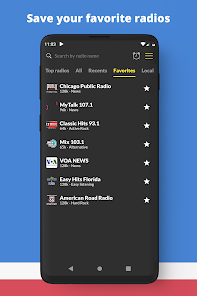
Customizable Favorites

With the customizable favorites feature, users can easily save their go-to stations for quick access. This personalized touch enhances your listening experience, allowing you to jump straight to your preferred content without scrolling through endless options.

Diverse Station Selection

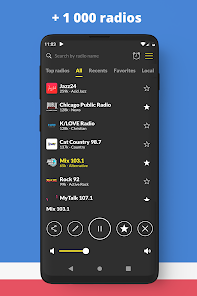
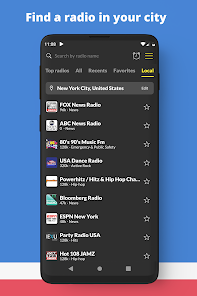
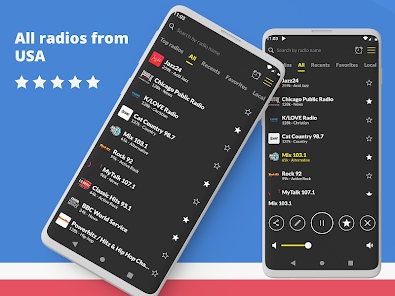
This app offers an extensive range of FM radio stations from across the United States, catering to all musical tastes and preferences. Whether you're into pop, rock, jazz, or talk radio, you'll find something to enjoy without ever feeling limited.

Offline Listening Mode

Radio USA allows users to download their favorite shows or playlists for offline listening, making it perfect for those times when you’re on the go or in areas with limited connectivity. This feature ensures you can keep enjoying your favorite content anytime, anywhere.

User-Friendly Interface

Radio USA boasts an intuitive interface that makes it easy for users of all ages to navigate. With just a few taps, you can access a wide variety of stations, ensuring a seamless listening experience without the hassle of complicated menus.

Pros & Cons

Pros
  • Access to diverse music genres anytime
  • Listen to live broadcasts from anywhere
  • Enjoy high-quality audio streaming
  • User-friendly interface for easy navigation
  • Discover new artists and stations effortlessly
Cons
  • Limited local station availability
  • Streaming quality may vary
  • Requires a stable internet connection
  • May lack exclusive content or features

Real Experience Using Radio USA: Online FM Radio

Application Scenarios

Radio USA: Online FM Radio is a versatile application that caters to various listening scenarios. Whether you're commuting to work, exercising at the gym, or relaxing at home, this app provides a seamless way to access your favorite radio stations. Users can tune in to a wide variety of genres, from classic rock and pop to country and jazz, ensuring that there’s something for everyone. The app's ability to stream live broadcasts makes it an excellent companion for those who want to stay updated with local news, sports events, or cultural programs while on the go. Additionally, it proves to be an invaluable tool for expatriates longing to connect with their roots by accessing stations from their home country. The offline listening feature allows users to download shows, making it possible to enjoy content without an internet connection during travel or in remote areas.

User Experience

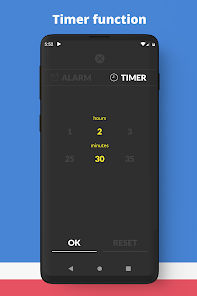
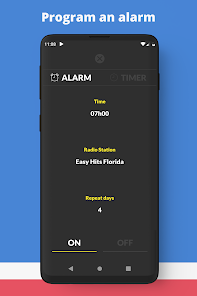
The user experience of Radio USA: Online FM Radio is intuitive and user-friendly. The app boasts a clean interface with easy navigation, allowing users to quickly browse through various categories and discover new stations. The search function is efficient, enabling users to find specific stations or podcasts with minimal effort. One standout feature is the ability to create personalized playlists, which enhances user engagement and satisfaction. The app also offers a sleep timer and alarm function, allowing users to wake up to their favorite station or drift off to sleep with soothing music. Audio quality is generally excellent, with minimal buffering, even on cellular connections. However, some users have reported occasional connectivity issues, particularly with less popular stations, but these instances are typically few and far between.

Pricing

Radio USA: Online FM Radio adopts a freemium model, providing users access to a substantial library of radio stations and features at no cost. The free version is ad-supported, which is typical for many radio apps. For those looking for an uninterrupted experience, the app offers a premium subscription that removes ads and unlocks additional features, such as offline listening and enhanced audio quality. The pricing for the premium version is competitive compared to other radio streaming services, making it an attractive option for avid listeners who want more from their experience without breaking the bank.

Updates & Support

The developers of Radio USA: Online FM Radio are committed to providing regular updates to enhance the app's functionality and address any bugs. Users can expect new features and improvements based on feedback, which reflects the developers’ dedication to user satisfaction. Support is readily available through the app’s help section, offering FAQs and troubleshooting tips. For more complex issues, users can contact customer support via email, and responses are generally prompt and helpful. This level of ongoing support and commitment to improvement ensures that Radio USA remains a reliable choice for online radio enthusiasts.

verified Security & Privacy Review

When it comes to security and privacy, Radio USA: Online FM Radio takes user protection seriously. The app requires minimal permissions, primarily accessing the internet to stream radio stations. This ensures that users can enjoy their listening experience without compromising their personal data. The app does not request access to sensitive information such as contacts or location, which further enhances its privacy stance. User data is not stored or shared with third parties, aligning with best practices for data protection. However, users should always review the privacy policy for the most current information regarding data handling and practices. Additionally, Radio USA employs encryption protocols to secure any data transmitted over the internet, providing an extra layer of protection against potential cyber threats. Overall, users can enjoy the app with peace of mind, knowing that their privacy is a priority and their data is handled with care.

Reviews

4.8

“Great selection of stations, love the variety!”

“User-friendly interface, easy to navigate.”

“Occasional buffering issues, but overall a solid app.”

“Perfect for discovering new music and shows.”

“Reliable streaming, very few ads.”

FAQ

1

Does Radio USA: Online FM Radio collect my personal data?

Radio USA: Online FM Radio may collect certain data to improve user experience and provide personalized services, but it typically adheres to privacy policies that outline how data is used and protected. Users should review the app's privacy policy for specific details.

2

Does Radio USA: Online FM Radio offer a free trial or free version?

Yes, Radio USA: Online FM Radio offers a free version that allows users to access many of its features, though it may include ads. Additionally, there may be options for premium features through a subscription plan.

3

Does Radio USA: Online FM Radio require an internet connection?

Yes, Radio USA: Online FM Radio requires an active internet connection to stream radio stations, as it operates over the internet to provide access to live broadcasts.

4

How can I contact support or send feedback for Radio USA: Online FM Radio?

Users can contact support or send feedback through the app's help section or by visiting the official website. There are typically options for email support or support tickets to address any questions or concerns.

5

How do I manage or cancel my Radio USA: Online FM Radio subscription?

Users can manage or cancel their subscription directly through the app's settings or via the app store where they initially subscribed. Detailed instructions are usually provided in the app's help section.

How to use Radio USA: Online FM Radio

1

How can I contact Customer Service for the Radio USA app?

You can reach Customer Service through the app's "Help" section or by emailing support at the official website.

2

How do I find the Customer Number for the Radio USA app?

The Customer Number can typically be found in the account settings or profile section of the app.

3

How do I log in to the Radio USA app?

Open the app, tap on "Log In," and enter your registered email and password to access your account.

4

Is there a way to activate premium features in the Radio USA app?

Yes, you can activate premium features by purchasing a subscription through the app's settings or upgrade menu.

Editor's Choice