This site uses cookies to enhance your user experience. By clicking any link on this site you are giving your consent to our cookie policy. Read more
Reject
Accept All

Advertiser and Editorial Disclosures

RØDE Central Mobile

RØDE Central Mobile

verified Verified App

Developer: RØDE Microphones

  • category

    Category: Music & Audio

  • price

    Price: free

  • age rating

    Age Rating: Everyone

  • rating

    Rating: 2.2

  • download

    Downloads: 100,000+

  • version

    Version: 2.0.108

Screenshot 1
Screenshot 2
Screenshot 3
Screenshot 4
Screenshot 5
Screenshot 6
Screenshot 7
Screenshot 8
Screenshot 9

Features & Highlights

Audio Adjustment

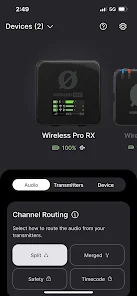
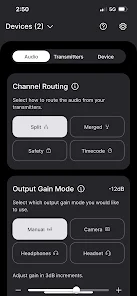
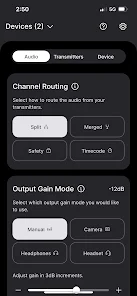
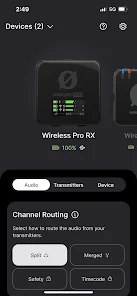
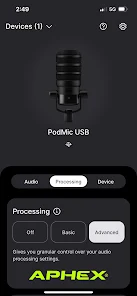
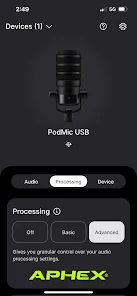
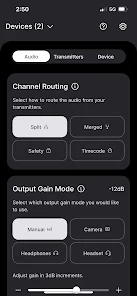
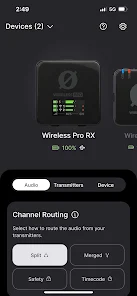
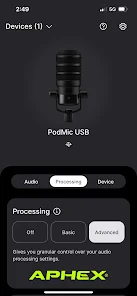
RØDE Central Mobile offers intuitive audio controls, allowing users to easily adjust gain levels, EQ settings, and more directly from their mobile devices. This feature empowers content creators to fine-tune their sound in real-time, ensuring the best audio quality for their recordings or live streams.

Device Compatibility

Designed to work seamlessly with RØDE's range of microphones, RØDE Central Mobile supports various models, giving users the flexibility to choose their preferred gear. Whether you're using a shotgun mic or a lavalier, this app ensures you can connect and optimize your setup effortlessly.

Recording Features

The app comes packed with advanced recording options, allowing you to capture high-quality audio directly to your phone. Whether you're podcasting, vlogging, or recording music, RØDE Central Mobile provides essential tools like metadata tagging and file management to streamline your workflow.

User-Friendly Interface

With its sleek and streamlined design, RØDE Central Mobile makes navigating through features a breeze. Even if you're not tech-savvy, you'll find it easy to access all the necessary tools to enhance your audio experience, making it perfect for both beginners and seasoned pros alike.

Pros & Cons

Pros
  • Enhances audio quality for mobile recordings with professional-grade features.
  • User-friendly interface simplifies recording and editing processes effortlessly.
  • Supports various RØDE microphones, expanding your audio capture options.
  • Seamlessly integrates with mobile devices for convenient on-the-go usage.
  • Offers real-time monitoring for precise audio adjustments during recordings.
Cons
  • Limited compatibility with non-RØDE devices may restrict usage options.
  • Lacks advanced editing features, reducing post-production flexibility.
  • User interface can be confusing for newcomers, impacting ease of use.

Real Experience Using RØDE Central Mobile

Application Scenarios

The RØDE Central Mobile app is designed for users who rely on RØDE audio equipment, particularly those who utilize devices like the RØDE Wireless GO and the RØDE NT-USB Mini. This app caters to a variety of scenarios, including content creation for social media, podcasting, and video production. With its intuitive interface, users can easily manage their audio settings and customize their devices to suit different environments, whether recording in a studio or capturing sound on location. The ability to monitor audio levels in real-time adds a layer of professionalism to any project, making it an essential tool for both amateurs and seasoned professionals.

User Experience

The user experience of RØDE Central Mobile is largely positive, characterized by its sleek design and straightforward functionality. The app's layout is user-friendly, allowing for easy navigation through various settings and features. Users can quickly access microphone gain controls, adjust output levels, and even apply filters to enhance audio quality. The seamless integration with RØDE devices ensures that users have a smooth experience, with little to no lag when making adjustments. Moreover, the app provides helpful tutorials and tips that guide users through the setup process, making it accessible even for those who are not tech-savvy. Feedback from users frequently highlights the app's reliability and efficiency, reinforcing its reputation as a go-to choice for audio management.

Pricing

RØDE Central Mobile is available for free, making it an attractive option for anyone who owns compatible RØDE devices. While the app itself does not incur any costs, users should consider the investment in RØDE hardware to fully utilize its features. Given the high quality of RØDE products and the free nature of the app, the overall value proposition is strong. This pricing model encourages users to experiment and engage with the app without financial barriers, leading to a more extensive user base and community feedback that can drive improvements in future updates.

Updates & Support

RØDE is known for its commitment to customer support and regular updates for its products. The RØDE Central Mobile app receives periodic updates that enhance functionality, fix bugs, and introduce new features based on user feedback. The company actively engages with its user community through social media and forums, offering assistance and gathering insights for future improvements. This responsive approach to customer support ensures that users feel valued and heard, fostering a loyal user base. Overall, the combination of consistent updates and reliable support reinforces the app's standing as a top-tier audio management tool.

verified Security & Privacy Review

The RØDE Central Mobile app places a strong emphasis on security and privacy, ensuring that user data is handled with care. Upon installation, the app requests permissions that are essential for its functionality, such as access to the device's microphone and storage. These permissions are clearly outlined, allowing users to make informed decisions about what data they share. Data transmitted between the app and RØDE's servers is encrypted, safeguarding against unauthorized access during communication. Additionally, the app does not collect unnecessary personal information, adhering to a minimal data collection policy. Users can feel secure knowing that their audio recordings and personal settings are stored locally on their devices unless explicitly shared. RØDE Central Mobile provides users with the ability to manage their privacy settings, including options to opt-out of data sharing. Regular updates to the app include security enhancements, reflecting the developers' commitment to maintaining a secure environment. Overall, RØDE Central Mobile demonstrates a responsible approach to user privacy and data security, making it a trustworthy choice for audio management.

Reviews

2.2

“User-friendly interface, easy to navigate and use”

“Great sound quality adjustments for mobile recordings”

“Seamless integration with RØDE microphones”

“Perfect for on-the-go audio editing”

“Highly reliable app for content creators”

FAQ

1

Can I submit suggestions or feedback to RØDE Central Mobile?

Yes, users can submit suggestions or feedback through the app or by contacting RØDE's customer support for consideration in future updates.

2

Does RØDE Central Mobile collect my personal data?

RØDE Central Mobile is designed with user privacy in mind and does not collect personal data unless explicitly provided for specific features or services.

3

Does RØDE Central Mobile support offline use?

Yes, RØDE Central Mobile can be used offline for certain features, although some functionalities may require an internet connection for updates and additional content.

4

How do I cancel my RØDE Central Mobile subscription?

Since RØDE Central Mobile does not have a subscription model, there is no need to cancel a subscription as there are no associated costs.

5

How much does a subscription to RØDE Central Mobile cost?

RØDE Central Mobile does not require a subscription; it is completely free to use without any hidden fees or charges.

How to use RØDE Central Mobile

1

Can I change my customer number after activation?

No, customer numbers are unique and cannot be changed. If you need assistance, please contact customer service.

2

Can customer service help me with issues related to my account?

Yes, customer service is available to assist you with any account-related issues you may encounter. Just reach out via the app or website.

3

How can I contact customer service for RØDE Central Mobile?

You can reach customer service through the support section of the RØDE website or via the app's help feature.

4

How do I activate my RØDE Central Mobile account?

To activate your account, follow the link sent to your email after registration. If you didn't receive it, check your spam folder or contact customer support.

5

How do I log in if I've previously activated my account?

Simply enter your registered email and password in the log-in section of the app. If you encounter issues, reset your password or contact support.

Editor's Choice