This site uses cookies to enhance your user experience. By clicking any link on this site you are giving your consent to our cookie policy. Read more
Reject
Accept All

Advertiser and Editorial Disclosures

Podcast Player App - Podbean

Podcast Player App - Podbean

verified

Podbean - Podcast & Radio & Audiobook

4.6
Rating
10,000,000+ Downloads
9.7.0 Version
  • category

    Category: Music & Audio

  • price

    Price: free

  • age rating

    Age Rating: Teen

  • rating

    Rating: 4.6

  • available on

    Available on: /

  • updated on

    Updated on: Jun 14, 2026

Screenshot 1
Screenshot 2
Screenshot 3
Screenshot 4
Screenshot 5
Screenshot 6
Screenshot 7
Screenshot 8
Screenshot 9
Screenshot 10
Screenshot 11
Screenshot 12
Screenshot 13
Screenshot 14
Screenshot 15
Screenshot 16

Features & Highlights

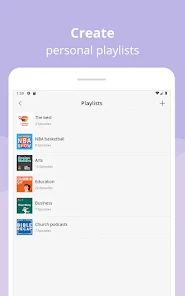
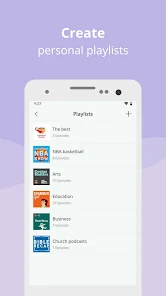
Custom Playlists

Create and organize custom playlists to tailor your listening experience with Podbean. This feature lets you group episodes by theme or mood, making it easy to switch between different topics or simply enjoy a curated collection of your favorites whenever you want.

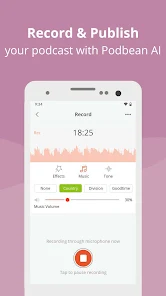
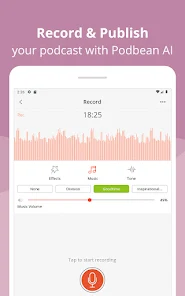
In-App Recording

Podbean offers an in-app recording feature that allows users to create their own podcasts directly within the app. This user-friendly tool simplifies the recording process, making it accessible for anyone looking to share their voice and stories with an audience, all from the convenience of their mobile device.

Offline Listening

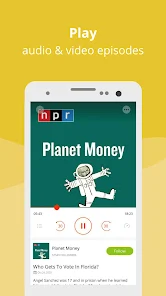
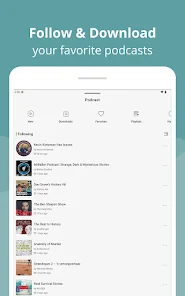
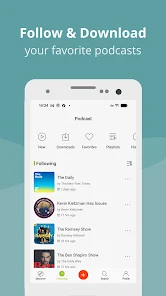
With Podbean's offline listening capability, you can download your favorite episodes and enjoy them without needing an internet connection. This feature is perfect for those on the go, allowing you to make the most of your commute or travel time without worrying about data usage.

Smart Search

Podbean's smart search feature makes it easy to find your favorite podcasts by allowing you to search by keywords, genres, or even specific episodes. This intuitive search functionality helps you discover new content that aligns with your interests, ensuring you never run out of engaging audio entertainment.

Pros & Cons

Pros
  • User-friendly interface for easy navigation.
  • Access to thousands of podcasts across various genres.
  • Offline listening allows enjoyment without internet access.
  • Personalized recommendations improve discovery of new content.
  • Supports seamless playback across multiple devices.
Cons
  • Limited customization options for user interface design
  • Occasional buffering issues during playback
  • Ads can disrupt listening experience frequently
  • Search functionality may yield irrelevant results

Real Experience Using Podcast Player App - Podbean

Application Scenarios

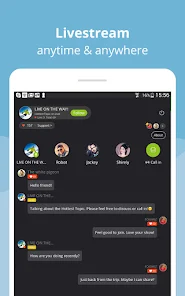
The Podbean Podcast Player App is designed to cater to a diverse range of podcast enthusiasts, whether you are a casual listener or a serious podcast aficionado. It serves well in various scenarios such as commuting, exercising, or simply relaxing at home. Users can easily access thousands of podcasts across multiple genres, including true crime, technology, and personal development. The app's seamless integration with various devices also allows for an uninterrupted listening experience, whether you’re using your smartphone, tablet, or smart speaker. This flexibility makes it an ideal choice for those who wish to keep up with their favorite shows on the go.

User Experience

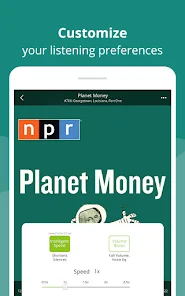
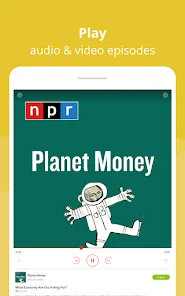
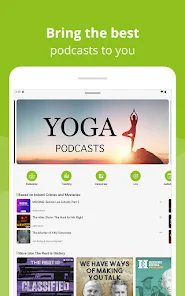
The user experience of the Podbean app is generally intuitive and user-friendly. Upon launching the app, users are greeted with a clean interface that simplifies navigation through a vast library of podcasts. The search functionality is robust, enabling users to find specific shows or explore by categories and trending topics effortlessly. One standout feature is the personalized recommendations tailored to users' preferences, helping them discover new content that aligns with their interests. Playback controls are easy to use, with options to adjust playback speed, create playlists, and download episodes for offline listening. The app also supports background play, allowing users to multitask without interruptions, enhancing the overall experience.

Pricing

Podbean offers a freemium model, making it accessible to a wide audience. Users can enjoy a free version with ads, which provides basic functionalities, including access to a limited number of episodes and features. For those seeking an ad-free experience with additional perks such as exclusive content and advanced playback options, Podbean offers a premium subscription. This subscription is competitively priced, making it an attractive option for avid listeners. The app frequently runs promotions and discounts, providing users with opportunities to save on their subscriptions, which enhances its value proposition.

Updates & Support

Podbean is committed to delivering a high-quality user experience through regular updates and enhancements. The development team actively listens to user feedback, implementing new features and addressing bugs promptly. The app receives updates that improve performance, introduce new functionalities, and expand its content library. Additionally, Podbean offers robust customer support through its website and within the app, providing users with access to FAQs, troubleshooting guides, and direct assistance. This commitment to user satisfaction and continuous improvement ensures that Podbean remains a top choice in the competitive podcast player market.

verified Security & Privacy Review

The Podcast Player App - Podbean prioritizes user security and privacy with a robust framework designed to protect personal information. The app employs encryption protocols to secure data transmission, ensuring that user activity remains confidential while streaming or downloading content. In terms of permissions, Podbean requires access to storage for downloading episodes and, optionally, microphone access for recording. Users are informed about these permissions during the installation process, allowing for informed consent. The app does not collect unnecessary data, focusing only on what is essential for functionality. Podbean’s privacy policy outlines clear guidelines on data handling, stating that personal information is not shared with third parties without explicit user consent. Users can manage their data preferences directly within the app, including options to delete their account and associated data. Overall, Podbean demonstrates a commitment to maintaining user privacy and adhering to best practices in data security, making it a trustworthy choice for podcast enthusiasts.

User Reviews

  • LuLu Bell
    2026/04/27

    I have never been into listening to podcasts, but they have all the best sermons and homilies and studies I listen to on YouTube without all the visual distractions. 2/9/26- update- saw the Bookmark feature, can't wait to try it out💖I don't listen as often as I should, but the alerts are timely, and they have a great selection, even for a person like me who watches and listens to mostly faith-based content. This is a wonderful app!!

  • Kathy Benton
    2026/06/18

    Podbean is so much more straightforward, and easier to use than Spotify. I'm a 64-year-old grandma and mom, so maybe that is helpful context. I try to stay connected and use Spotify to listen to a couple of my favorite podcasts because they are monetized much better there than here. But I really do not enjoy using Spotify, and find it very frustrating, while using Podbean is very intuitive and easy. I don't understand how content creators get paid, so I will go back and forth for now . for me.

  • Brad Mrsny
    2026/07/01

    been using this app for a while and i am finally done. the apps ability to remember where i left off on a podcast has gotten so bad that if i pause an episode for more then 15 minutes it wont resume playback and the episode will need to be restarted. this is horrible and was always a small issue with podbean but now its a major issue whenever i even pause for more then 15 and every episode needs to be restarted from the beginning. finally i give up.

  • Debbie Cannon
    2026/06/25

    My sound works now, but it keeps stopping and giving me the error 2002 that says "connection timeout". I have no idea what this means or why it keeps stopping every couple of minutes. Sometimes it goes days without doing it, and suddenly does it constantly. This app pains me. I don't know why I still use it. Almost 3 years later now. Still using it. Been much better, but after the last update, it's back to stopping. Been good awhile now, upping rating from 2 to 4.Thx!

  • Robby Birdsong (birdblue4u2)
    2026/06/11

    So far I'm loving it. I'm a Google Pixel user so I definitely relied on YouTube music over the years for all my podcasts. I'm getting honest I didn't realize how much better it could be. every now and then I find myself missing the video feature of listening to podcasts on YouTube. thank you organized list over that any day.

Review Source: Google Play store public user reviews.

FAQ

1

Does Podcast Player App - Podbean collect my personal data?

Podcast Player App - Podbean does collect certain personal data to enhance user experience, but it is committed to user privacy and complies with relevant data protection regulations.

2

Does Podcast Player App - Podbean offer a free trial or free version?

Podcast Player App - Podbean offers a free version with basic features, while a premium subscription is available that includes additional features and content.

3

Does Podcast Player App - Podbean require an internet connection?

While an internet connection is required for streaming podcasts, you can download episodes for offline listening, enabling you to enjoy content without an active internet connection.

4

How can I contact support or send feedback for Podcast Player App - Podbean?

You can contact support or send feedback for Podcast Player App - Podbean through the app's help section or by visiting their official website, where you can find support email and contact forms.

5

How do I manage or cancel my Podcast Player App - Podbean subscription?

You can manage or cancel your Podcast Player App - Podbean subscription through the app's settings or by visiting the account management section on their website, depending on how you subscribed.

How to use Podcast Player App - Podbean

1

Do I need to activate my Podbean account?

Yes, after signing up, you'll receive an activation email. Click the link in the email to activate your account.

2

How can I contact customer service for the Podbean app?

You can contact Podbean's customer service through their support page on the app or their website. They also provide support via email at support

3

How do I log into my Podbean account?

Open the Podbean app, tap on "Login," enter your email and password, then tap "Sign In."

4

What is the customer number for Podbean support?

Podbean does not have a dedicated customer number but offers support through their website and email.

What's New

Crash fix.

Editor's Choice