This site uses cookies to enhance your user experience. By clicking any link on this site you are giving your consent to our cookie policy. Read more
Reject
Accept All

Advertiser and Editorial Disclosures

Music Recognition

Music Recognition

verified

Beatfind Music Recognition

4.3
Rating
10,000,000+ Downloads
1.6.61 Version
  • category

    Category: Music & Audio

  • price

    Price: free

  • age rating

    Age Rating: Everyone

  • rating

    Rating: 4.3

  • available on

    Available on: /

  • updated on

    Updated on: Jul 6, 2026

Screenshot 1
Screenshot 2
Screenshot 3
Screenshot 4
Screenshot 5
Screenshot 6

Features & Highlights

History Tracking

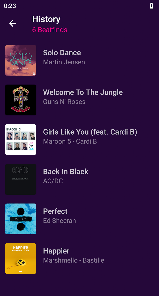
The app keeps a record of all the songs you've identified, making it simple to revisit your musical discoveries. You can explore your history anytime, ensuring you never lose track of that perfect track you found, even if you heard it weeks ago.

Instant Song Identification

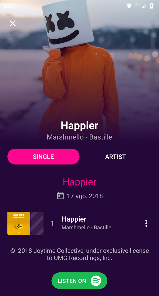
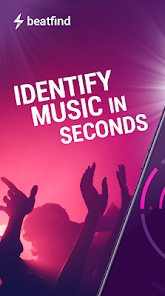
With just a tap, Music Recognition can quickly identify any song playing in your surroundings. Whether it's a catchy tune on the radio or a background track in a café, you'll have the title and artist at your fingertips in seconds, making it easier than ever to discover new music.

Lyrics Display

Once a song is recognized, the app provides instant access to its lyrics. This feature allows you to follow along as you listen, enhancing your overall experience and helping you sing along with confidence, even if you're not familiar with the song.

Playlist Integration

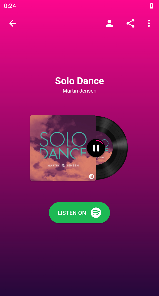
Music Recognition seamlessly integrates with your favorite streaming services, allowing you to save identified songs directly to your playlists. This means that every time you discover a new favorite, you can easily add it to your listening library without any hassle.

Pros & Cons

Pros
  • Identifies songs quickly and accurately
  • Enhances music discovery and exploration
  • Supports personalized playlists and recommendations
  • Facilitates seamless music sharing with friends
  • Boosts engagement in music-related activities
Cons
  • Privacy concerns with data collection
  • Limited accuracy for obscure tracks
  • May misidentify songs frequently
  • Requires internet access for best results

Real Experience Using Music Recognition

Application Scenarios

The Music Recognition app serves a multitude of scenarios where identifying music can enhance the overall experience. Imagine sitting in a café, and a catchy tune catches your ear—simply open the app and let it listen for a few seconds to reveal the song title and artist. It’s also incredibly useful during parties or social gatherings where background music plays a significant role in setting the mood. The app seamlessly integrates into moments where you might hear a song on the radio, in a movie, or even performed by a street musician. Whether you are a music enthusiast looking to expand your playlist or a casual listener curious about a song, this app becomes an essential tool for discovering new music on the go.

User Experience

The user experience with the Music Recognition app is generally smooth and intuitive. Upon launching the app, users are greeted with a clean interface that is easy to navigate. The primary feature, song recognition, operates with impressive speed, often identifying tracks in just a few seconds. Users appreciate the simplicity of tapping a button to start listening, and the app provides instant feedback, displaying song details and options to save or share the information. Additionally, the app offers a personalized experience by maintaining a history of recognized songs, allowing users to revisit their discoveries. However, some users have reported occasional inaccuracies with less popular tracks or remixes, which can sometimes lead to frustration. Overall, the app manages to create a satisfying environment for music discovery.

Pricing

The Music Recognition app adopts a freemium model, which is appealing to a wide range of users. The free version provides basic song recognition capabilities along with limited access to additional features. For those who wish to enhance their experience, a premium subscription is available. This subscription unlocks advanced features, such as offline recognition, ad-free usage, and the ability to explore curated playlists based on recognized songs. The pricing structure is competitive compared to similar apps on the market, making it a viable option for anyone serious about music discovery.

Updates & Support

The developers of the Music Recognition app are committed to providing regular updates to enhance functionality and user experience. Frequent updates mean that users can expect new features and improvements based on feedback. The app also has a dedicated support section where users can find FAQs, troubleshooting tips, and contact information for further assistance. This ensures that any issues faced are addressed promptly, and users feel supported throughout their experience. Overall, the combination of regular updates and accessible support enhances the overall quality of the Music Recognition app, making it a reliable companion for music lovers.

verified Security & Privacy Review

The Music Recognition app prioritizes user security and privacy through a robust framework of data protection measures. The app employs end-to-end encryption for any audio data captured, ensuring that users' musical preferences and listening habits remain confidential. In terms of permissions, the app requests access to the device's microphone, which is essential for its core functionality. Users are informed about this requirement transparently, and the app does not collect any additional personal information unless explicitly granted by the user. The app adheres to strict data handling practices, storing minimal user data necessary for improving recognition accuracy and enhancing user experience. Users have the option to manage their data preferences through the settings, including the ability to delete their history and disable data tracking features. Overall, Music Recognition demonstrates a strong commitment to user privacy, with clear policies and practices in place to protect sensitive information, making it a reliable choice for music enthusiasts concerned about data security.

User Reviews

  • Samantha Tunnell
    2026/07/01

    The app works great for identifying songs. The problem starts if you don't pay a subscription. You have to wait through ads before you can start song identification... there have been multiple times I missed the song just trying to get through the ad. To fix this, all the dev needs to do is let the app open and let you select song identification; then, the subscription prompt and ad can display after the app has figured out the song, but before it displays the artist and song for you to see.

  • Brent Hancock
    2026/06/21

    Until recently this was a pretty good app. Now though it starts with an offer of a subscription. Okay, everybody needs income. But then there's ads, again ok. But these are sleazy ads. Ads that are like from the bad old days of the internet. Claiming they have found viruses. Ads claiming services are expiring (like toll passes, etc) unless you act NOW!!

  • the_bird _is_watching
    2022/11/03

    When it works, this app is great. More often than not I see "no audio" and "microphone could be blocked" which makes app useless. I've tried tweaking media volume setting, it helps every once in a while. I've delayed Beatfind's search while picking the position in a song where it seems good place to start sampling. If I feel I've time to kill, I'll try that. Mostly it doesn't help, but it worked in couple of instances. I would not be surprised that I've missed a phone setting.

  • Casey Crockett
    2021/02/26

    As long as you catch the song before the next one starts, you are good. I tried to find the current song but it had JUST transitioned to Motley Crue Kick Start My Heart. It found MC, and I was thinking that is totally not it, but it was ahead of my lousy brain. Seriously, it had three chords at the most! I hadn't even realized the song had changed. Had to uninstall, it couldn't find my browser? Firefox Focus.

  • Dani Long
    2020/08/15

    Perfect! It finds songs quickly, keeps a history of songs you've searched for, had options for listening to the songs you've found. That's all I wanted, and it does it really well! To those who complain because you can't listen and search for a song while you're playing it in a different app on your phone, I believe that's a limitation of your phone's system, not of the app itself.

Review Source: Google Play store public user reviews.

FAQ

1

Does Music Recognition collect my personal data?

Many Music Recognition apps may collect data such as song preferences and location to enhance user experience, but reputable apps will provide clear privacy policies outlining data usage and collection practices.

2

Does Music Recognition offer a free trial or free version?

Many Music Recognition apps offer a free version with basic features, while some may provide a free trial period for premium versions that include additional functionalities.

3

Does Music Recognition require an internet connection?

Most Music Recognition apps require an internet connection to access their databases and provide accurate song identification, although some features may work offline after initial setup.

4

How can I contact support or send feedback for Music Recognition?

Most Music Recognition apps provide a support section within the app, or you can visit their official website for contact information, FAQs, and feedback submission options.

5

How do I manage or cancel my Music Recognition subscription?

You can manage or cancel your Music Recognition subscription through the app's settings or your app store account settings, depending on the platform you are using.

How to use Music Recognition

1

Can I use the app without creating an account?

Yes, basic features can be accessed without an account, but full functionality requires logging in.

2

How can I contact customer service for the Music Recognition app?

You can reach customer service by emailing support

3

How can I find my account number for customer service inquiries?

Your account number can be found in the 'Account Info' section under 'Settings' in the app.

4

How do I activate my subscription after purchase?

Go to 'Settings', select 'Subscription', and log in with the account you used to purchase your subscription to activate it.

5

How do I log in to my account on the Music Recognition app?

Open the app, tap on 'Log In', enter your email and password, then tap 'Sign In'.

What's New

SDK Updates

Editor's Choice