This site uses cookies to enhance your user experience. By clicking any link on this site you are giving your consent to our cookie policy. Read more
Reject
Accept All

Advertiser and Editorial Disclosures

Music Player & Podcast

Music Player & Podcast

verified Verified App

Developer: Mobilensoft

  • category

    Category: Music & Audio

  • price

    Price: free

  • age rating

    Age Rating: Everyone

  • rating

    Rating: 4.2

  • download

    Downloads: 10,000,000+

  • version

    Version: 6.0.15

Screenshot 1
Screenshot 2
Screenshot 3
Screenshot 4
Screenshot 5
Screenshot 6
Screenshot 7
Screenshot 8

Features & Highlights

Offline Listening

Download your favorite songs and podcasts for offline enjoyment, eliminating the need for an internet connection. This feature is perfect for travel or areas with limited connectivity, allowing you to keep the music going wherever you are.

Seamless Podcast Integration

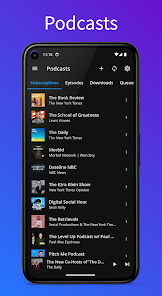
Effortlessly switch between your favorite music and a wide range of podcasts without missing a beat. The app supports automatic updates, so you’ll always have the latest episodes ready to stream or download at your convenience.

Sleep Timer

Wind down with your favorite tunes using the built-in sleep timer that gently fades out your music after a set time. This thoughtful feature ensures you can relax and fall asleep without worrying about your playlist running all night.

Smart Playlists

Easily create customized playlists based on your mood, activity, or genre preferences. The app’s intelligent sorting algorithms help you find and organize your favorite tracks, ensuring the right music is always at your fingertips for any occasion.

Pros & Cons

Pros
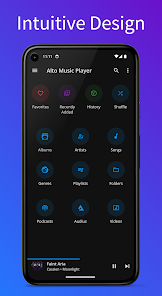
  • Intuitive user interface for easy navigation and music selection.
  • High-quality audio playback enhances your listening experience.
  • Extensive playlist features allow for personalized music organization.
  • Supports various audio formats for versatile playback options.
  • Regular updates ensure improved performance and new features.
Cons
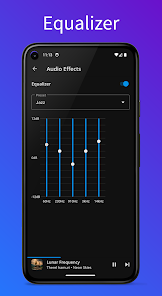
  • Alto Music Player lacks advanced equalizer settings for personalized sound adjustments.
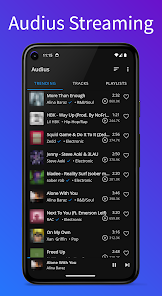
  • The app has limited support for popular music streaming services, restricting user choice.
  • Its user interface can feel cluttered, making navigation challenging for new users.

Real Experience Using Music Player & Podcast

Application Scenarios

The Music Player & Podcast app is designed to cater to a wide range of audio preferences, making it suitable for various scenarios. Whether you're commuting to work, exercising at the gym, or relaxing at home, this app seamlessly integrates into your daily routine. It allows users to create personalized playlists for different moods and activities, ensuring that the right soundtrack is always at your fingertips. The podcast feature enhances its versatility, enabling users to explore a plethora of topics, from news and entertainment to educational content. This makes it an ideal companion for multitaskers who enjoy consuming audio content while engaging in other activities, such as cooking or driving.

User Experience

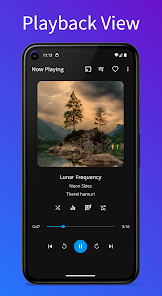
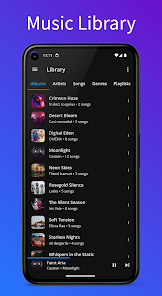
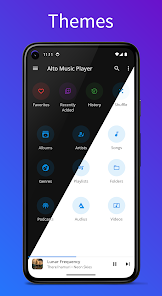
The user experience of the Music Player & Podcast app is one of its standout features. The interface is intuitively designed, allowing even the least tech-savvy users to navigate effortlessly. The layout is clean and organized, with easy access to your music library and podcasts. One of the app's highlights is the customizable playlists and smart recommendations that adapt based on listening habits. Users can enjoy high-quality audio playback, and the app supports various audio formats, ensuring compatibility with most digital music files. Furthermore, the seamless integration of podcast subscriptions allows users to manage both music and podcasts within a single platform, enhancing convenience. The app also includes useful features such as sleep timers and background play, catering to the diverse preferences of its audience.

Pricing

The Music Player & Podcast app offers competitive pricing, with a free version that provides access to a substantial amount of content. Users can enjoy basic features without any cost, making it accessible for everyone. For those seeking an enhanced experience, a premium subscription is available, unlocking features such as ad-free listening, offline playback, and exclusive content. The pricing structure is transparent, with no hidden fees, and users can opt for monthly or annual plans, allowing for flexibility based on individual needs. Overall, the pricing strategy strikes a balance between affordability and value, making it an attractive option for audio enthusiasts.

Updates & Support

The developers of the Music Player & Podcast app are committed to continuous improvement, frequently releasing updates that enhance functionality and user experience. These updates often include new features, bug fixes, and performance optimizations, ensuring that the app remains competitive and user-friendly. The support system is robust, with a dedicated help center that offers FAQs, troubleshooting guides, and direct customer service options. Users can easily reach out for assistance or provide feedback, which the developers actively consider for future updates. This commitment to user satisfaction and ongoing improvements significantly boosts the overall reliability and appeal of the app.

verified Security & Privacy Review

The Music Player & Podcast app prioritizes user security and privacy, implementing robust measures to protect personal data. The app uses encryption protocols to safeguard sensitive information, ensuring that users' listening habits and preferences remain confidential. In terms of permissions, the app requests access to media files and storage, which is necessary for optimal functionality. Users are informed about these permissions transparently during installation, allowing for informed consent. It is important to note that the app does not require access to contacts or location data, minimizing potential privacy risks. The Music Player & Podcast app has a clear privacy policy that outlines how user data is collected, used, and shared. It emphasizes that personal information is not sold to third parties and is only utilized for enhancing user experience and app performance. Users can manage their data preferences easily within the app settings, allowing for greater control over their privacy. Overall, the Music Player & Podcast app demonstrates a commitment to user security and privacy, making it a reliable choice for those concerned about data handling practices.

Reviews

4.2

“Easy to use and navigate, love the interface!”

“Great selection of podcasts, always something new to listen to.”

“Sound quality is impressive, really enhances my music experience.”

“Frequent updates keep improving the app, very responsive!”

“Offline listening feature is a game changer for me!”

FAQ

1

Can I submit suggestions or feedback to Alto Music Player?

Yes, Alto Music Player encourages users to submit suggestions and feedback through the app’s support section, helping improve the overall user experience.

2

Does Alto Music Player collect my personal data?

Alto Music Player prioritizes user privacy and only collects necessary data to enhance the user experience, ensuring compliance with data protection regulations.

3

Does Alto Music Player support offline use?

Yes, Alto Music Player allows users to download songs and playlists for offline listening, making it convenient to enjoy music without an internet connection.

4

How do I cancel my Alto Music Player subscription?

Users can cancel their Alto Music Player subscription through their account settings in the app or by contacting customer support for assistance.

5

How much does a subscription to Alto Music Player cost?

The subscription cost for Alto Music Player varies based on the plan selected, often offering monthly and yearly options, with promotional rates available from time to time.

How to use Music Player & Podcast

1

Can I change my customer number?

Unfortunately, customer numbers cannot be changed. If you need help with your account, please contact customer service.

2

How can I reach customer service if I'm having trouble with podcasts?

You can contact customer service through the app or our website. Just look for the support section for assistance with podcast issues.

3

How do I activate my account after signing up?

You can activate your account by clicking the link sent to your email after registration. If you didn’t receive it, contact customer service.

4

How do I contact customer service for my music player?

You can reach customer service by calling the number listed in the app or on our website. Our team is available 24/7 to assist you.

5

How do I log in to my podcast account?

To log in, open the app and enter your email and password. If you forgot your password, use the “Forgot Password” link to reset it.

Editor's Choice