This site uses cookies to enhance your user experience. By clicking any link on this site you are giving your consent to our cookie policy. Read more
Reject
Accept All

Advertiser and Editorial Disclosures

Meetup: Social Events & Groups

Meetup: Social Events & Groups

verified

Meetup

4.0
Rating
10,000,000+ Downloads
2026.01.29.2805 Version
  • category

    Category: Social

  • price

    Price: free

  • age rating

    Age Rating: Teen

  • rating

    Rating: 4.0

  • available on

    Available on: /

  • updated on

    Updated on: Jul 7, 2026

Screenshot 1
Screenshot 2
Screenshot 3
Screenshot 4
Screenshot 5
Screenshot 6
Screenshot 7
Screenshot 8
Screenshot 9
Screenshot 10
Screenshot 11
Screenshot 12
Screenshot 13
Screenshot 14
Screenshot 15
Screenshot 16
Screenshot 17
Screenshot 18
Screenshot 19
Screenshot 20
Screenshot 21

Features & Highlights

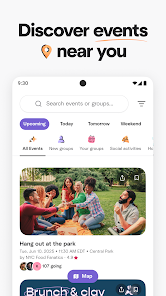
Event Discovery

Meetup makes finding local events easy and fun. You can explore a wide range of activities tailored to your interests, from tech meetups to book clubs, ensuring there's something for everyone. Simply browse or search to connect with like-minded individuals in your area.

Group Creation

With Meetup, you can create your own group centered around your passions or hobbies. This feature allows you to gather people who share your interests, whether it's hiking, cooking, or gaming, fostering community and engagement. It's a great way to take the initiative and bring people together.

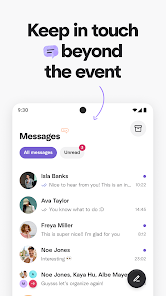
In-App Messaging

Stay connected with fellow members through the in-app messaging feature. You can chat with group members, discuss event details, or simply get to know each other better. This adds a personal touch to your Meetup experience, making it easier to build friendships and networks.

RSVP Management

Easily manage your attendance with the RSVP feature. You can quickly confirm your participation, track who’s coming, and receive reminders about upcoming events. This ensures that you never miss out on a gathering while also helping organizers plan better based on attendee numbers.

Pros & Cons

Pros
  • Connect with like-minded individuals in your area easily.
  • Discover new hobbies and interests through local events.
  • Build lasting friendships and network in a friendly atmosphere.
  • Attend events that fit your schedule and preferences effortlessly.
  • Promote your own events to engage your community effectively.
Cons
  • Limited control over event quality and organization can lead to disappointing experiences.
  • High competition among groups may dilute engagement and member participation.
  • Privacy concerns arise as personal information is often shared within the platform.

Real Experience Using Meetup: Social Events & Groups

Application Scenarios

The Meetup app serves as a bridge for individuals seeking to connect with like-minded people through various social events and interest-based groups. Whether you are new to a city, looking to expand your social circle, or wanting to pursue a hobby, this platform offers numerous scenarios to cater to your needs. Users can explore a wide range of activities, from hiking and photography meetups to tech workshops and book clubs. The app makes it easy to find events tailored to specific interests, allowing users to immerse themselves in their passions while meeting others who share the same enthusiasm. Additionally, Meetup is perfect for professionals looking to network or collaborate on projects, making it a versatile tool for both social and professional growth.

User Experience

The user experience on the Meetup app is designed to be intuitive and engaging. Upon downloading the app, users are greeted with a clean interface that encourages exploration. The onboarding process is straightforward, requiring users to select their interests, which then curates a personalized feed of events. Users can easily RSVP to events, communicate with hosts, and even share events with friends. The app also features a calendar view, making it simple to keep track of upcoming activities. Feedback from users highlights the ease of navigation and the quality of events hosted through the app. Many users appreciate the ability to rate and review events, which helps maintain a standard of quality within the community.

Pricing

Meetup operates on a freemium model. While users can join and attend many events for free, there are costs associated with hosting events or joining certain premium groups. For event organizers, a subscription fee is required to create and manage groups, which helps fund the platform and allows for enhanced features such as event promotion and analytics. Users often find that the cost of hosting is justified by the benefits of networking and community building. Overall, the pricing structure is considered reasonable, especially considering the value of the connections and experiences gained through the app.

Updates & Support

The developers of Meetup are committed to continuous improvement, regularly rolling out updates that enhance functionality and user experience. Recent updates have focused on improving event discovery algorithms and refining the messaging system to facilitate better communication among users. Customer support is readily accessible through the app, offering assistance via email and a comprehensive FAQ section. Users have noted that the support team is responsive and helpful, providing timely solutions to any issues encountered. This dedication to user satisfaction contributes to the app's reputation as a reliable platform for social engagement.

verified Security & Privacy Review

The Meetup app prioritizes user security and privacy by implementing robust data protection measures. The app uses encryption protocols to safeguard personal information, ensuring that user data is transmitted securely. Additionally, Meetup is transparent about its data collection practices, clearly outlining what information is collected and how it is utilized in its privacy policy. When it comes to permissions, the app requires access to location services to help users find relevant events nearby. However, users have the option to customize these settings based on their comfort level. Meetup also allows users to control their visibility and manage personal information shared with other users, enhancing privacy options. Meetup complies with applicable privacy regulations, and users can request to delete their accounts and associated data at any time. Overall, Meetup demonstrates a commitment to protecting user data while providing a platform for social connections and event organization.

User Reviews

  • Leanne Dupont
    2025/08/11

    I've been an organizer with meetup 17 years and it has gone downhill ovee.the last 7 years or so. The price to organize a group has gone up but with nothing important to offer to justify the extreme cost increase. And now you can pay as a user to get a more enhanced experience? I think not. I wouldn't waste anymore money on this app, especially since there are other, comparable apps out there now that cost way less to operate and are more fun to use.

  • Justin Mettee
    2024/09/06

    Extremely slow, & buggy at times. For being mostly a text based app with few graphics, Meetup is annoyingly slow. Group pages & events take too long to load even when connected to strong wifi. Sometimes events dated for 2 days way say "happening tomorrow". In the past year, it started adding annoying pop up ads after you RSVP to an event, as well as popups to rate previously attended events. I've not found a way to turn off any of these options. Overall it seems updates don't make improvements

  • Ted Sneed
    2025/09/19

    The app regularly switches half the text to Spanish, while the rest remains in English. There's no way to fix it since you can't pick your preferred language. When I bring this up to the support team, they blow me off with some canned response and then closed my ticket without fixing the issue. It's been this way for almost a year.

  • Sam B
    2026/06/22

    Extremely obnoxious UI, convoluted and cramped. Constant notification spam unless completely turned off and then impossible to turn it back on or only for certain groups (some you can and most you can't for uncertain reasons) Paywalls for virtually every feature. Bombarded with ads for other services any time you sign up for an event. They try to switch the payment button around so you accidentally click on it when trying to say "no".

  • Mark Heppert
    2026/05/16

    Something is broken now. I've been a member for years and suddenly I now have no groups available and my account is not accessible. when I try to click on my pfrofile picture, I'm sent to a page that says "Something went wrong, try again later". Ihave an event today and others that I've signed up for in the future that I can search for and confirm I'm still on the list for each but my account seems broken and inaccesible. How does someone get help for this?

Review Source: Google Play store public user reviews.

FAQ

1

Can I submit suggestions or feedback to Meetup: Social Events & Groups?

Yes, users can submit suggestions or feedback through the app's support section or website, where they can provide input on features and improvements.

2

Does Meetup: Social Events & Groups collect my personal data?

Yes, Meetup collects personal data such as your name, email address, and location to facilitate event organization and enhance user experience.

3

Does Meetup: Social Events & Groups support offline use?

Meetup requires an internet connection to access its features and events; thus, it does not support offline use.

4

How do I cancel my Meetup: Social Events & Groups subscription?

To cancel your subscription, you can go to your account settings in the app or website, find the subscription section, and follow the instructions to cancel.

5

How much does a subscription to Meetup: Social Events & Groups cost?

The subscription cost can vary based on the features chosen and the location, but generally, it ranges from a few dollars to a monthly fee for premium group features.

How to use Meetup: Social Events & Groups

1

Can I update my customer number?

You cannot update your customer number directly; please contact customer service if you need assistance with your account.

2

How can I contact customer service for my Meetup account?

You can reach customer service by visiting the Help Center on the Meetup website and submitting a request.

3

How can I reset my password if I can't log in?

To reset your password, click "Forgot Password?" on the login page and follow the instructions sent to your email.

4

How do I activate my account after signing up?

To activate your account, click the link in the activation email sent to you after registration.

5

How do I log in to my Meetup account?

To log in, visit the Meetup website or app, enter your email and password, then click "Log In."

What's New

We've made some under-the-hood improvements to keep things running smoothly. App feedback is always welcome: [email protected]

Editor's Choice