This site uses cookies to enhance your user experience. By clicking any link on this site you are giving your consent to our cookie policy. Read more
Reject
Accept All
Facebook Lite

Facebook Lite

verified Verified App

Developer: Meta Platforms, Inc.

  • category

    Category: Social

  • price

    Price: free

  • age rating

    Age Rating: Teen

  • rating

    Rating: 4.5

  • download

    Downloads: 1,000,000,000+

  • version

    Version: /

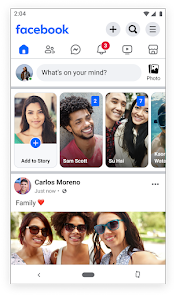
Screenshot 1
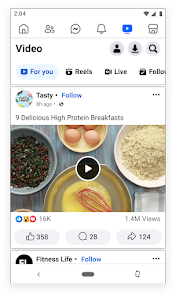
Screenshot 2
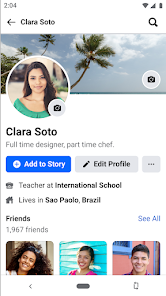
Screenshot 3
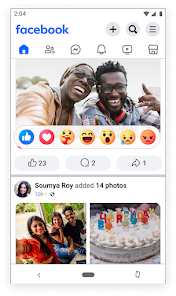
Screenshot 4
Screenshot 5
Screenshot 6

Features & Highlights

Data Efficient

Facebook Lite is designed to use less data, making it ideal for those with limited internet connectivity. It ensures you can stay connected without worrying about your data plan, allowing for a seamless browsing experience even on slower networks.

Faster Load Times

With a lightweight design, Facebook Lite loads quickly, even on low-end devices. This means you can access your news feed, messages, and notifications in no time, enhancing your overall experience and keeping you engaged without delays.

Offline Access

One of the standout features of Facebook Lite is its ability to function offline. You can view previously loaded content and even respond to messages, ensuring that you stay connected with friends and family, regardless of your internet situation.

User-Friendly Interface

Facebook Lite offers a simplified and intuitive interface that makes navigation a breeze. It retains essential features while minimizing clutter, making it easy for users of all ages to connect, share, and discover content effortlessly.

Pros & Cons

Pros
  • Uses less data for efficient browsing
  • Fast loading times enhance user experience
  • Designed for low-end devices and slower networks
  • Simple interface for easy navigation and access
  • Regular updates ensure improved features and security
Cons
  • Limited features compared to the standard app
  • Slower updates and bug fixes
  • May not support all devices
  • Less engaging user experience overall

Real Experience Using Facebook Lite

Application Scenarios

Facebook Lite is designed primarily for users in regions with limited internet connectivity or those using older mobile devices. This lightweight version of the popular social media platform allows individuals to stay connected with friends and family, share updates, and engage with community groups without the heavy data consumption associated with the standard Facebook app. It is ideal for users who want to access social media on the go when Wi-Fi is not available or when using mobile data is a concern. Additionally, it serves well in areas where high-speed internet is a luxury, making it a preferred choice for many users in developing countries.

User Experience

The user experience on Facebook Lite is notably streamlined compared to its more robust counterpart. The app loads quickly and navigates smoothly, making it accessible even on low-end smartphones. Users appreciate the simple interface, which allows for easy navigation between news feeds, notifications, and messages. While some features, such as high-definition video playback, are limited, the core functionalities remain intact. Users can post updates, comment on friends’ posts, and react to content with ease. Moreover, the app’s reduced graphics and lighter design contribute to faster load times, enhancing the overall user experience, especially for those accustomed to slower internet speeds.

Pricing

Facebook Lite is free to download and use, which is a significant advantage for users looking for a cost-effective way to stay connected. While the app itself does not charge for its services, users should be aware that data charges may apply when using mobile networks. However, the data-efficient design of Facebook Lite helps minimize these costs, making it an economical option for users who want to engage with social media without incurring high data expenses. Advertisements may be present within the app, as is standard with free social media services, but they are generally unobtrusive and do not detract from the user experience.

Updates & Support

Facebook Lite is regularly updated to enhance performance, improve security, and introduce new features tailored to its users' needs. These updates are typically automatic, ensuring that users have access to the latest version without needing to manually download them. Support for the app is available through the Facebook Help Center, where users can find troubleshooting tips, FAQs, and community forums to address any concerns. While direct customer support may not be as extensive as that of dedicated applications, the robust online community and comprehensive help resources generally suffice to assist users in resolving common issues.

verified Security & Privacy Review

Facebook Lite prioritizes user security and privacy by implementing several protective measures. The app uses encryption protocols to safeguard user data during transmission, ensuring that messages and personal information remain confidential. Users have control over their privacy settings, allowing them to manage who can see their posts and personal details. The app requests a range of permissions, including access to contacts, location, and storage. While these permissions enhance user experience, they also raise potential privacy concerns. Users are advised to review permission requests carefully and only grant access that is necessary for their use of the app. Facebook Lite adheres to data handling practices in line with industry standards, offering transparency about how data is collected and used. Users can access their privacy settings to delete account information or adjust their data-sharing preferences at any time. Overall, while Facebook Lite provides a lightweight and efficient platform for social interaction, users should remain vigilant about their privacy and regularly update their security settings.

Reviews

4.5

“Lightweight and fast, perfect for low-end devices”

“Great for saving data and battery life”

“Simple interface, easy to navigate”

“Lacks some features of the full app”

“Good alternative for users in low connectivity areas”

Editor's Choice