This site uses cookies to enhance your user experience. By clicking any link on this site you are giving your consent to our cookie policy. Read more
Reject
Accept All

Advertiser and Editorial Disclosures

Skool

Skool

verified Verified App

Developer: skool.com

  • category

    Category: Social

  • price

    Price: free

  • age rating

    Age Rating: Teen

  • rating

    Rating: 4.0

  • download

    Downloads: 1,000,000+

  • version

    Version: 1.0.40

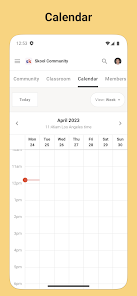
Screenshot 1
Screenshot 2
Screenshot 3
Screenshot 4
Screenshot 5
Screenshot 6

Features & Highlights

Community Engagement

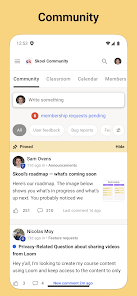
Skool fosters vibrant community interactions by allowing users to create and join groups based on shared interests. This feature encourages meaningful discussions, collaboration, and networking, making it easy for members to connect and grow together in a supportive environment.

Course Creation Tools

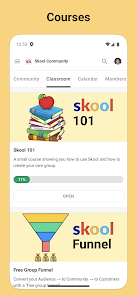
With Skool's intuitive course creation tools, users can effortlessly design and launch online courses. The platform offers customizable templates and multimedia support, enabling educators to craft engaging learning experiences that cater to various learning styles and preferences.

Gamification Elements

To enhance user engagement, Skool incorporates gamification elements such as badges, leaderboards, and rewards. These features motivate users to participate actively in their communities and courses, making learning a fun and rewarding experience that encourages consistent involvement.

Integrated Learning Hub

Skool serves as a centralized learning hub where users can access all their courses, resources, and community discussions in one place. This streamlined approach helps users stay organized and focused, allowing for a more productive and enjoyable learning journey.

Pros & Cons

Pros
  • User-friendly interface enhances learning experience
  • Engaging community fosters collaboration and support
  • Customizable courses cater to individual learning needs
  • Integrated tools streamline communication and feedback
  • Affordable pricing makes education accessible for everyone
Cons
  • Limited customization options for course layouts
  • High subscription costs can deter new users
  • User interface may feel outdated to some
  • Less integration with third-party tools available

Real Experience Using Skool

Application Scenarios

Skool is designed to create a vibrant community for learners and educators alike. It excels in a variety of scenarios, including online courses, workshops, and group discussions. For instance, educators can use Skool to build comprehensive course modules that allow for easy access to materials and resources. Students benefit from a centralized hub where they can collaborate on projects, participate in discussions, and access course updates. Additionally, Skool can be a great tool for hobbyists and enthusiasts looking to connect with like-minded individuals. Whether it’s a photography club or a coding bootcamp, Skool facilitates engaging interactions and knowledge sharing.

User Experience

The user experience on Skool is intuitive and user-friendly. Upon entering the app, users are greeted with a clean interface that emphasizes ease of navigation. The onboarding process is straightforward, allowing new users to set up their profiles and customize their preferences quickly. Users can easily join or create communities, contribute to discussions, and access a variety of resources. The app's interactive features, such as polls and quizzes, enhance engagement and make learning more dynamic. Notifications keep users informed about community updates and upcoming events, ensuring that they never miss a beat. Overall, Skool provides a seamless experience that encourages active participation and fosters a sense of belonging.

Pricing

Skool offers a freemium model, providing users with a basic free tier that includes essential features for community building and engagement. Users can create and join communities without any cost, making it accessible for everyone. For those seeking advanced functionalities, such as enhanced analytics, custom branding, and additional storage, Skool offers premium plans at competitive prices. The pricing structure is transparent, with various tiers to cater to different needs and budgets. This flexibility allows both individual users and organizations to choose a plan that best suits their requirements.

Updates & Support

Skool is committed to continuous improvement, regularly rolling out updates that enhance functionality and user experience. These updates often include new features based on user feedback, ensuring that the platform evolves to meet the community's needs. The support system is robust, offering users access to a comprehensive help center filled with tutorials and FAQs. For more personalized assistance, users can reach out to the support team via email or through in-app messaging. The responsiveness of the support team has been noted positively by users, making it easier to resolve any issues quickly and effectively.

verified Security & Privacy Review

The Skool app prioritizes user security and privacy, implementing robust measures to protect personal information. All data transmitted within the app is encrypted using industry-standard protocols, ensuring that sensitive information remains secure from unauthorized access. Skool is transparent about its data handling practices, informing users about what data is collected and how it is used. The app requires minimal permissions, allowing users to maintain control over their information. Users can easily manage their privacy settings, including the ability to limit data sharing with third parties. The app adheres to relevant privacy regulations, demonstrating a commitment to safeguarding user data. Regular updates are rolled out to address potential vulnerabilities, further enhancing the app's security framework. In summary, Skool takes significant steps to ensure user privacy and data security, making it a reliable choice for those concerned about their online safety.

Reviews

4.0

“Great community and support for learning!”

“User-friendly interface, easy to navigate.”

“Excellent resources and networking opportunities available.”

“Engaging content keeps me motivated to learn.”

“Responsive customer support, very helpful!”

FAQ

1

Can I integrate Skool with other tools?

Yes, Skool offers integration options with various tools and platforms to enhance your community experience. You can connect Skool with email marketing services, payment processors, and other applications that support community management and engagement. This allows for a more streamlined workflow and improved communication with your members.

2

Can I monetize my Skool community?

Yes, you can monetize your Skool community by offering paid memberships, courses, or exclusive content. Skool provides features to manage subscriptions and payments, allowing you to set pricing for different tiers of access. This can be an effective way to generate income while providing valuable resources and support to your community members.

3

How do I create a Skool community?

To create a Skool community, you need to sign up for an account on the Skool website. Once registered, you can set up your community by providing a name, description, and any specific guidelines or rules. You can also customize the appearance of your community to reflect your brand or purpose. After you've set it up, you can invite members to join and start collaborating.

4

How does Skool handle privacy and security?

Skool takes privacy and security seriously. The platform allows community creators to control membership settings, approve or deny member requests, and manage who can view or post content. Additionally, user data is protected through secure protocols, ensuring that personal information remains confidential and safe from unauthorized access.

5

How does Skool support community engagement?

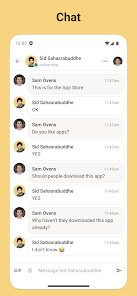
Skool supports community engagement through features like discussion boards, polls, events, and direct messaging. These tools encourage members to interact, share their thoughts, and collaborate on projects, creating a sense of belonging and active participation within the community. Gamification elements can also be added to motivate members further.

How to use Skool

1

How do I activate my Skool account?

You can activate your account by clicking the link in the confirmation email sent after registration.

2

How do I contact customer service for the Skool app?

You can contact customer service through the app's help section or by emailing support

3

How do I log in to my Skool account?

To log in, open the Skool app, enter your email and password, then tap 'Login'.

4

What is the customer number for Skool app inquiries?

The Skool app does not have a specific customer number; please use the support email for assistance.

Editor's Choice