This site uses cookies to enhance your user experience. By clicking any link on this site you are giving your consent to our cookie policy. Read more
Reject
Accept All

Advertiser and Editorial Disclosures

Linktree: Link in bio creator

Linktree: Link in bio creator

verified Verified App

Developer: Linktree

  • category

    Category: Social

  • price

    Price: free

  • age rating

    Age Rating: Everyone

  • rating

    Rating: 4.6

  • download

    Downloads: 1,000,000+

  • version

    Version: 3.27.0

Screenshot 1
Screenshot 2
Screenshot 3
Screenshot 4
Screenshot 5
Screenshot 6
Screenshot 7

Features & Highlights

Analytics Dashboard

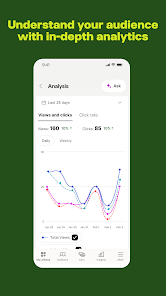
With Linktree's built-in analytics, you can track the performance of your links in real-time. This feature provides insights into how many clicks each link receives, helping you understand what content resonates most with your audience and allowing you to optimize your strategy accordingly.

Customizable Links

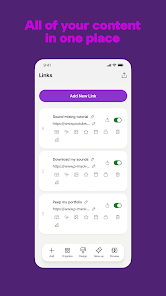
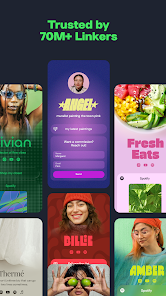
Linktree allows you to create a personalized landing page that showcases all your important links in one place. You can easily customize the appearance, including colors and fonts, to ensure it matches your brand identity, making it visually appealing for your audience.

Multiple Link Options

You can add unlimited links and prioritize them according to your needs with Linktree. This flexibility allows you to promote new content, products, or campaigns quickly, ensuring your audience always has access to the most relevant information at their fingertips.

Social Media Integration

Linktree seamlessly integrates with various social media platforms, making it incredibly easy to share your link across multiple channels. Whether you're on Instagram, TikTok, or Twitter, your Linktree can be accessed effortlessly, maximizing your reach and engagement with followers.

Pros & Cons

Pros
  • Easily share multiple links in one place.
  • Customize your link page with unique designs.
  • Track link performance with built-in analytics.
  • Optimize for mobile to enhance user experience.
  • Integrate with various social media platforms effortlessly.
Cons
  • Limited customization options can hinder brand identity and uniqueness
  • Performance analytics may be basic, lacking deep insights
  • Users might face link overload, causing confusion among visitors

Real Experience Using Linktree: Link in bio creator

Application Scenarios

Linktree serves as an essential tool for users who want to consolidate their online presence in a single location. Whether you are a social media influencer, a small business owner, or a content creator, Linktree allows you to share multiple links through one accessible bio link. This is especially useful on platforms like Instagram and TikTok, where there is often a restriction on the number of links you can share. Users can create a personalized landing page featuring links to their latest content, merchandise, or even donation pages, making it ideal for those who want to drive traffic to various online resources without overwhelming their audience. Additionally, Linktree can be used by event planners to provide comprehensive information about upcoming events, by educators to share resources with students, or by non-profit organizations to highlight their causes and fundraising efforts.

User Experience

The user experience of Linktree is designed to be intuitive and straightforward. Upon signing up, users are greeted with a clean and user-friendly interface that allows for easy customization. The drag-and-drop functionality facilitates the arrangement of links, enabling users to prioritize the most important ones. Customization options, including the ability to change colors, fonts, and backgrounds, allow users to create a unique representation of their brand. Furthermore, Linktree provides analytics tools to track link performance, giving users insight into which links are getting the most clicks. The platform is responsive and works seamlessly across devices, ensuring that users can access and update their Linktree on-the-go. However, some users have noted that while the free version is robust, certain features like advanced analytics and additional customization options are locked behind a paywall, which may limit the experience for those on a budget.

Pricing

Linktree offers a freemium model, which means that users can start with a free plan that includes essential features like link creation and basic customization. For users who want more advanced features, such as in-depth analytics, additional customization options, and the ability to remove Linktree branding, the Pro plan is available at a monthly or annual subscription fee. The pricing is competitive within the market, and many users find the investment worthwhile for the additional capabilities provided. For those unsure about committing to a paid plan, Linktree offers a free trial of the Pro version, allowing users to explore the premium features before making a financial commitment.

Updates & Support

Linktree is dedicated to continuously improving its platform, frequently releasing updates that enhance functionality and user experience. Users can expect regular improvements, including new features and design templates, which keep the service fresh and engaging. The support team is responsive and helpful, offering assistance through various channels, including email and a comprehensive help center filled with FAQs and tutorials. Many users appreciate the promptness of the support team in addressing issues and queries. Additionally, Linktree maintains an active presence on social media, where they share tips and updates, fostering a community around their product. Overall, the combination of regular updates and reliable support contributes to a positive user experience and satisfaction with the app.

verified Security & Privacy Review

Linktree prioritizes user security and privacy, implementing robust measures to protect personal information. The app uses encryption protocols to safeguard data during transmission, ensuring that sensitive information remains confidential. Users are encouraged to create strong passwords and enable two-factor authentication for added security. In terms of permissions, Linktree requires minimal access, primarily to your account settings and social media profiles. This limited permission scope helps reduce potential vulnerabilities and protects user data from unnecessary exposure. Linktree’s privacy practices are transparent, with a clear privacy policy outlining how user data is collected, utilized, and shared. The app does not sell personal information to third parties, and data analytics are anonymized to maintain user privacy. Users have control over their data and can easily manage their privacy settings within the app. Overall, Linktree demonstrates a commitment to security and privacy, making it a reliable choice for users looking to consolidate their online presence while maintaining control over their personal information.

Reviews

4.6

“Easy to use and visually appealing interface”

“Great for consolidating multiple links”

“Customization options are fantastic and user-friendly”

“Perfect for Instagram bios and promotions”

“Reliable and efficient link management tool”

FAQ

1

Can I submit suggestions or feedback to Linktree: Link in bio creator?

Yes, Linktree encourages users to submit suggestions or feedback through their support channels or website, helping to improve the app's features and user experience.

2

Does Linktree: Link in bio creator collect my personal data?

Yes, Linktree collects some personal data to provide its services, including information about your usage of the app and any personal information you provide during registration.

3

Does Linktree: Link in bio creator support offline use?

Linktree requires an internet connection to access and manage your links, so it does not support offline use.

4

How do I cancel my Linktree: Link in bio creator subscription?

To cancel your Linktree subscription, you can go to your account settings in the app or website and follow the instructions for subscription management to complete the cancellation process.

5

How much does a subscription to Linktree: Link in bio creator cost?

The premium subscription for Linktree typically costs a monthly or annual fee, with prices varying based on the chosen plan; users can check the website for the most current pricing.

How to use Linktree: Link in bio creator

1

Can I change my customer number if I need to?

Customer numbers are unique and cannot be changed, but you can contact customer service for any account-related concerns.

2

Can I change my email associated with my Linktree account?

Yes, log in to your account settings and update your email, or contact customer service if you need assistance.

3

How can I activate my Linktree account after signing up?

After signing up, check your email for an activation link and follow the instructions to activate your account.

4

How can I contact customer service for Linktree?

You can reach customer service by visiting our website and using the contact form or live chat feature.

5

How do I log in if I forgot my password?

Click on "Forgot password?" on the login page to receive a password reset email.

Editor's Choice