This site uses cookies to enhance your user experience. By clicking any link on this site you are giving your consent to our cookie policy. Read more
Reject
Accept All

Advertiser and Editorial Disclosures

LeafSnap Plant Identification

LeafSnap Plant Identification

verified Verified App

Developer: Appixi

  • category

    Category: Education

  • price

    Price: free

  • age rating

    Age Rating: Everyone

  • rating

    Rating: 4.2

  • download

    Downloads: 5,000,000+

  • version

    Version: 2.8.2

Screenshot 1
Screenshot 2
Screenshot 3
Screenshot 4
Screenshot 5
Screenshot 6
Screenshot 7
Screenshot 8
Screenshot 9
Screenshot 10
Screenshot 11
Screenshot 12

Features & Highlights

Community Sharing Features

LeafSnap encourages users to share their findings and connect with fellow plant lovers through its community features. You can post your identified plants, seek advice, and engage with others who share your passion for nature, fostering a sense of camaraderie among plant enthusiasts.

Comprehensive Plant Database

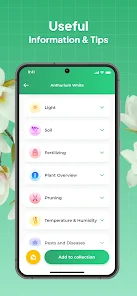
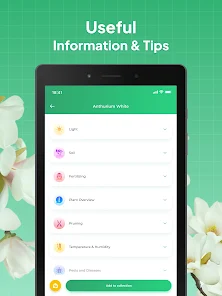
LeafSnap boasts an extensive database containing thousands of plant species, making it a valuable resource for anyone interested in botany. You can explore detailed information about each plant, including its habitat, care tips, and interesting facts, enhancing your understanding of the plant world.

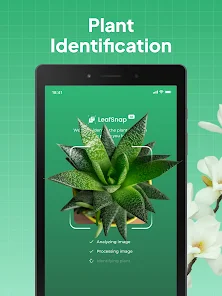
Instant Plant Identification

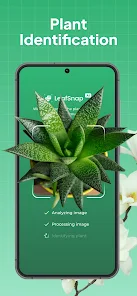
With LeafSnap, you can snap a picture of any plant, and the app will quickly identify it using advanced image recognition technology. This feature is perfect for nature enthusiasts and gardeners who want to learn more about the plants they encounter in their daily lives.

User-Friendly Interface

The app is designed with simplicity in mind, ensuring that even those new to plant identification can navigate it with ease. Its intuitive layout allows users to browse plants effortlessly, making the learning process enjoyable and engaging for everyone.

Pros & Cons

Pros
  • Quickly identify plants using advanced image recognition technology
  • Access a vast database of plant species for accurate results
  • Learn detailed information about plant care and characteristics
  • User-friendly interface makes identification simple and enjoyable
  • Contribute to citizen science by sharing findings with the community
Cons
  • Limited accuracy in identifying less common plant species can lead to misinformation.
  • The app may struggle with low-quality images, impacting identification success.
  • User interface can be confusing, hindering the overall user experience.

Real Experience Using LeafSnap Plant Identification

Application Scenarios

LeafSnap Plant Identification is an innovative app designed for nature enthusiasts, gardeners, and even casual users who are curious about the plant life around them. Whether you’re hiking in the woods, strolling through a botanical garden, or even just exploring your backyard, LeafSnap allows you to effortlessly identify plants and trees by simply taking a picture of a leaf. The app is particularly useful for educators and students in botany or environmental science, providing a hands-on learning tool to enhance understanding of plant species. Additionally, for urban dwellers interested in green spaces, the app can help identify local flora, enabling users to connect more deeply with their environment.

User Experience

The user experience of LeafSnap is intuitive and engaging. The interface is clean and user-friendly, making it accessible for users of all ages. The process of identification is straightforward: users can upload a photo of a leaf, and the app utilizes advanced algorithms to analyze the image and provide potential matches. Users have noted that the accuracy of the identification is impressive, often yielding correct results within seconds. Beyond identification, the app offers detailed information about each plant, including its habitat, care tips, and interesting facts, which enhances the overall learning experience. The community feature allows users to share their findings, fostering a sense of connection among plant lovers. However, some users have mentioned that occasionally, the app may struggle with certain leaf shapes or less common species, which can lead to inaccuracies.

Pricing

LeafSnap operates on a freemium model, offering a free version that includes basic plant identification capabilities. Users can access a limited database of plants without any cost, making it a great starting point for casual users. However, for those who wish to unlock the full potential of the app, including access to a more extensive plant database, premium features, and ad-free usage, there is a subscription option available. The pricing is competitive compared to similar apps on the market, and many users have found the investment worthwhile for the wealth of information and features provided.

Updates & Support

The developers of LeafSnap are committed to continuously improving the app. Regular updates not only enhance the user interface but also expand the plant database, ensuring that users have access to the latest information on various species. The app also benefits from a responsive support team that addresses user queries and feedback promptly. Users can reach out for assistance through the app or the official website, where a comprehensive FAQ section and community forums are also available. These resources ensure that users feel supported and can make the most of their plant identification journey.

verified Security & Privacy Review

LeafSnap Plant Identification prioritizes user privacy and data security through a transparent approach to data handling. The app requires minimal permissions, primarily accessing the camera and storage to facilitate plant identification via images. This limited access helps to protect user information while enhancing functionality. The app does not collect excessive personal data, ensuring that user identities remain anonymous during the identification process. Any data shared with third-party services is handled under strict guidelines, and users are informed about what data may be shared. LeafSnap employs industry-standard encryption to safeguard any data transmitted over the internet, reducing the risk of unauthorized access. Furthermore, the app offers a straightforward privacy policy that outlines users’ rights and the measures taken to protect their information. Users have the option to manage their data preferences and can delete their information at any time. Overall, LeafSnap demonstrates a commitment to maintaining user trust through responsible data practices and robust security measures.

Reviews

4.2

“Accurate plant identification, love this app!”

“User-friendly interface, easy to navigate.”

“Great for gardening enthusiasts and beginners alike.”

“Helpful tips on plant care included.”

“Fast identification, impressive database of plants.”

FAQ

1

Can I submit suggestions or feedback to LeafSnap-Plant Identification?

Yes, users can submit suggestions or feedback through the app's support options or via the official website, where they can communicate directly with the developers.

2

Does LeafSnap-Plant Identification collect my personal data?

LeafSnap may collect certain data as outlined in its privacy policy, but it primarily focuses on providing plant identification services and does not sell user data.

3

Does LeafSnap-Plant Identification support offline use?

LeafSnap requires an internet connection for the identification process, as it relies on a database for accurate results, but some features may be accessible offline.

4

How do I cancel my LeafSnap-Plant Identification subscription?

Users can cancel their subscription through their app store account settings, following the cancellation procedure specific to either iOS or Android platforms.

5

How much does a subscription to LeafSnap-Plant Identification cost?

A subscription to LeafSnap typically costs around $19.99 per year, but prices may vary based on promotions or regional pricing.

How to use LeafSnap Plant Identification

1

Can I change my customer number?

Customer numbers are unique and cannot be changed. If you need assistance, please contact customer service for options.

2

Can I use LeafSnap without creating an account?

No, you must create an account to use LeafSnap features. Follow the prompts in the app to activate your account. If you need help, reach out to customer service.

3

How can I contact customer service for LeafSnap?

You can reach customer service by emailing support

4

How do I log in if I have two accounts?

You need to log in with the email and password associated with each account separately. If you have trouble, contact customer service for support.

5

How do I log in to my LeafSnap account?

To log in, open the app, enter your registered email and password, then tap 'Log In'. If you face issues, ensure your credentials are correct.

Editor's Choice