This site uses cookies to enhance your user experience. By clicking any link on this site you are giving your consent to our cookie policy. Read more
Reject
Accept All

Advertiser and Editorial Disclosures

Kajabi

Kajabi

verified

Kajabi

4.0
Rating
1,000,000+ Downloads
4.4.0 Version
  • category

    Category: Education

  • price

    Price: free

  • age rating

    Age Rating: Everyone

  • rating

    Rating: 4.0

  • available on

    Available on: /

  • updated on

    Updated on: Jun 3, 2026

Screenshot 1
Screenshot 2
Screenshot 3
Screenshot 4
Screenshot 5
Screenshot 6

Features & Highlights

Comprehensive Analytics Dashboard

The comprehensive analytics dashboard in Kajabi provides valuable insights into your business performance. Track key metrics such as sales, user engagement, and course completion rates, empowering you to make informed decisions and optimize your strategies for better results.

Integrated Payment Solutions

Kajabi offers integrated payment solutions that simplify the transaction process for both you and your customers. Accept payments seamlessly through multiple gateways, allowing you to focus on your content while ensuring a smooth purchasing experience for your users.

Powerful Course Builder

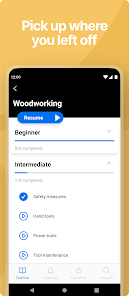
Kajabi's intuitive course builder allows users to create and customize online courses effortlessly. With a drag-and-drop interface, you can easily add videos, quizzes, and assignments, making it simple to deliver engaging content that resonates with your audience.

Robust Marketing Automation

With Kajabi's robust marketing automation tools, you can streamline your marketing efforts and nurture leads effectively. Set up personalized email campaigns, automate follow-ups, and track engagement to boost conversions and keep your audience connected with your brand.

Pros & Cons

Pros
  • User-friendly interface simplifies course creation
  • Integrated marketing tools boost sales effortlessly
  • Customizable templates enhance brand visibility
  • Robust analytics track performance and growth
  • 24/7 customer support ensures reliable assistance
Cons
  • High monthly fees can be limiting for small businesses
  • Limited design customization options can restrict uniqueness
  • Steeper learning curve for beginners compared to others
  • Customer support response times can be inconsistent

Real Experience Using Kajabi

Application Scenarios

Kajabi is designed for entrepreneurs, content creators, and businesses looking to monetize their knowledge and skills through online courses, membership sites, and digital products. Its versatile platform allows users to create and sell a wide range of offerings, from video tutorials and coaching sessions to eBooks and subscription services. Whether you're a fitness coach wanting to provide training modules, an author looking to share writing courses, or a business professional aiming to deliver corporate training, Kajabi provides the tools necessary to build a comprehensive online presence. The platform is particularly beneficial for those who wish to manage everything from marketing to sales and customer engagement in one place. Users can seamlessly integrate email marketing campaigns and landing pages to attract potential customers, making it an all-in-one solution for online business.

User Experience

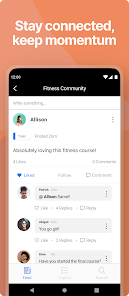
The user experience on Kajabi is generally positive, with many users praising its intuitive interface and ease of use. The drag-and-drop feature makes it simple for anyone, regardless of technical skill, to design professional-looking websites and course layouts. The platform's tutorials and resources further enhance the experience, providing step-by-step guidance on how to maximize its capabilities. Users appreciate the robust analytics tools that allow them to track engagement and sales performance effectively. However, some users have noted that the learning curve can be steep initially, especially for those unfamiliar with online marketing concepts. Overall, Kajabi's community forums and support resources help alleviate these concerns, creating an encouraging environment for users to grow and succeed.

Pricing

Kajabi offers several pricing tiers to accommodate different business needs and budgets. Starting with a basic plan, users can access essential features such as course creation, website hosting, and email marketing. As users scale their businesses, they can opt for higher-tier plans that include advanced features like automation, custom branding, and additional products. While some users find the pricing a bit steep compared to competitors, many agree that the comprehensive features and tools justify the investment. Kajabi frequently provides trial options, allowing potential users to explore the platform without upfront commitment, making it easier to assess if it aligns with their business goals.

Updates & Support

Kajabi is known for its regular updates, which often include new features and improvements based on user feedback. This commitment to continuous enhancement keeps the platform competitive and user-friendly. Users have also reported that the support team is responsive and knowledgeable, providing assistance through various channels, including chat, email, and community forums. The resource library is extensive, featuring tutorials, webinars, and articles that help users maximize their experience. Overall, Kajabi's dedication to updates and support enhances user satisfaction and fosters a thriving community of creators and entrepreneurs.

verified Security & Privacy Review

Kajabi prioritizes user security and privacy by implementing robust data protection measures. The app employs industry-standard encryption protocols to safeguard sensitive information during transmission and storage. This ensures that user data, including payment details and personal information, remains protected from unauthorized access. In terms of privacy practices, Kajabi adheres to stringent data handling policies. It clearly outlines its data collection methods and usage in its privacy policy, providing transparency to users. The app collects only the necessary information required for functionality and enhances user experience, ensuring that personal data is not misused. Kajabi also offers users control over their data, allowing them to manage their privacy settings effectively. Users can modify permissions related to data sharing and can opt-out of marketing communications at any time. This empowers users to maintain their privacy while utilizing the app's features. Overall, Kajabi demonstrates a strong commitment to safeguarding user data and privacy, making it a reliable choice for individuals looking to create and manage their online business safely.

User Reviews

  • Keisha Brown
    2026/05/18

    Terrible app. If part of multiple community boards you can't access all of them; just the first one you've ever joined. The notification of "now playing" will restart what you're listening to instead of just opening it. The menu is very plain white and doesn't reflect the course or community designs. If you email support you get thrown at a very unintelligent AI before getting a human who also gives you a run around instead of contacting clients on their end.

  • Evan Wilson
    2026/01/10

    great app. I only wish I could view the videos in the small PIP viewer that YouTube uses I like the new logo design but the accents in the app are still the old color, and it's an odd transition lastly, it would be great if the media available on the website that corresponds with my Kajabi community could be viewed and listened to through the app without having to download. even if it opened in an in app browser.

  • Mike Schmitt
    2026/03/27

    This app keeps dropping connections or pausing audio randomly. Sometimes it resumes after a few seconds or a minute. Sometimes you have to reopen the app, click pause and then play again. Sometimes when you do that it reverts all the way back to the beginning. So frustrating. Did you bother to test the app so all before releasing it??

  • Jenny Aldrich
    2023/07/17

    It's alright. Biggest thing I would like is for an audio only playback for vids when phone isn't connected to WiFi to save data!!!!! In the past, App crashes every so often. With my phone screen off, sometimes it will play for a few minutes and then stop. When I turn my phone back on, the video starts back to wherever it was when I turned my phone off. I haven't listened much since the update because it's inconvenient on account of saving data

  • Ra Sha
    2024/09/25

    It works, but needs work to run smooth. Maybe they decided to only make it run smoothly on iOS, I have a Samsung. But it can sometimes get stuck. If you turn screen off and let the audio play, then try to turn screen on and watch the video or skip to next video, it will freeze and not let you do anything for a while. It does it every time without fail and it's very annoying and time consuming. If it is an iOS thing, then default is with the app and not the phone. Actually it's same on my ipad.

Review Source: Google Play store public user reviews.

FAQ

1

Does Kajabi collect my personal data?

Yes, Kajabi collects personal data as part of its operations, including user information for account creation, payment processing, and analytics. However, it adheres to privacy policies and regulations to protect user data.

2

Does Kajabi offer a free trial or free version?

Yes, Kajabi offers a 14-day free trial that allows users to explore the platform and its features without any commitment. However, there is no permanently free version available.

3

Does Kajabi require an internet connection?

Yes, Kajabi is a cloud-based platform, which means you need an active internet connection to access and use its features.

4

How can I contact support or send feedback for Kajabi?

You can contact Kajabi support through their help center, where you can access live chat, submit a support ticket, or browse their extensive knowledge base for assistance. Feedback can also be submitted through the same channels.

5

How do I manage or cancel my Kajabi subscription?

You can manage or cancel your Kajabi subscription by logging into your account, navigating to the billing section, and following the prompts to modify or cancel your subscription.

How to use Kajabi

1

How can I activate my Kajabi account?

After signing up, check your email for an activation link. Click the link to verify your email and activate your account.

2

How can I contact Kajabi customer service?

You can reach Kajabi customer service through their support page or by emailing support

3

How do I log in to my Kajabi account?

To log in, visit the Kajabi website and click on the "Login" button. Enter your email and password to access your account.

4

What is Kajabi's customer support phone number?

Kajabi does not provide a direct customer support phone number; support is primarily offered via email and live chat.

What's New

Right to left language support and various bugfixes

Editor's Choice